Vigor2820 Series User’s Guide
159
1
st
Subnet Mask Display the subnet mask address of the LAN interface.
DHCP Server Display the current status of DHCP server of the LAN
interface.
MAC Address Display the MAC address of the WAN Interface.
IP Address Display the IP address of the WAN interface.
Default Gateway Display the assigned IP address of the default gateway.
DNS Display the assigned IP address of the primary DNS.
MAC Address Display the MAC address of the wireless LAN.
Frequency Domain It can be Europe (13 usable channels), USA (11 usable
channels) etc. The available channels supported by the
wireless products in different countries are various.
Firmware Version It indicates information about equipped WLAN miniPCi
card. This also helps to provide availability of some
features that are bound with some WLAN miniPCi card.
3
3
.
.
1
1
2
2
.
.
2
2
T
T
R
R
-
-
0
0
6
6
9
9
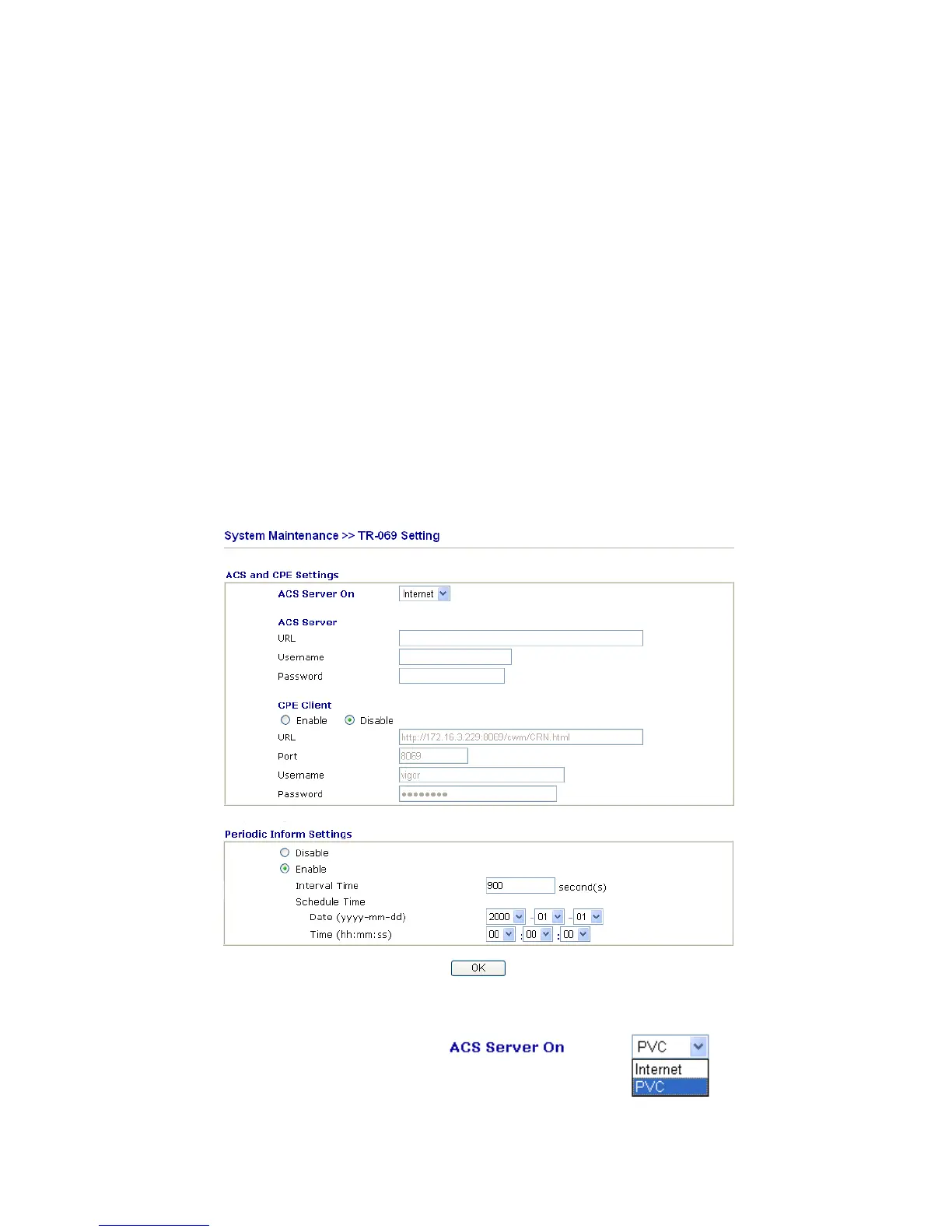
This device supports TR-069 standard. It is very convenient for an administrator to manage a
TR-069 device through an
Auto Configuration Server, e.g., VigorACS.
ACS Server On Choose the interface for the router connecting to ACS
server.













 To Next Page