Vigor2820 Series User’s Guide
148
Separate the Wireless and the Wired LAN- WLAN Isolation enables you to isolate your
wireless LAN from wired LAN for either quarantine or limit access reasons. To isolate
means neither of the parties can access each other. To elaborate an example for business use,
you may set up a wireless LAN for visitors only so they can connect to Internet without
hassle of the confidential information leakage. For a more flexible deployment, you may add
filters of MAC addresses to isolate users’ access from wired LAN.
Manage Wireless Stations - Station List will display all the station in your wireless
network and the status of their connection.
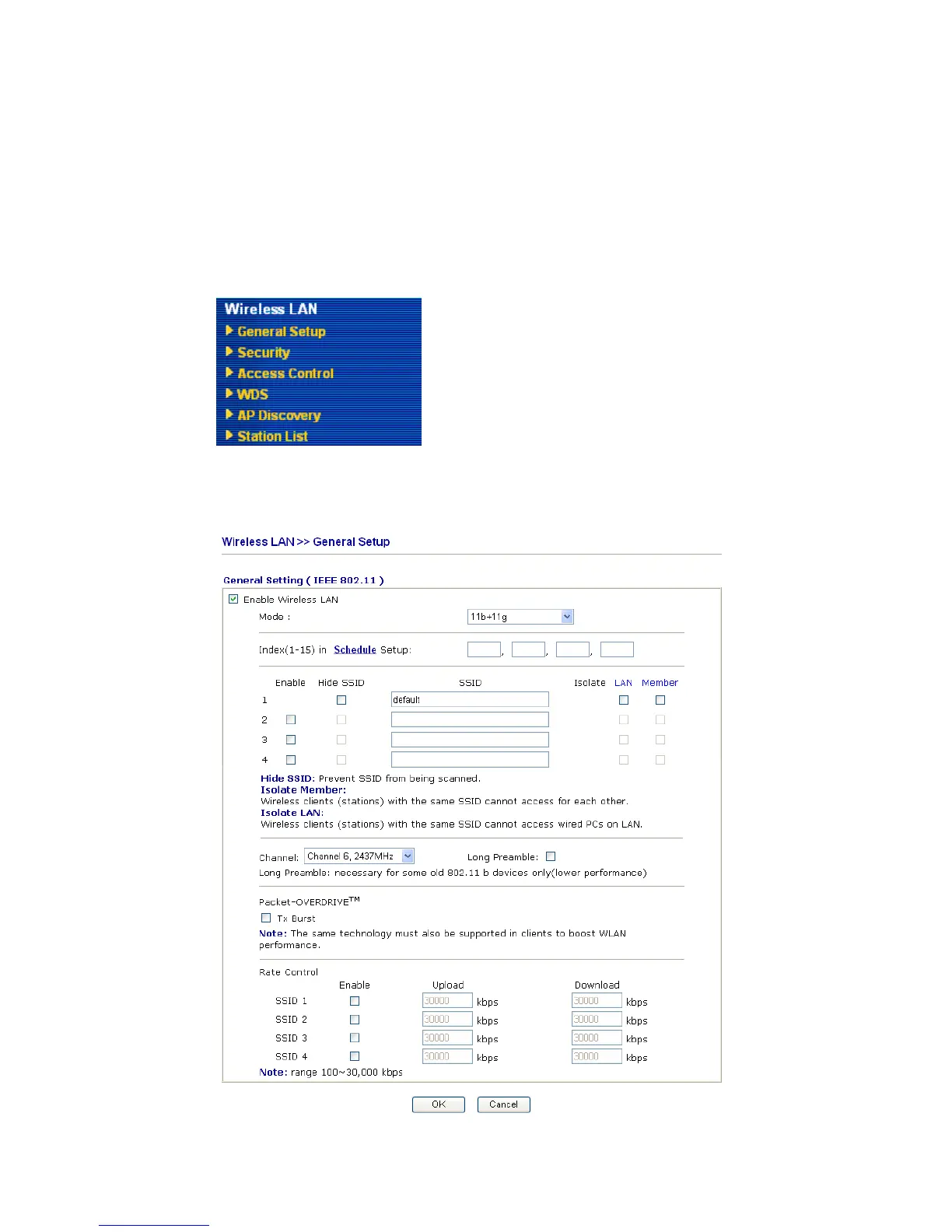
Below shows the menu items for Wireless LAN.
3
3
.
.
1
1
1
1
.
.
2
2
G
G
e
e
n
n
e
e
r
r
a
a
l
l
S
S
e
e
t
t
u
u
p
p
By clicking the General Settings, a new web page will appear so that you could configure
the SSID and the wireless channel. Please refer to the following figure for more information.













 To Next Page