Vigor2820 Series User’s Guide
155
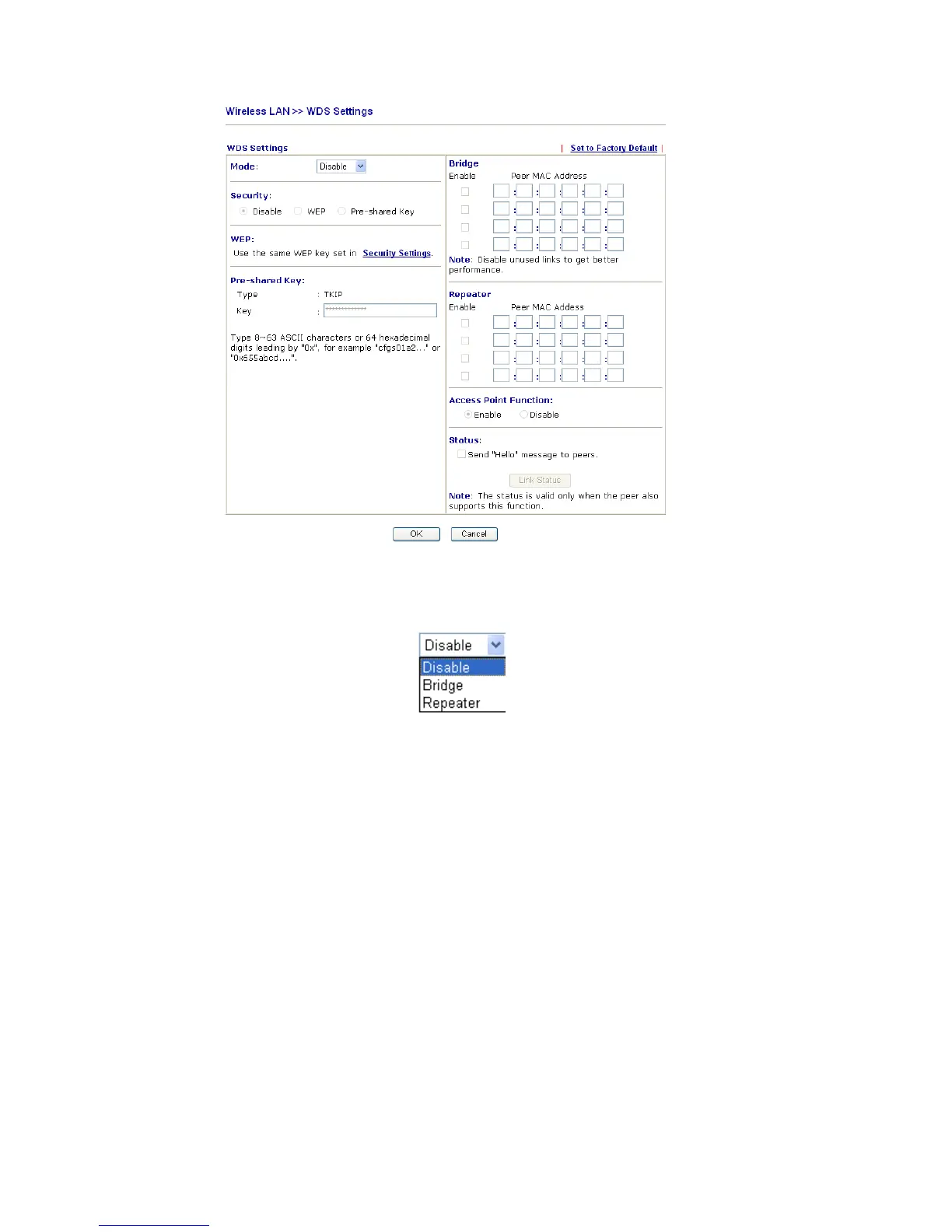
Mode Choose the mode for WDS setting. Disable mode will not
invoke any WDS setting. Bridge mode is designed to fulfill
the first type of application. Repeater mode is for the second
one.
Security There are three types for security, Disable, WEP and
Pre-shared key. The setting you choose here will make the
following WEP or Pre-shared key field valid or not. Choose
one of the types for the router.
WEP Check this box to use the same key set in Security Settings
page. If you did not set any key in Security Settings page,
this check box will be dimmed.
Pre-shared Key Type 8 ~ 63 ASCII characters or 64 hexadecimal digits
leading by “0x”.
Bridge If you choose Bridge as the connecting mode, please type in
the peer MAC address in these fields. Four peer MAC
addresses are allowed to be entered in this page at one time.
Yet please disable the unused link to get better performance.
If you want to invoke the peer MAC address, remember to
check Enable box in the front of the MAC address after
typing.
Repeater If you choose Repeater as the connecting mode, please type in
the peer MAC address in these fields. Four peer MAC
addresses are allowed to be entered in this page at one time.
Similarly, if you want to invoke the peer MAC address,













 To Next Page