Vigor2820 Series User’s Guide
36
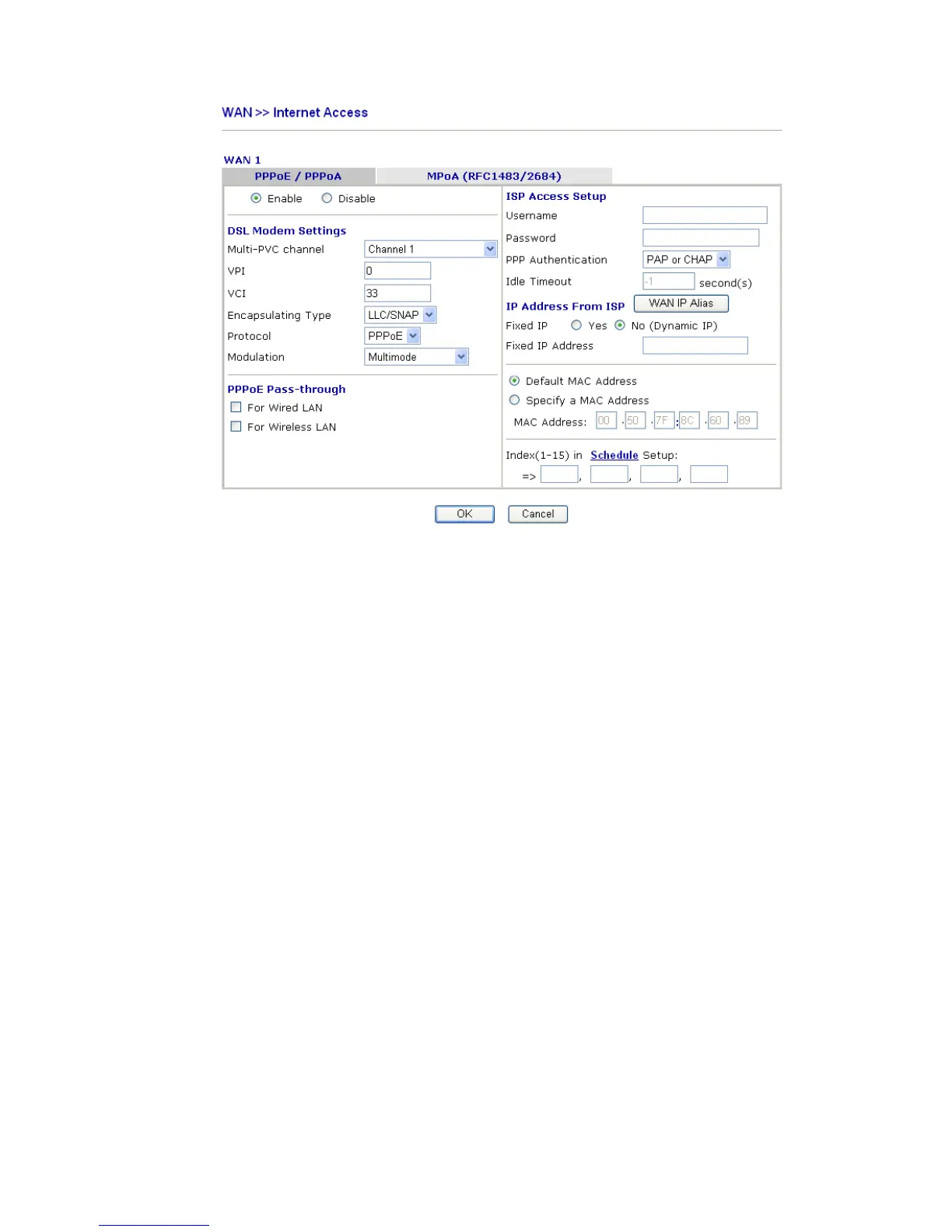
Enable/Disable Click Enable for activating this function. If you click Disable, this
function will be closed and all the settings that you adjusted in this
page will be invalid.
DSL Modem Settings Set up the DSL parameters required by your ISP. These are vital
for building DSL connection to your ISP.
Multi-PVC channel - The selections displayed here are
determined by the page of Internet Access – Multi PVCs. Select
M-PVCs Channel means no selection will be chosen.
VPI - Type in the value provided by ISP.
VCI - Type in the value provided by ISP.
Encapsulating Type - Drop down the list to choose the type
provided by ISP.
Protocol - Drop down the list to choose the one provided by ISP.
If you have already used Quick Start Wizard to set the protocol,
then it is not necessary for you to change any settings in this group.
PPPoE Pass-through The router offers PPPoE dial-up connection. Besides, you also can
establish the PPPoE connection directly from local clients to your
ISP via the Vigor router. When PPPoA protocol is selected, the
PPPoE package transmitted by PC will be transformed into PPPoA
package and sent to WAN server. Thus, the PC can access Internet
through such direction.
For Wired LAN – If you check this box, PCs on the same network
can use another set of PPPoE session (different with the Host PC)
to access into Internet.
For Wireless LAN – If you check this box, PCs on the same
wireless network can use another set of PPPoE session (different
with the Host PC) to access into Internet.
ISP Access Setup Enter your allocated username, password and authentication
parameters according to the information provided by your ISP. If
you want to connect to Internet all the time, you can check Always













 To Next Page