A
A
p
p
p
p
l
l
i
i
c
c
a
a
t
t
i
i
o
o
n
n
N
N
o
o
t
t
e
e
s
s
A
A
-
-
1
1
H
H
o
o
w
w
t
t
o
o
s
s
e
e
t
t
u
u
p
p
A
A
d
d
d
d
r
r
e
e
s
s
s
s
M
M
a
a
p
p
p
p
i
i
n
n
g
g
w
w
i
i
t
t
h
h
R
R
o
o
u
u
t
t
e
e
P
P
o
o
l
l
i
i
c
c
y
y
?
?
Address Mapping is used to map a specified private IP or a range of private IPs of NAT subnet
into a specified WAN IP (or WAN IP alias IP). Refer to the following figure.
This document introduces how to set up address mapping with Route Policy. When a WAN
interface has multiple public IP addresses,the administrator may specify the outgoing IP for
certain internal IP address by a Route Policy.
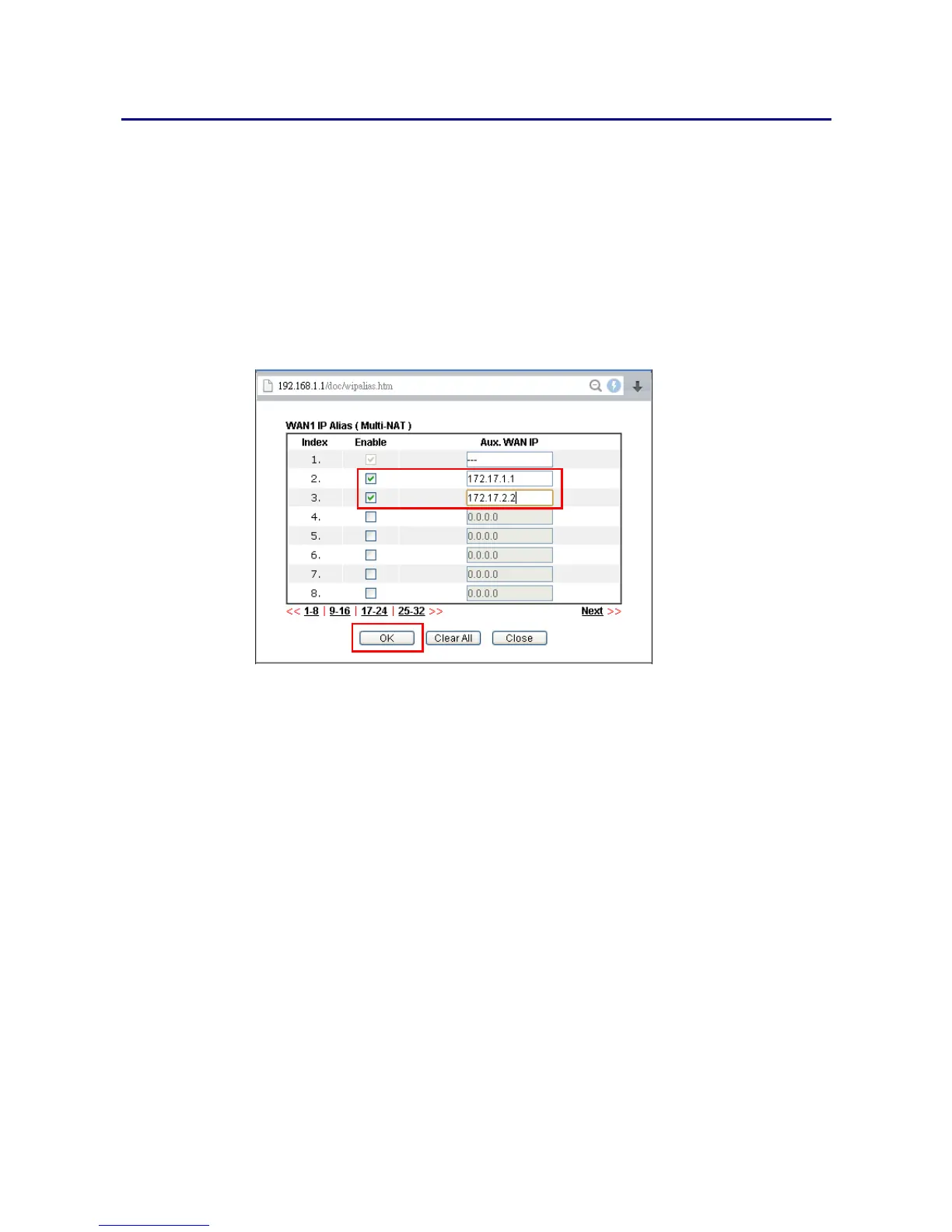
1. Set up WAN IP Alias. Go to WAN >> Internet Access >> Details Page, and click on WAN
IP Alias button.
1. Check Enable.
2. Enter the WAN IP address.
3. Click OK to save.
After setting up the WAN IP Alias, the IP addresses will be shown in the drop-down list of
Interface in Route Policy setting.















 To Next Page