15
C
C
h
h
a
a
p
p
t
t
e
e
r
r
2
2
D
D
i
i
s
s
p
p
l
l
a
a
y
y
S
S
c
c
r
r
e
e
e
e
n
n
C
C
o
o
n
n
f
f
i
i
g
g
u
u
r
r
a
a
t
t
i
i
o
o
n
n
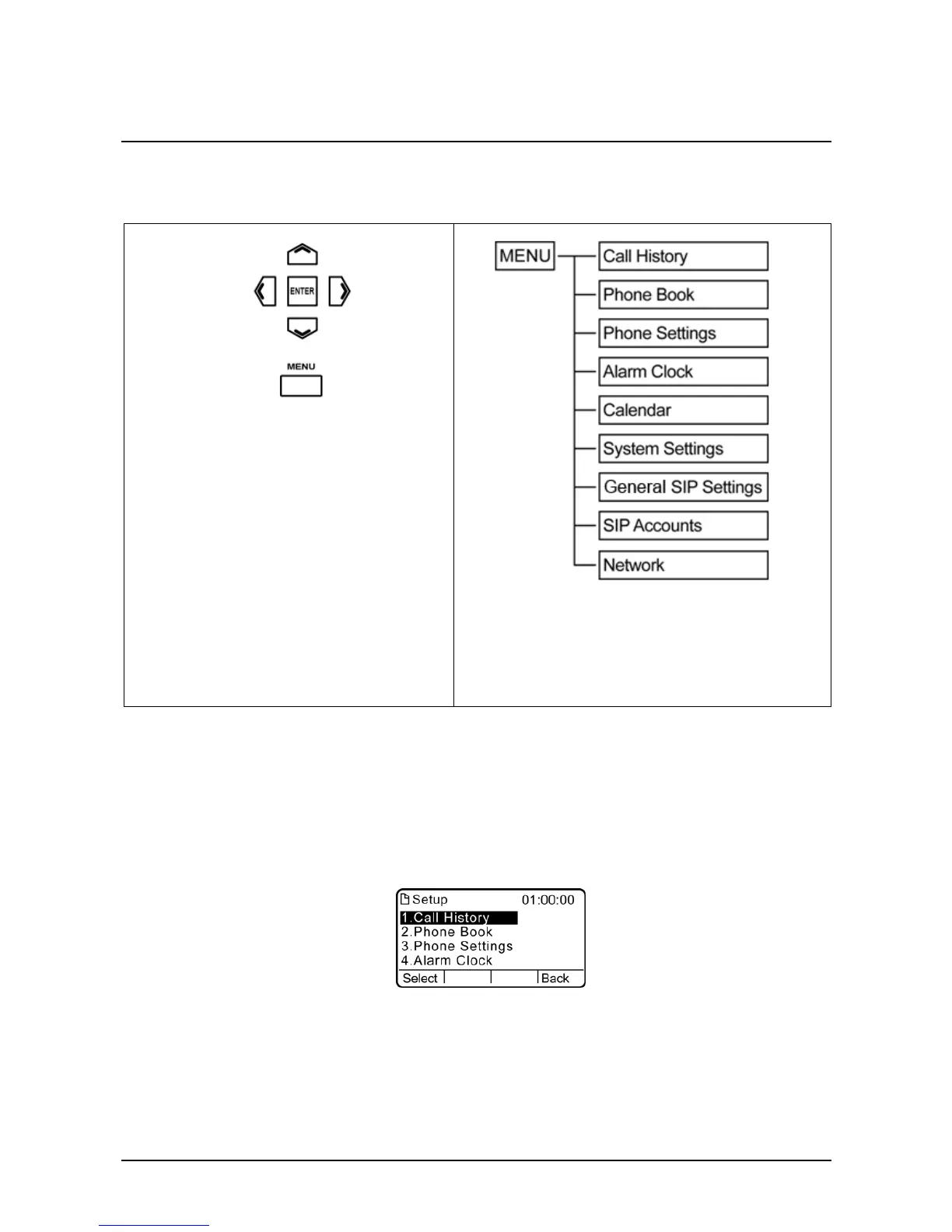
The menu directory enables you to setup the product configuration from Phone Settings, VoIP settings,
and Network settings. Follow these steps to access the menu and the menu items.
1. Press the Menu key to access the menu.
2. Scroll through the main menu options
using the 4-way navigation keys and press
the Enter key to view the submenu.
3. Repeat the previous step to browse
through the menu items, submenus, and
options.
4. Press the Back soft key to cancel your
selection and go back to the previous
level of the menu.
5. To choose a menu setting, press the Enter
key.
Entering to the areas Phone Settings, General SIP Settings, SIP Accounts and Network submenus.
NOTE: Default login-in timeout 2:00.
When you access the menu, the display screen shows the menu options and the soft key. There are four
soft key located under the display screen. Soft key items vary depending on the menu options.
For example, the illustration below shows the main menu options and two available soft key, Select and
Back.



 To Next Page