52
End IP: Input End IP address.
Lease: Input lease time in minutes.
Domain Name: Input domain name.
Primary DNS: Input the primary DNS server.
Secondary DNS: Input the secondary DNS server.
3. Click OK to save your settings or Cancel to cancel.
3
3
.
.
9
9
.
.
4
4
N
N
T
T
P
P
&
&
T
T
i
i
m
m
e
e
S
S
e
e
t
t
t
t
i
i
n
n
g
g
s
s
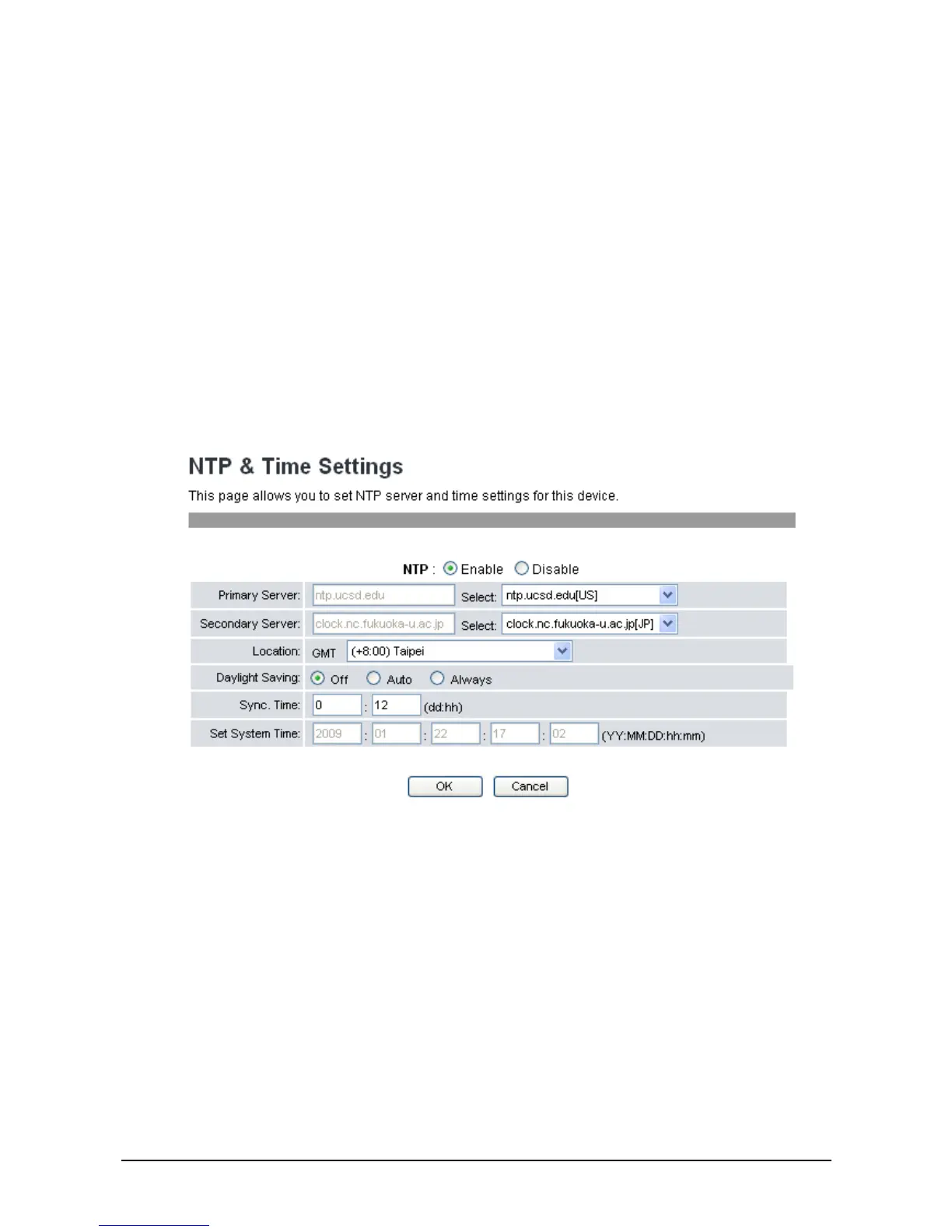
The NTP & Time Setting enables you to configure the date and time of the VoIP phone manually or
synchronize the clock with the NTP (Network Time Protocol) server, and specify the time zone you are
in. The NTP function should be disabled if you want to set the date and time manually.
To access NTP & Time settings, click Network>>NTP Settings. The following screen will be
displayed.
To synchronize clock with the NTP server:
1. Choose Enable to enable NTP and enter the server information provided by your ITSP or MIS.
2. Select the time zone you are in.
3. Set up the synchronization time and system time.
4. Click OK to save your settings or Cancel to cancel.
To configure date and time manually:
1. Choose Disable to disable NTP.
2. Enter the date and time manually on the Set System Time fields.
3. Click OK to save your settings or Cancel to cancel.



 To Next Page