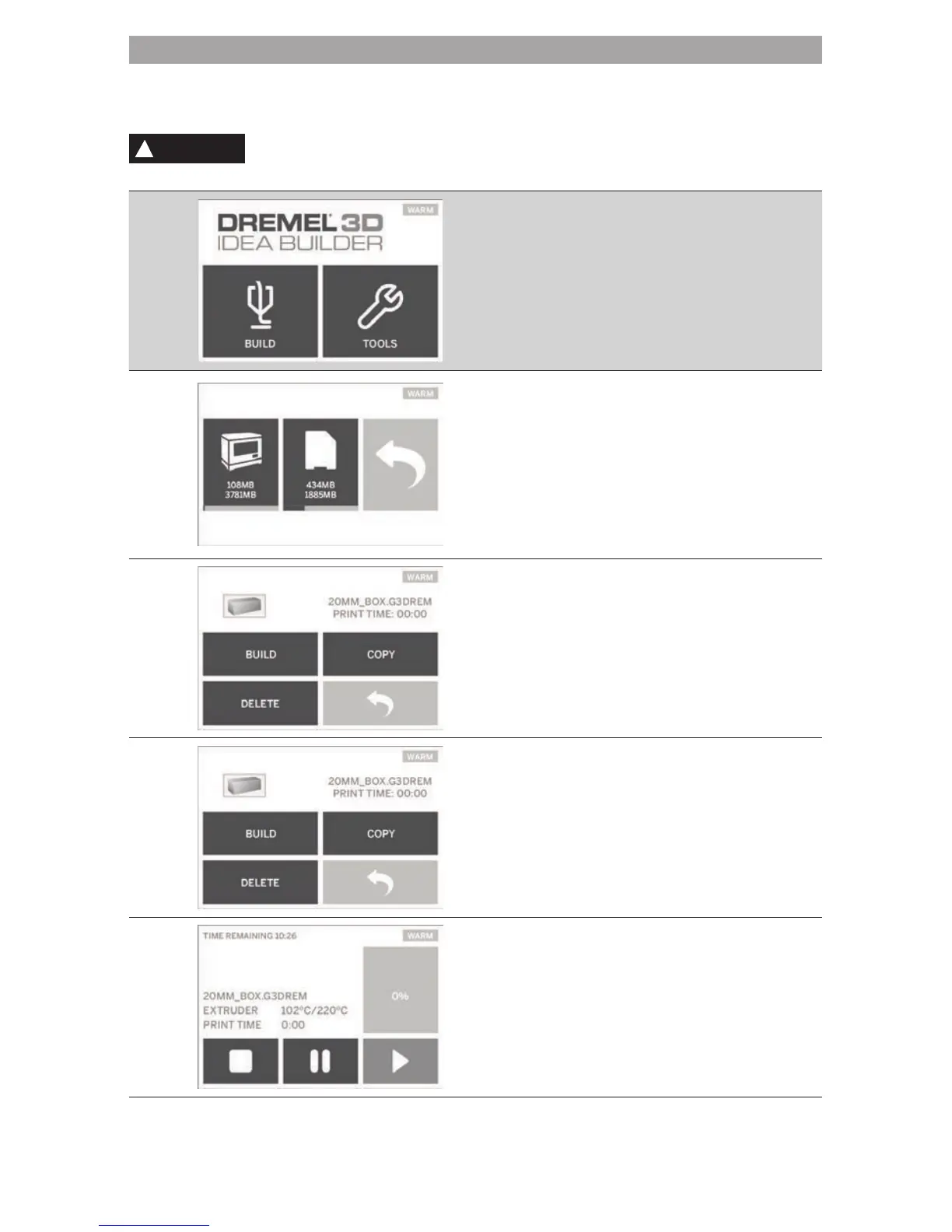
TOUCH SCREEN
Using your Dremel 3D20 without a computer is easy with the onboard software and full color touch screen.
Before building your model we want to familiarize you with the touch screen menu structure and options.
WARNING
OBSERVE ALL PROVIDED WARNINGS AND SAFETY INSTRUCTIONS WHEN USING THE
DREMEL 3D20. FAILURE TO DO SO MAY RESULT IN FIRE, EQUIPMENT DAMAGE,
PROPERTY DAMAGE OR PERSONAL INJURY.
BUILD
Select a model le from your Dremel 3D20‘s
onboard memory by tapping the Dremel 3D20
icon or select a model le from SD card by
tapping the SD card icon.
After a model is selected, a pop-up window will
appear on the touch screen with the following
options:
BUILD
Tapping this option will begin the building
process while displaying useful information and
object status.
STOP – Tapping this option will cancel the
object.
You will be asked whether to cancel building or
continue building.
PAUSE – Tapping this option will pause the
building process. This will allow you to access
the “Tools” menu to unload or load lament.
PLAY – Tapping this option will exit the pause
mode and resume building your object.
11



 To Next Page