48
DEHUMIDIFIER INSTALLATION, OPERATION, AND MAINTENANCE MANUAL
MAINTENANCE
Maintenance
90-2607
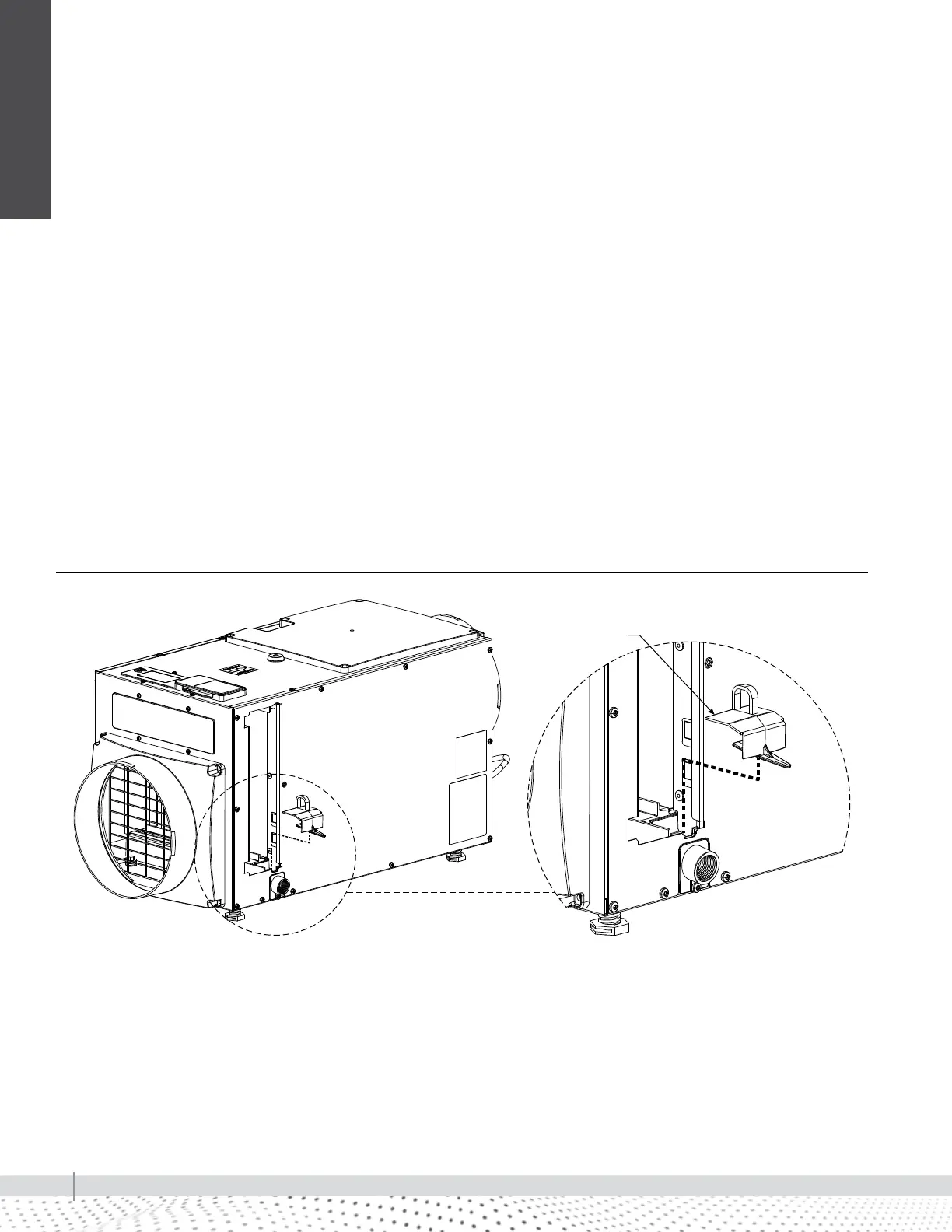
FIGURE 48-1: MODEL RL-4 DRAIN INSERT
REMOVING THE MODEL RL-4 DRAIN INSERT
1. Turn the ON/OFF switch OFF.
2. Remove the filter access door from the drain side of
the dehumidifier.
3. Remove the filter from the dehumidifier to access the
drain insert.
4. Locate the drain insert which is located over the drain
opening.
5. Remove the drain insert by hooking your finger into
the finger loop and gently lifting the cover up and out
of the drain pan.
6. Clean the drain insert with warm water and mild
detergent solution.
REINSTALLING THE MODEL RL-4 DRAIN INSERT
1. Reinstall the drain insert by inserting your forefinger
into the finger loop and grasping the outer edge of the
finger loop with your thumb.
2. Gently insert the drain insert tip into the drain opening
and tilt the cover downwards into place.
3. Ensure the drain insert is seated properly by checking
the top surface of the drain cover is the same surface
height as the filter guide channel.
4. Turn the ON/OFF switch ON.
5. At the UI control, select the ON/OFF button and
switch to ON mode.
Drain insert


 To Next Page