23
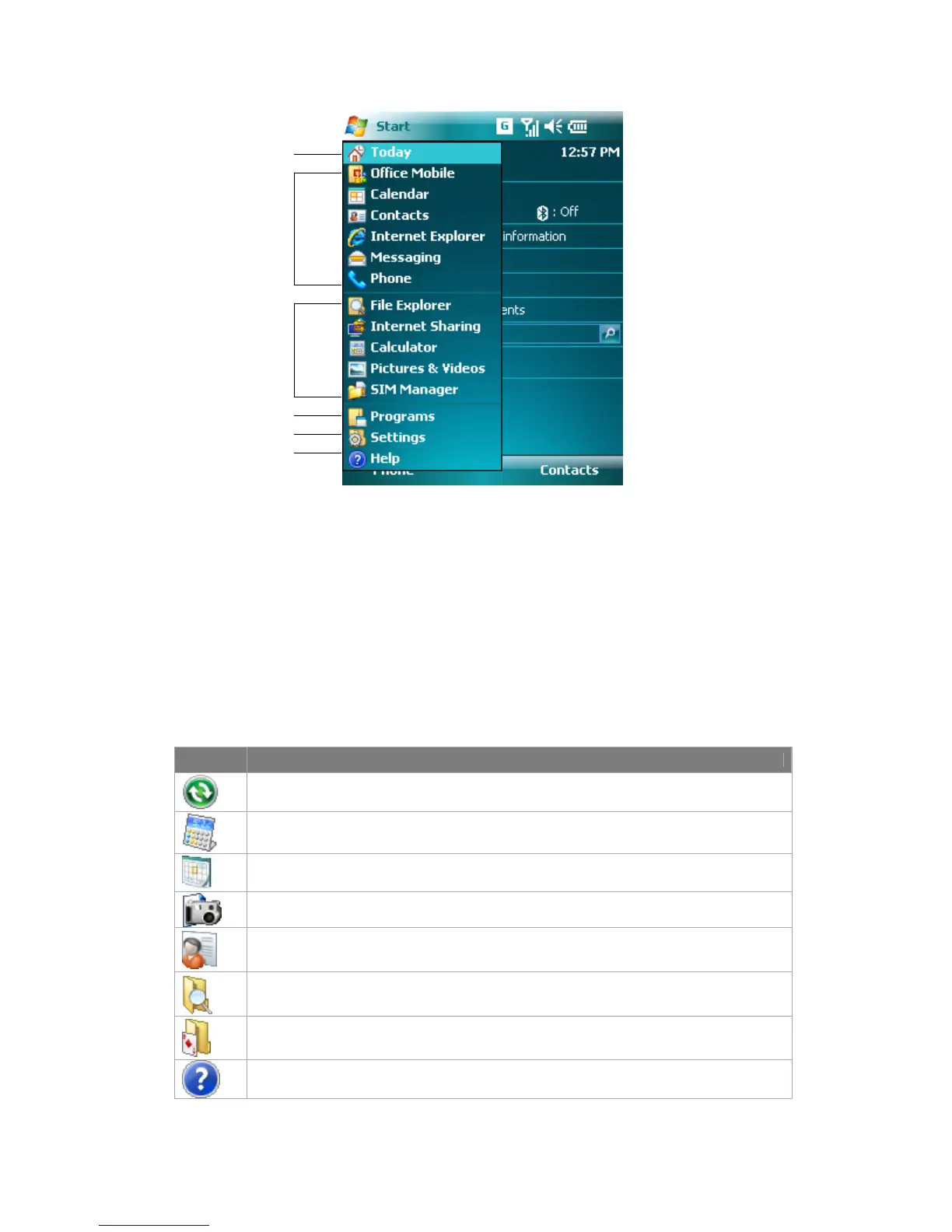
1 Tap to open the Today screen.
2 Tap to start a program. The items displayed in Start menu can be customized by
tapping Start > Settings > Personal tab >Menus.
3 Tap to start a recently-used program.
4 Tap to view and select more programs that are installed in your device.
5 Tap to change device settings.
6 Tap to see a Help topic for the current screen.
Program Indicators
Following indicators are some of the icons for the programs that are already installed
on your device.
Icon Description
ActiveSync Synchronizes information between your device and a PC.
Calculator Performs basic arithmetic and calculations, such as addition, subtraction,
multiplication, and division.
Calendar Keeps track of your appointments and creates meeting requests.
Camera Snaps photos or shoots video clips with accompanying audio.
Contacts Keeps track of your friends and colleagues.
File Explorer Enables you to organize and manage files on your device.
Games Lets you play two pre-installed games: Bubble Breaker and Solitaire.
Help Enables you to see Help topics for a program on your device.
1
2
3
4
5
6



 To Next Page