- 38 -
4.0 ELECTRICAL
4.3 VISION 2020i
CONTROLLER AND
TERMINAL
Vision2020i controller is equipped with a user
friendly 132x64 pixels back-lit graphic display
terminal. It is connected with controller through
telephone cable. This terminal allows carrying out
all program operations. The user terminal allows
displaying the unit working conditions,
compressor run times, alarm history at any time
and modifying the parameters. The terminal also
has an automatically self-test of the micro-
controller on system start-up. Multiple messages
will be displayed by automatically scrolling from
each message to the next. All of these messages
are spelled out in English language on the LCD
screen.
4.3.1 DBG1 OPERATOR KEYPAD
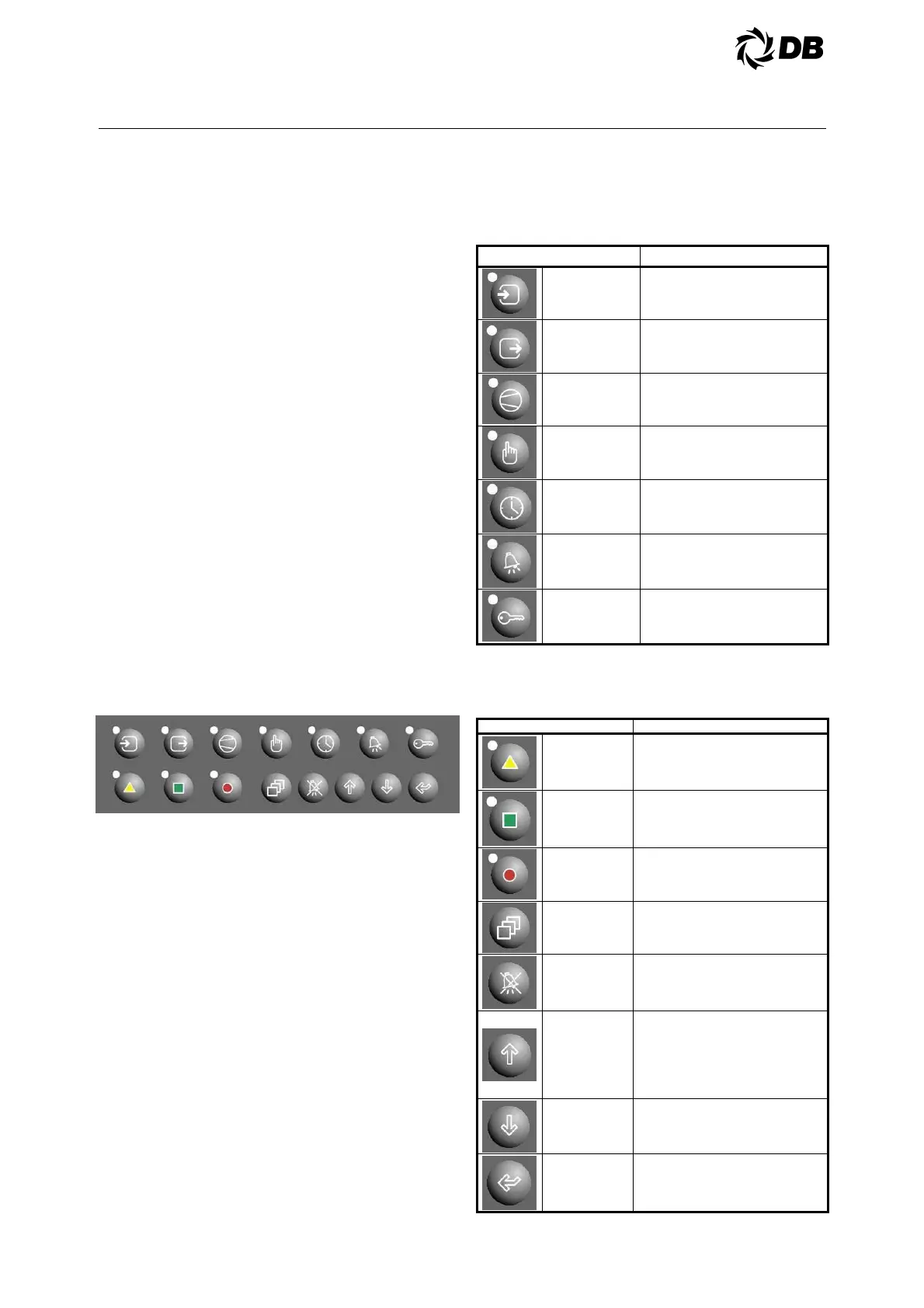
The DBG1 operator keypad consists of
15 polycarbonate buttons:
Figure 4.3.1 : Vision 2020i keypad
The top right ‘Authorization’ button is for
password log in to gain authorization, to
the access setting menu.
The top left six operator buttons
functions are to view status only, except
the ‘Setpoint’ button also allows setting
changes after gained authorization.
The three buttons at the bottom left are
to access different level of setting
changes.
These are 'User', 'Technician' and
'Factory' levels, from left.
It can only be access depend on the
password level. The higher password
can access the lower password level's
setting and not vice versa.
4.3.1.1 The fifteen polycarbonate buttons:
a) Seven polycarbonate buttons at top
row
Button Description
INPUT STATUS
Displays the analog inputs and
digital inputs status measured by
the probes/sensors.
OUTPUT
STATUS
Displays the relay outputs and
analog outputs status.
COMPRESSOR
STATUS
Displays the status of Compressor
1, 2 and so on.
SETPOINT Displays the status of set points.
CLOCK/
SCHEDULE
Displays the date, time and day.
ALARM HISTORY Display the alarm history.
AUTHORIZATION To log in the level of passwords.
b) Eight polycarbonate buttons at
bottom row
Button Description
USER User Control Changeable Settings.
TECHNICIAN
Technician Control Changeable
Settings.
FACTORY Factory Control Changeable Settings.
MENU
Unit information / Compressor
Information.
ALARM RESET
Display the active alarms and to
perform alarm manual resets.
UP
Scroll the various screens when the
cursor is in the top left of the display.
If the cursor is inside a numeric field,
the button increases or decreases
the corresponding value. If the field is
a selection, pressing the button
displays the available options.
DOWN See the UP arrow
ENTER
To move the cursor around the
screens and to save the values of the
set parameters



 To Next Page