15CA 602 O602EN1
CONTROLS IN THE CAB, FUNCTIONAL DESCRIPTION
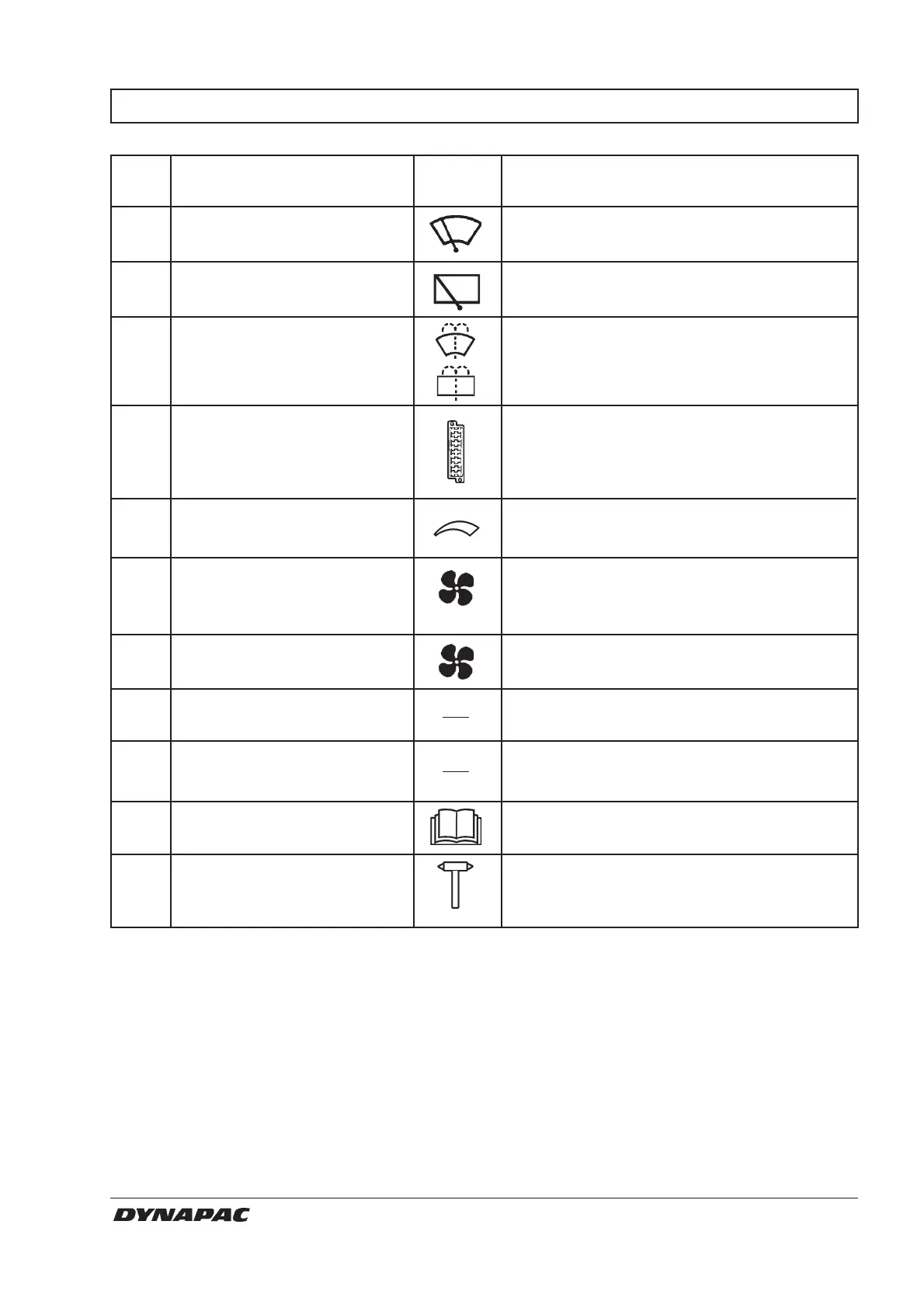
Item in Designation Symbol Function
fig. 8
1 Wiper front, switch Press to turn on the front wiper.
2 Wiper rear, switch Press to turn on the rear wiper.
3 Screenwash front and rear Press at the top to spray the windscreen.
panes, switch
Press at the bottom to spray the rear screen.
4 Fuse box (cab) Contains fuses for the electrical system.
See the “Electrical system” section in the
Maintenance Manual for functional
descriptions of the fuses.
5 Heater Right mode, maximum heating.
Left mode, heating turned off.
6 Air fan, switch Left mode, fan turned off.
Right mode, cab ventilation increases in three
steps.
7 Recirculation of cab air, Left mode, maximum recirculation of air.
slide control Right mode, minimum.
8 Temperature sensor Senses the interior temperature.
Must not be covered.
9 Air conditioning switch Starts and stops the air conditioner.
10 Handbook compartment Stowage space for safety manual and
operator’s manuals.
11 Hammer for emergency To evacuate the cab in an emergency, re
evacuation lease the hammer and break the REAR
window.



 To Next Page