13Xeo 4 / Xeo 6
Connection and operation
This section describes the connections and control elements for the Xeo components. Please contact
your Dynaudio Xeo distributor if you have any problems with connection and start-up. Distributor
addresses can be found in the Internet at www.dynaudio.com.
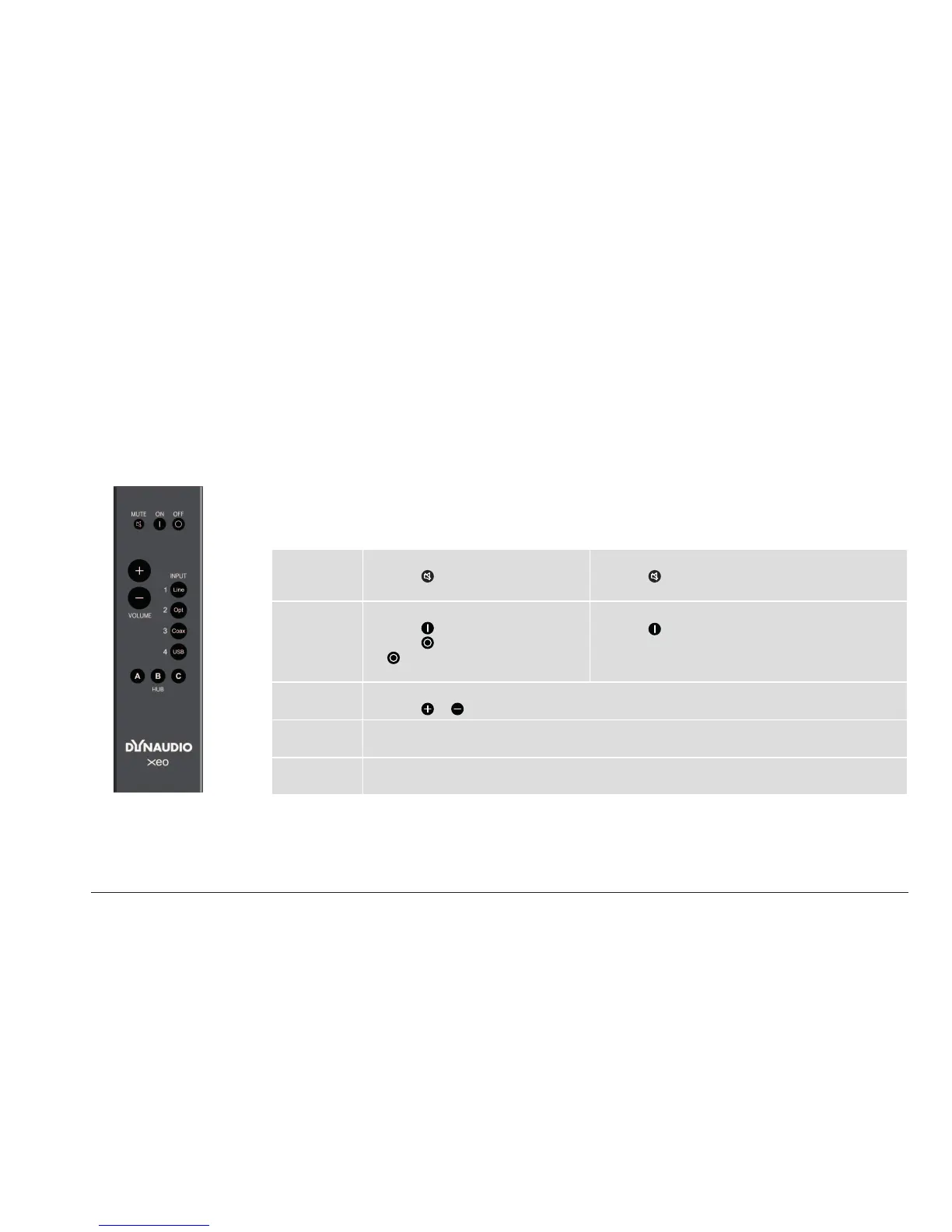
Remote control
The Xeo remote control can be used to turn the speakers on and o, change the volume, and select
a Hub and its connected signal sources. If the speakers are being operated in stereo mode (right/left),
commands will always apply to both of the speakers.
Control elements
MUTE Muting the speakers
► Press
to mute or unmute the
speakers.
Fixing the volume
► Press for at least 2 seconds to set a high volume
for the speakers (see page 21).
ON/OFF Speaker on/o
► Press
to switch on the speakers.
► Press for standby mode. Press
for at least 5 seconds to put the
speakers in sleep mode.
Reset
► Press for at least 5 seconds to reset the speakers
to the factory settings.
VOLUME Volume control
► Press
or to raise or lower the volume level.
INPUT
1/2/3/4
Signal source
► Press to select a signal source: Line, Optical, Coax or USB
HUB
A/B/C
Hub
► Press to select one of the three possible Hubs A, B, or C.



 To Next Page