16 Dynaudio
Xeo speakers
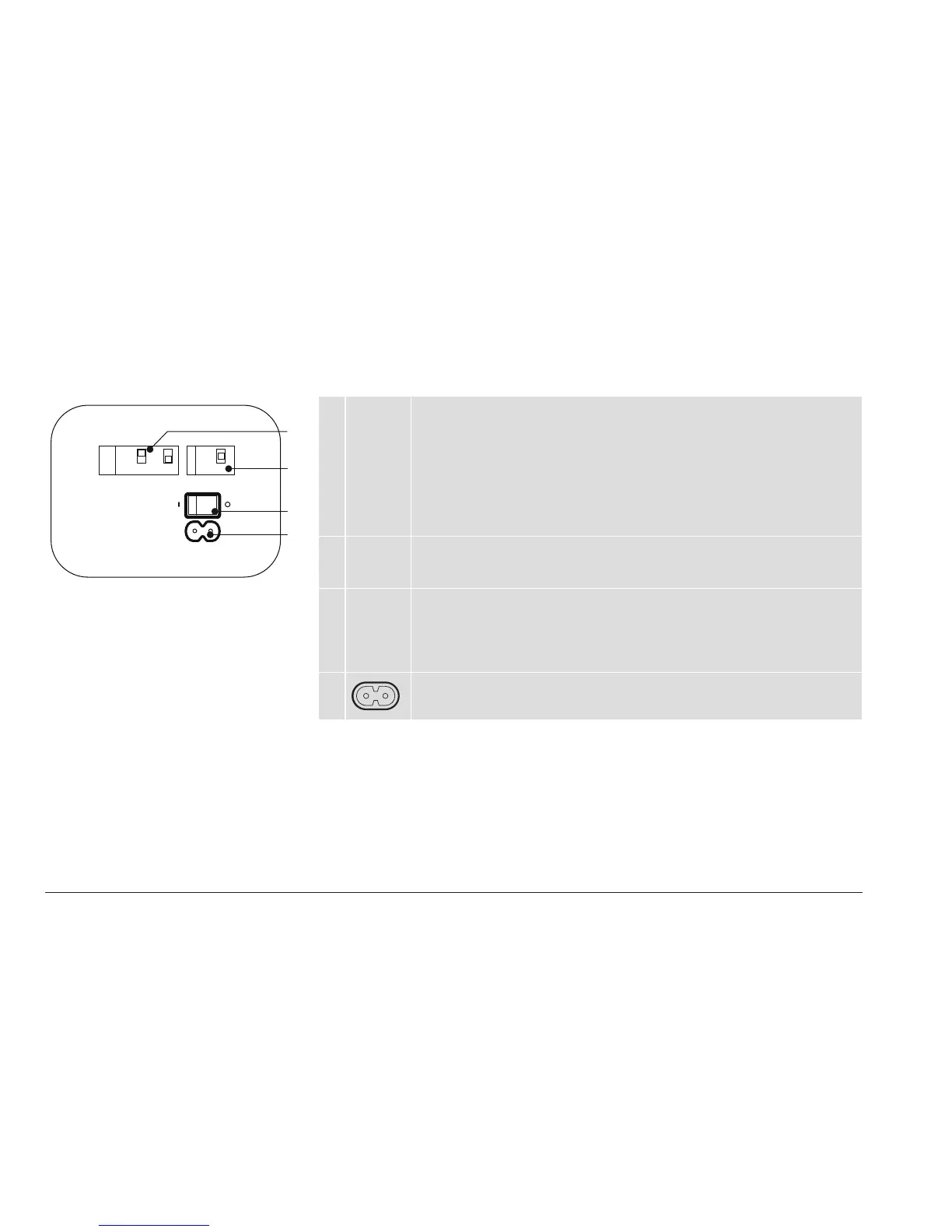
Connections and control elements
A Speaker
Position
Sound adjustment (depending on the position of the speakers)
• Neutral = with free-standing placement
• Wall = if placed near a wall
• Corner = if placed in a corner
Speaker placement
• Left = left speaker for stereo mode
• Mono = if only using one speaker
• Right = right speaker for stereo mode
B Speaker
ID / Zone
Selection of audio zones
Speakers assigned to dierent zones can be controlled separately via the remote
control. The zones are identied as Red, Green, and Blue.
C Power Power switch
• I = The speaker is on. The speaker can be activated and deactivated via the
remote control. If the speaker is activated and there is no signal, it will switch to
standby mode.
• O = The speaker is completely o.
D
Mains socket
To connect the speaker to the mains voltage.
Neutral
Zone
Power
Red
Green
Blue
Wall
Speaker
Position
Speaker Id
Corner
Left
Right
Mono
A
B
C
D



 To Next Page