18 Dynaudio
Interface display
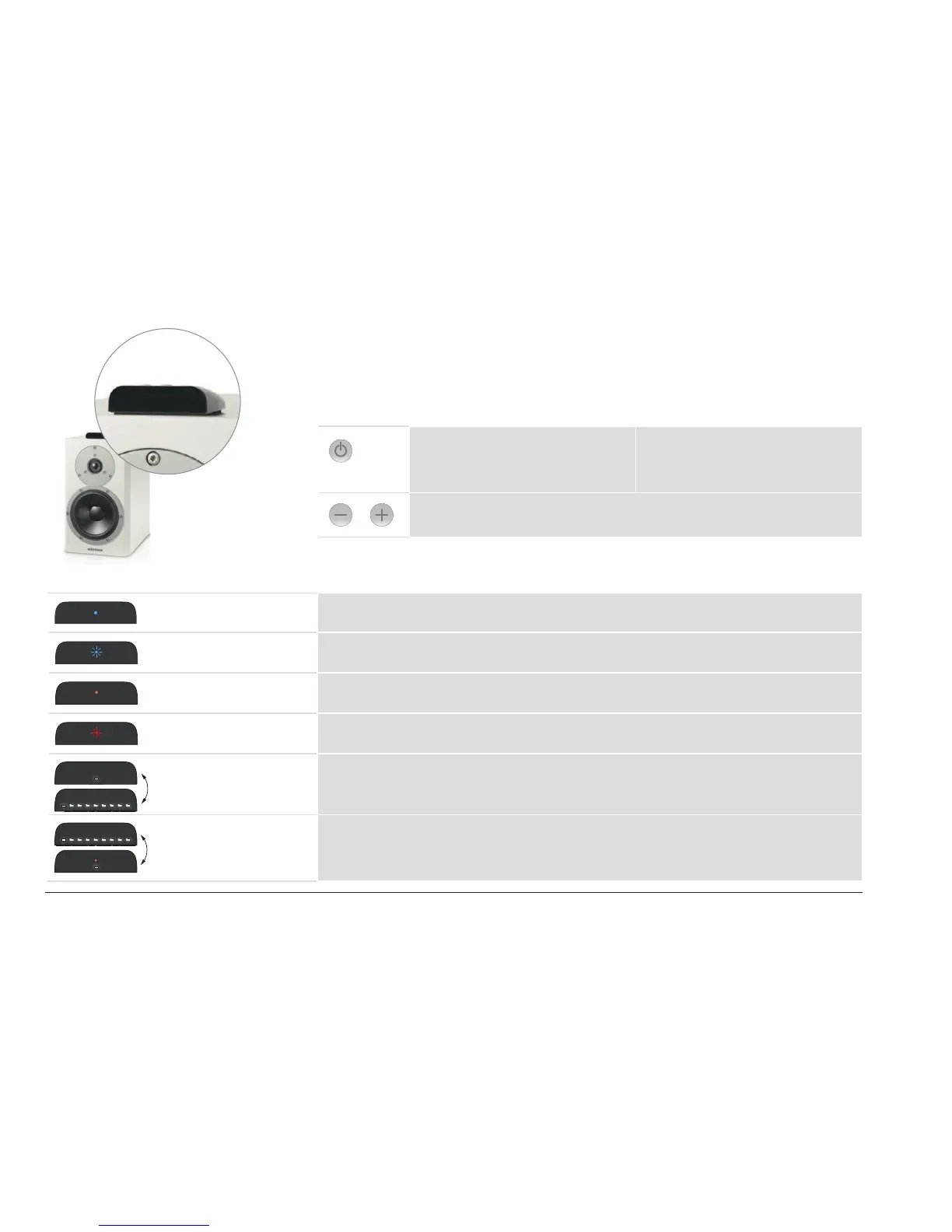
The display on the housing indicates the operational state of the speakers and system using LEDs
with various colors and ash functions.
Buttons on the display
On/o switch
Pressing this button for longer than
2 seconds will switch the speaker on or
to standby mode.
Input selection
A brief press of this button switches
between the inputs (1 → 2 → 3 → 4 →
1...). Only the inputs in use are shown.
Volume control
Increases or decreases the volume.
LED display meanings
On-state The LED is illuminated in blue. The speaker is switched on and an audio signal is played
back.
On-state The LED is blinking in blue. The speaker is switched on, but an audio signal cannot
be found.
O-state The LED is illuminated dimly in red. The speaker is in standby mode.
Hub connection The LED is blinking in red. There is no active Hub or no connection to a Hub
possible.
Switch-on process The LEDs are illuminated one by one. The speaker is being switched on.
Switch-o process The LEDs go out one by one.
In the nal state, only one LED is
illuminated dimly in red.
The speaker is being switched o.



 To Next Page