7
Safety infra-red beams funcon.
All modes except P.I.R.A.C.
Basic operang
features
If the safety beam input has been switched on, the control card will constantly monitor to ensure a set of safety beams is installed.
NB! If the BT input mode has been set to either simple auto-close or condominium mode, the safety beam input is required.
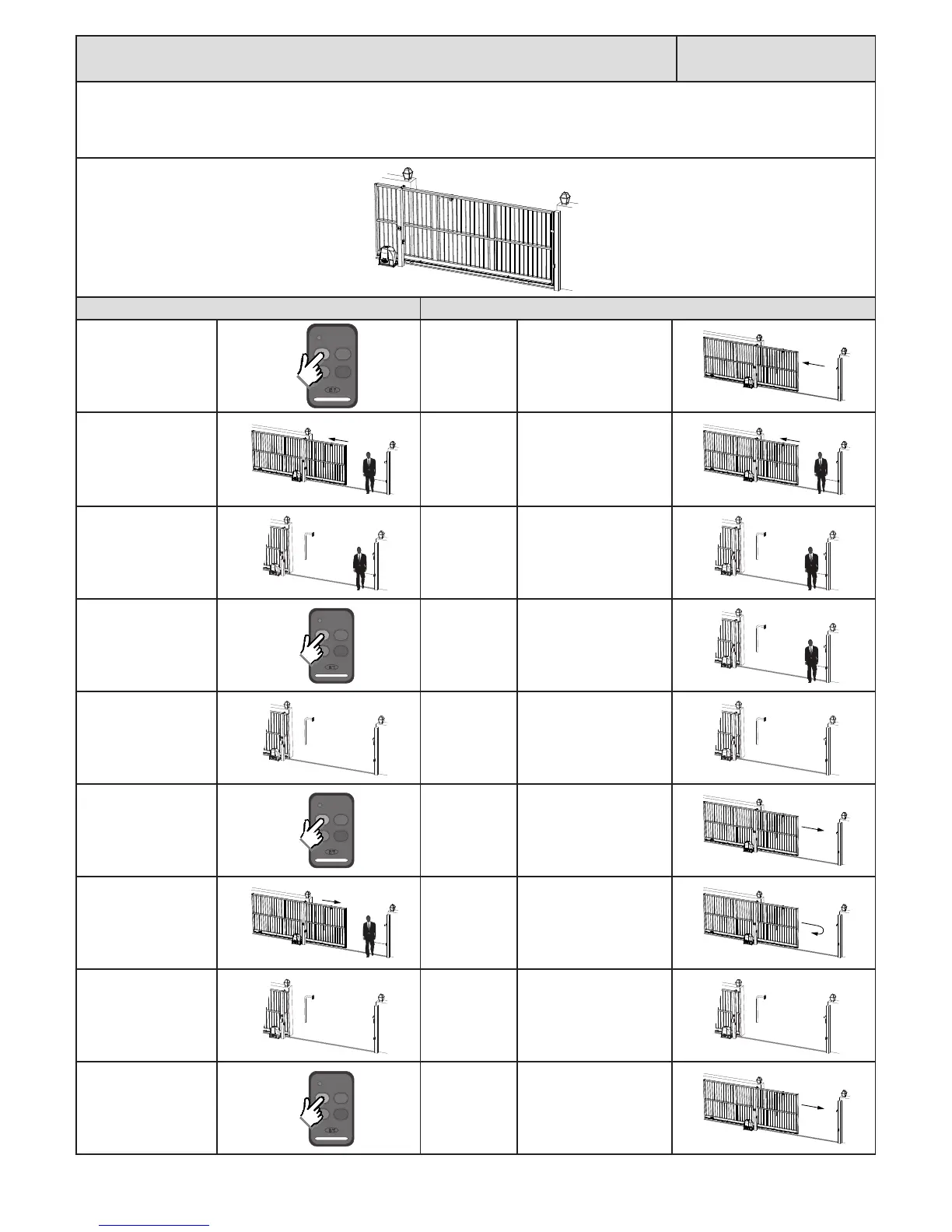
Below is an example of how the gates will behave whenever the safety beam input is acvated.
Acon Response
Momentary BT trigger.
Gate begins
opening.
No buzzer tones.
Safety beam input
triggered while gate is
opening.
Gate connues
opening.
No buzzer tones.
At full open posion.
Safety beam input sll
triggered.
Gate stops and
waits for next
trigger to close.
No buzzer tones.
Momentary BT trigger.
Trigger is
ignored and
gate remains
open.
No buzzer tones.
Safety beam input
cleared.
Gate remains
in the full open
posion unl
the next trigger
to close.
No buzzer tone.
Momentary BT trigger.
Gate begins
closing.
No buzzer tone.
Safety beam input while
the gate is closing.
Gate stops and
reverses open.
No buzzer tone.
At the full open
posion.
Gate stops and
waits for next
trigger to close.
No buzzer tone.
Momentary BT trigger.
Gate begins
closing.
No buzzer tone.
Gate closed.



 To Next Page