14
Basic operang
features
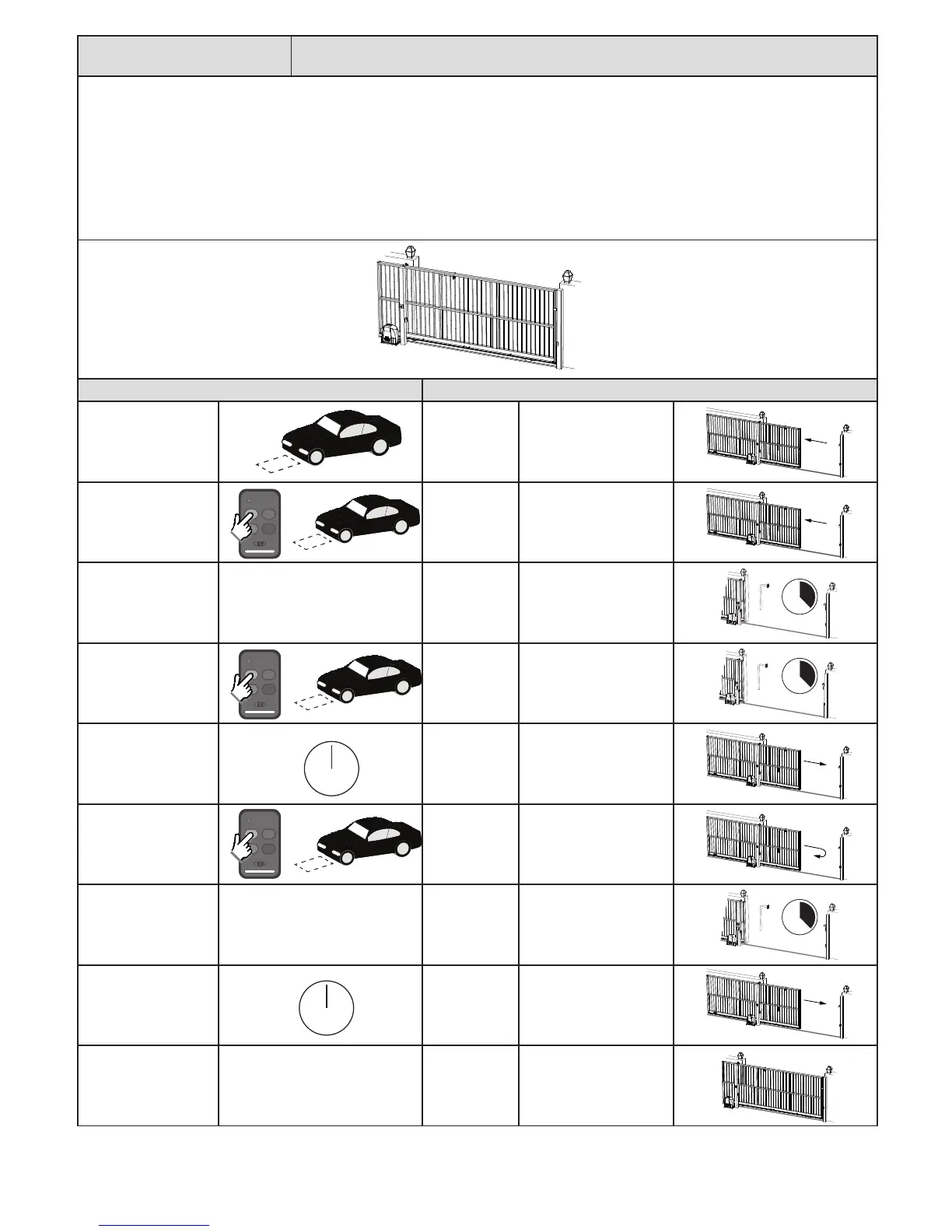
“Loop” trigger.
The Loop trigger mode is exactly the same as Condominium auto-close mode.
The only way to trigger loop detector mode is via the hardwired LPT input.
In Loop detector mode, a LPT trigger is treated as open, and any BT or LPT trigger is treated as a keep opening, keep open triggers or re-open trigger
while the gates are running. The gates will only close once the auto-close mer has med out. The loop mode transacon will only clear once the
gates reach the closed posion again.
NB! For any auto-close feature to work, a pair of safety infra-red beams must be installed and funconing correctly. If no safety infra-red beams are
installed then the gates will open but not close again.
Acon Response
Loop trigger.
Gate begins
opening.
No buzzer tones.
Momentary BT trigger
or Loop trigger while
gate is opening.
The trigger is
ignored and the
gate connues
opening.
No buzzer tone.
At full open posion.
Gate stops
and auto-close
mer starts
counng down.
No buzzer tones.
Momentary BT trigger
or Loop trigger while
gate is open.
Gate remains
open and auto-
close mer
resets.
No buzzer tones.
Auto-close mer
meout. Safety beam
input not triggered.
Gate begins
closing.
No buzzer tones.
Momentary BT trigger
or Loop trigger while
gate is closing.
Gate stops and
immediately
starts opening
again.
No buzzer tones.
At full open posion.
Gate stops
and auto-close
mer starts
counng down.
No buzzer tones.
Auto-close mer
meout. Safety beam
input not triggered.
Gate begins
closing.
No buzzer tones.
At full closed posion. Gate stops. No buzzer tones.
0
0 sec.c.



 To Next Page