23
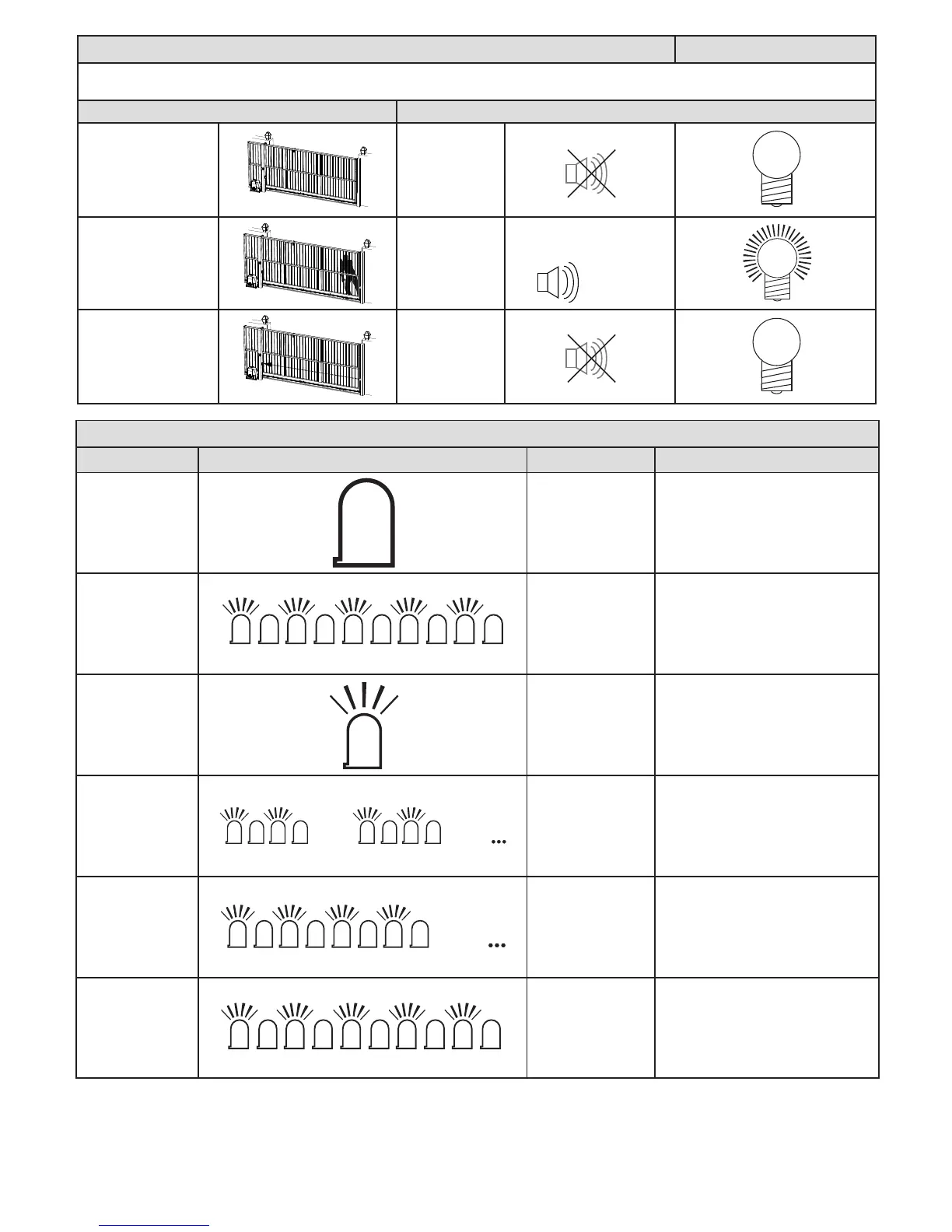
Gate forced open alarm.
Advanced features
In a case where the gate is physically lied o its track and forced open, the alarm output will immediately acvate. The alarm will only reset when
the gate is returned to normal secured condion in the closed posion.
Acon Response
Gate secured in the
closed posion.
Standing by.
Alarm output
remains in
standby status.
Aempt to li gate o
track and force open.
Alarm output
acvates.
Gate resecured in
the closed posion.
Standing by.
Alarm output
returns to
standby.
O
On/o...
Built in buzzer sounding is
oponal.
On
O
Status LED indicaons and buzzer guide.
Descripon Visual conrmaon Buzzer Reason
Stac o. None Gate fully closed.
Flashing slow 1
second on and 1
second o.
None Gate running normally.
Stac on. None Gate open.
2 x 500ms ashes
followed by a 2
second pause.
1 x 1 second beep
every 15 seconds for
5 minutes aer last
gate transacon.
AC mains o. Restore AC as soon as
possible.
4 x 500ms ashes
followed by a 2
second pause.
None.
Baery low. Allow at least 8 – 10hr
uninterrupted charge before checking
again.
5 x 125ms second
rapid ashes each
me a trigger is
received.
Mimics LED.
A lock-out mode is acve. Press and
release any holiday lock-out buon fol-
lowed by any BT buon, to deacvate.
O
OOn OOn OOn OOn OOn
1 sec 1 sec 1 sec 1 sec 1 sec 1 sec 1 sec 1 sec 1 sec 1 sec
On
OOn OOn
Pause
OOn OOn
Pause
OOn OOn
Pause
OOn OOn
OOn OOn OOn OOn OOn



 To Next Page