22/40
E-XTEQ DS ONE User Manual / Ref. MAN_DSOne_STL_EN_V1.3
Settings 3/3
OTHER SETTINGS ////////
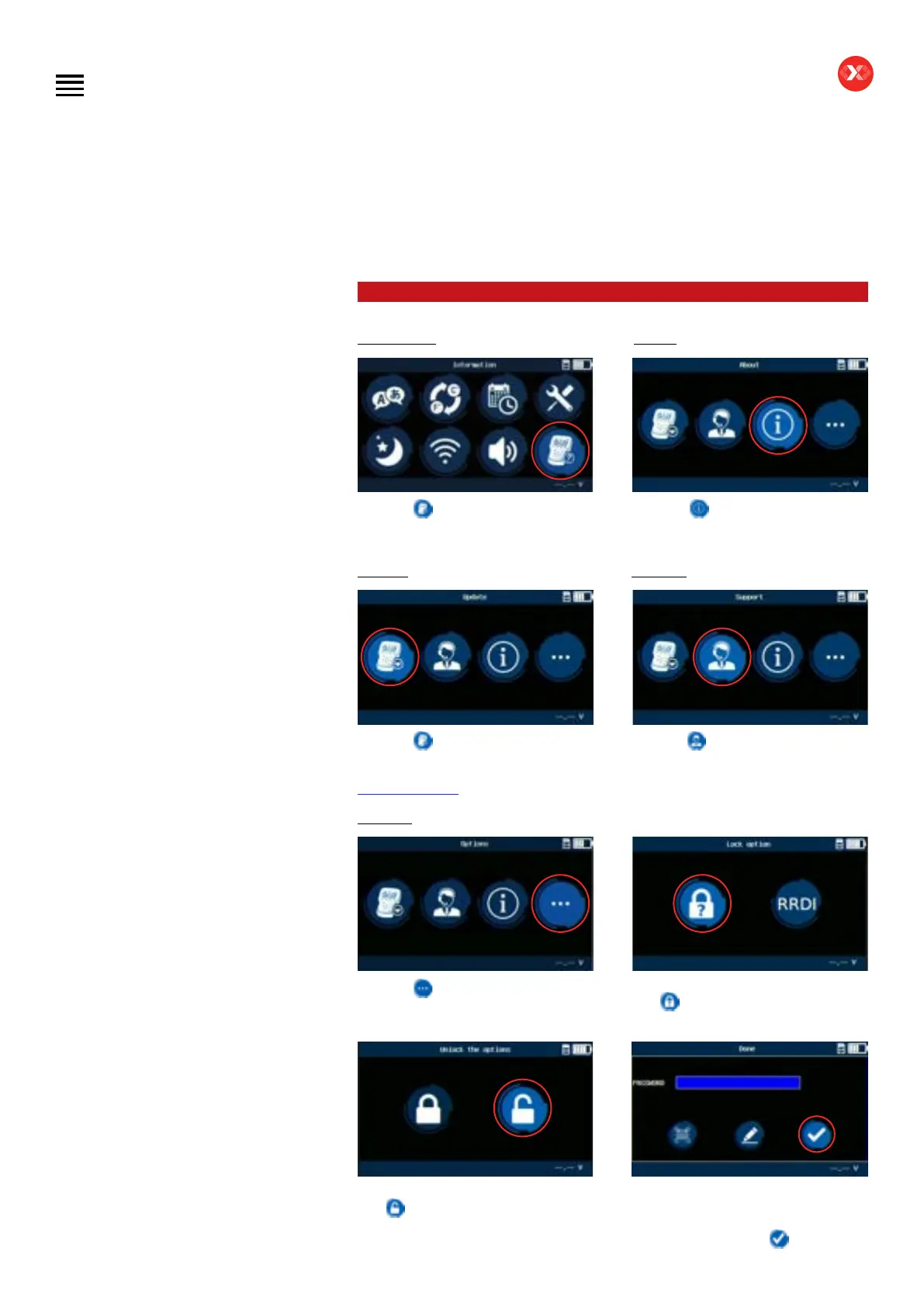
Information
This icon
will give access to
different extra settings and data about
the tool.
About
This icon
gives information
regarding the tester including serial
number, software version, and more.
Update
This icon
gives information about
how to update the device. Updating
application can be downloaded at
www.e-xteq.com
Support
This icon
gives information about
how to contact technical support for
assistance.
Options
This icon
gives access to the locked
options (diagnostics compound, plant,
and MBM).
For the modes lock option select this
icon
.
To unlock the options, select this
icon
.
Please contact your manager to obtain
the unlocking code. Then enter the code
using the scanner or the edit icon and
validate it by clicking on
.
Table of Contents
Introduction
Safety Guidelines
Maintenance and Storage
Before Use
Usage Precautions
Disassembly/Damage/Removal
Cleaning the Product
Information internal battery
Getting Started
Safety Reminders
Appearance and Dimensions
Presentation
Job Storage
Accessories
Best Practices
Positioning of the clamps
Connector longevity
Hybrid vehicles
Initial Setup
Power Cable Connection and Power On
Battery Cable Clamps Connection
Optimus
- Optimus installation
- Using Optimus
Update
Garage code (RRDI)
Settings
Preferences
WI-FI Connection
Other settings
Diagnostic PDI and REPAIR
Battery selection
- Using BK code
- Using VIN
Start Diagnostic
Other diagnostics
Results
Results storage
Support Information
Warranty
Technical specications


 To Next Page