37/40
E-XTEQ DS ONE User Manual / Ref. MAN_DSOne_STL_EN_V1.3
Support Information
ERROR MESSAGES ////////
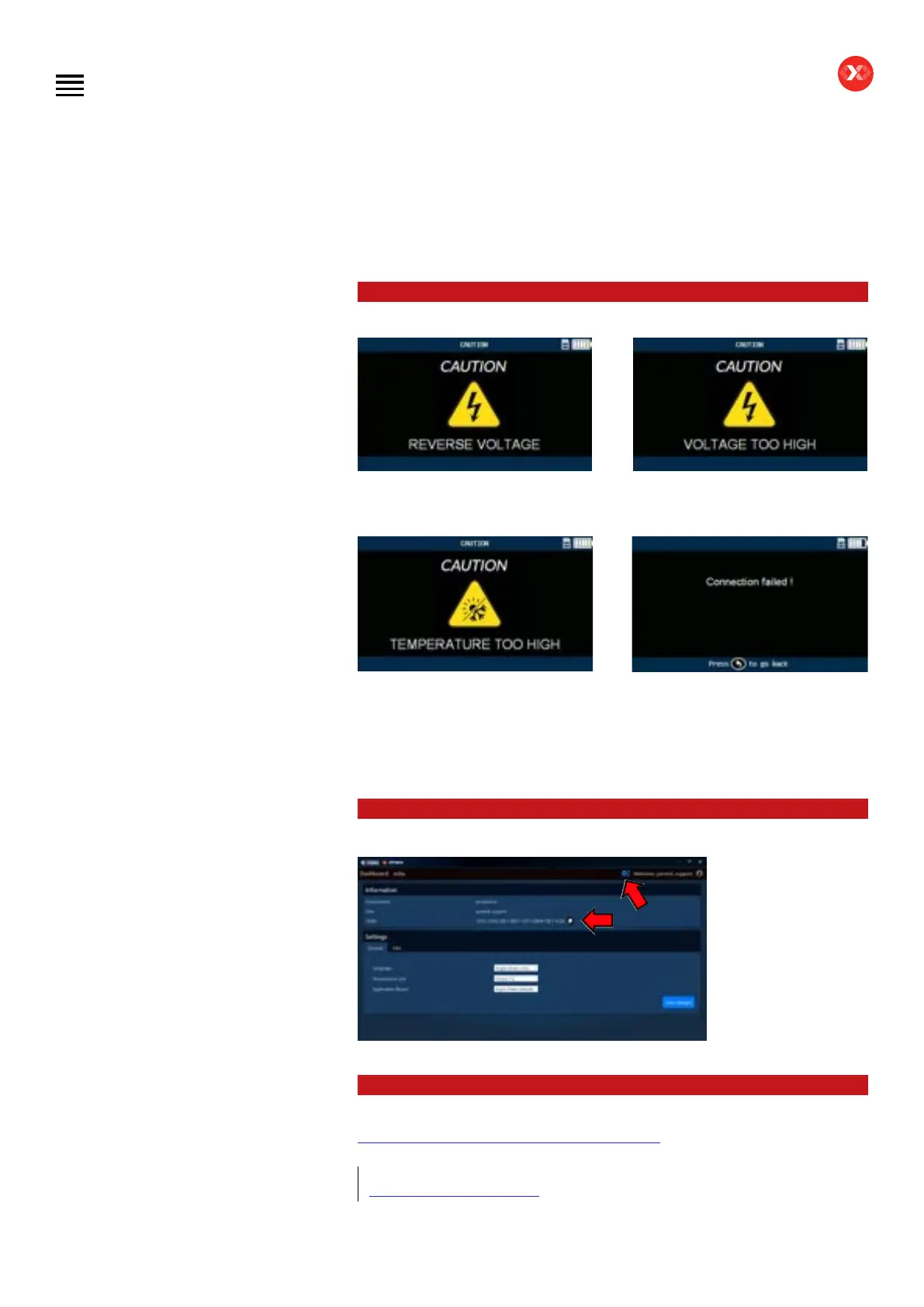
If the battery is connected on the
opposite polarity, the screen “Reverse
Voltage” will appear.
If the voltage of the connected battery
is higher than 13.5V the “Voltage too
high” screen will appear.
If the measured temperature of the
connected battery is above 45°C/113°F,
the “Temperature too high” screen will
appear. If the measured temperature is
below -30°C/-22°F, the “Temperature
too low” screen will appear.
If an issue is detected with the
WIFI connection when sending jobs,
please go to the Wireless menu and
search for the WIFI signal to set the
desired conguration again (see WIFI
connection section of this manual).
OPTIMUS SUPPORT ////////
If you have a problem
with OPTIMUS requiring
support, please note
your OUID Number.
(OPTIMUS/Settings).
OUID Number will
be requested by the
customer service
support.
LOCAL SUPPORT ////////
Complete DS One dedicated support can be found at:
https://e-xteq.com/customer-documents-stl-dsone
EMEA:
support.eu@e-xteq.com
Table of Contents
Introduction
Safety Guidelines
Maintenance and Storage
Before Use
Usage Precautions
Disassembly/Damage/Removal
Cleaning the Product
Information internal battery
Getting Started
Safety Reminders
Appearance and Dimensions
Presentation
Job Storage
Accessories
Best Practices
Positioning of the clamps
Connector longevity
Hybrid vehicles
Initial Setup
Power Cable Connection and Power On
Battery Cable Clamps Connection
Optimus
- Optimus installation
- Using Optimus
Update
Garage code (RRDI)
Settings
Preferences
WI-FI Connection
Other settings
Diagnostic PDI and REPAIR
Battery selection
- Using BK code
- Using VIN
Start Diagnostic
Other diagnostics
Results
Results storage
Support Information
Warranty
Technical specications


 To Next Page