7/40
E-XTEQ DS ONE User Manual / Ref. MAN_DSOne_STL_EN_V1.3
Getting Started 2/3
APPE
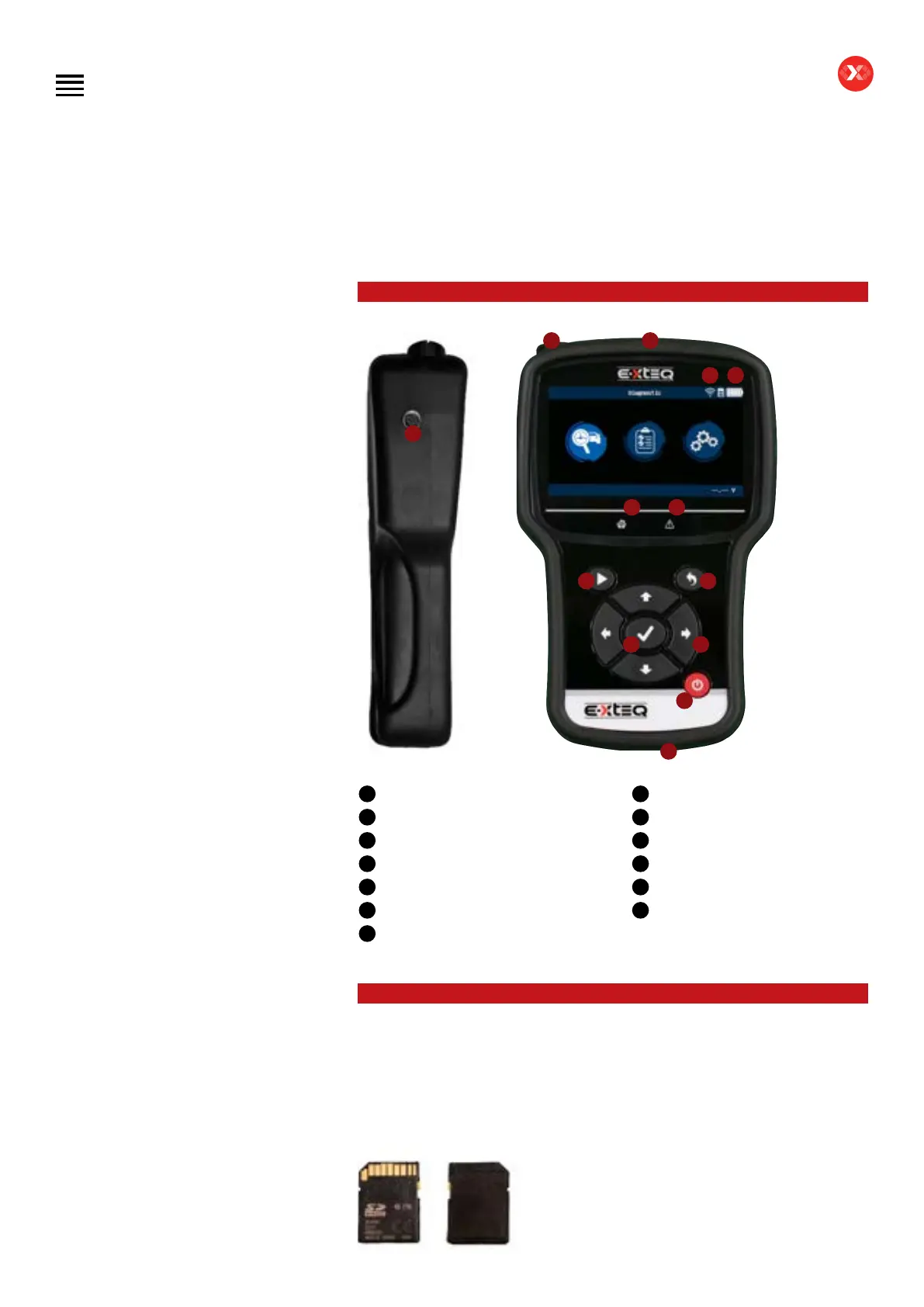
PRESENTATION ////////
5
1 2
3
6
8
10 11
12
13
9
4
7
JOB STORAGE ////////
The DS One has expandable storage through an SD card located on the right side of
the tool inside the silicone protective shell.
The tool comes with a 16 GB removable SD card.
E-XTEQ reference: E8-0037-A
Acceptable sizes for replacements are 4GB, 8GB and 16GB formatted with FAT32 le
system.
Table of Contents
Introduction
Safety Guidelines
Maintenance and Storage
Before Use
Usage Precautions
Disassembly/Damage/Removal
Cleaning the Product
Information internal battery
Getting Started
Safety Reminders
Appearance and Dimensions
Presentation
Job Storage
Accessories
Best Practices
Positioning of the clamps
Connector longevity
Hybrid vehicles
Initial Setup
Power Cable Connection and Power On
Battery Cable Clamps Connection
Optimus
- Optimus installation
- Using Optimus
Update
Garage code (RRDI)
Settings
Preferences
WI-FI Connection
Other settings
Diagnostic PDI and REPAIR
Battery selection
- Using BK code
- Using VIN
Start Diagnostic
Other diagnostics
Results
Results storage
Support Information
Warranty
Technical specications
1
IR thermometer + laser pointer
2
Optical code reader
3
Wi-Fi connection
4
Battery status
5
Clamps connection
6
Wi-Fi network connection LED
7
Error mode indicator
8
Start test
9
Cancel, previous step
10
OK, next step
11
Navigating Arrows
12
Power On/Off
13
USB connection


 To Next Page