MF2E-E -B 2
- 62 -
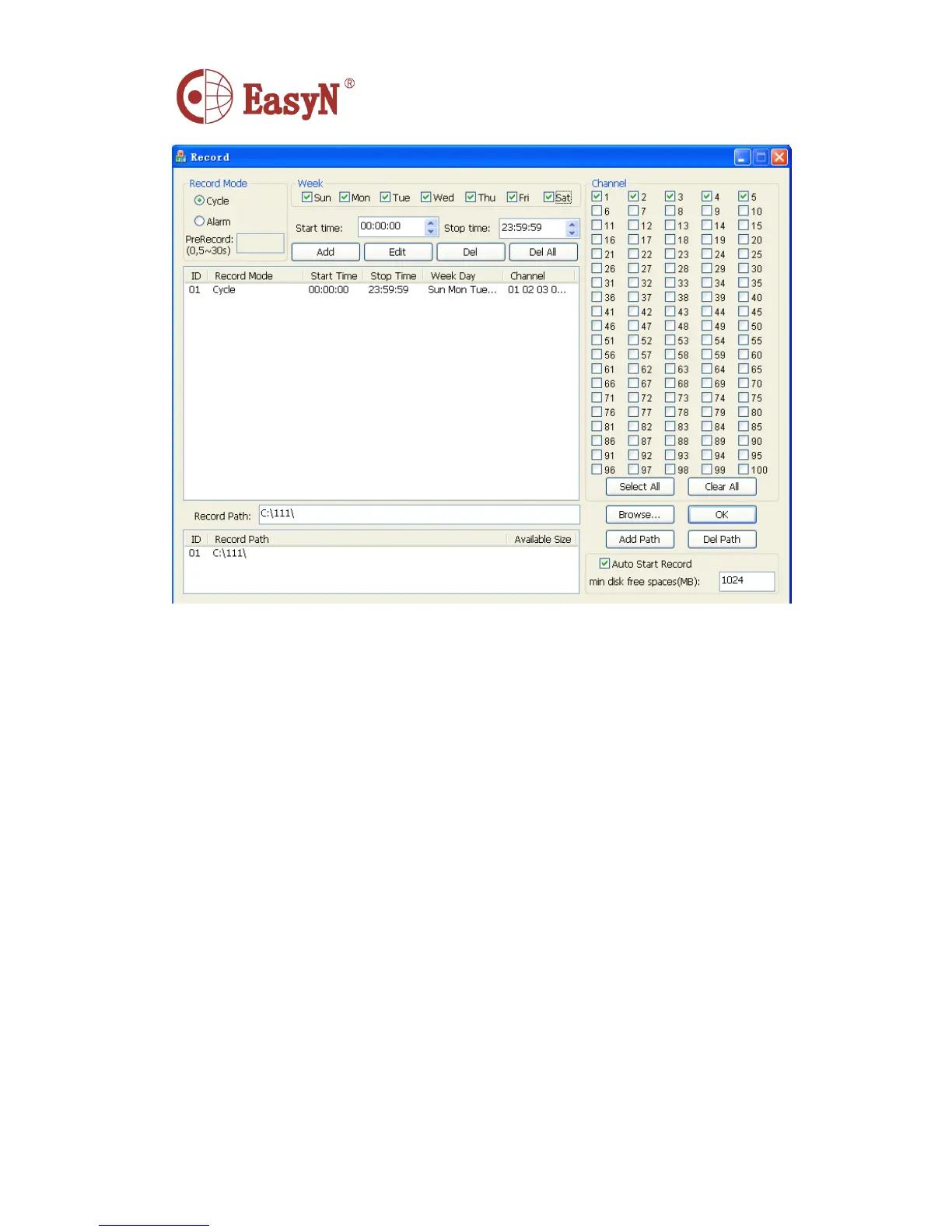
Week: Choose the Record Week Time
Start Time: The start time of the record file
Stop Time: The stop time of the record file
Add: Add the imformation of the record (Time region,channel and so on)
Del: Delete the Record Imformation which is seleted in the list
Del All: Delete all of the Record Information
Channel: Select the channel which you need to record
Select All: Select all of the channel
Clear All: Clear all of the selected channel
Auto Start Record: Auto to record the file
Record Path: The save path of the record file
Add Path: Add save path, when the residual disk spaces less than the Min disk free
spacees, switch to next path to contimue save the record file
Del Path: Delete the save path of the record file
Disk:
Auto Delete The Earliest File: System will delete the earliest record file when the residual disk
spaces less than the min disk free spaces
Auto Change Record Path: System will auto change the save path of the record file when
the residual disk spaces less than the min disk free spaces
Min disk free spaces(MB): The action above will be happened when the residual disk spaces
less than the min disk free spaces



 To Next Page