MF2E-E -B 2
- 18 -
5.7 . EMAIL SERVICE SETTINGS
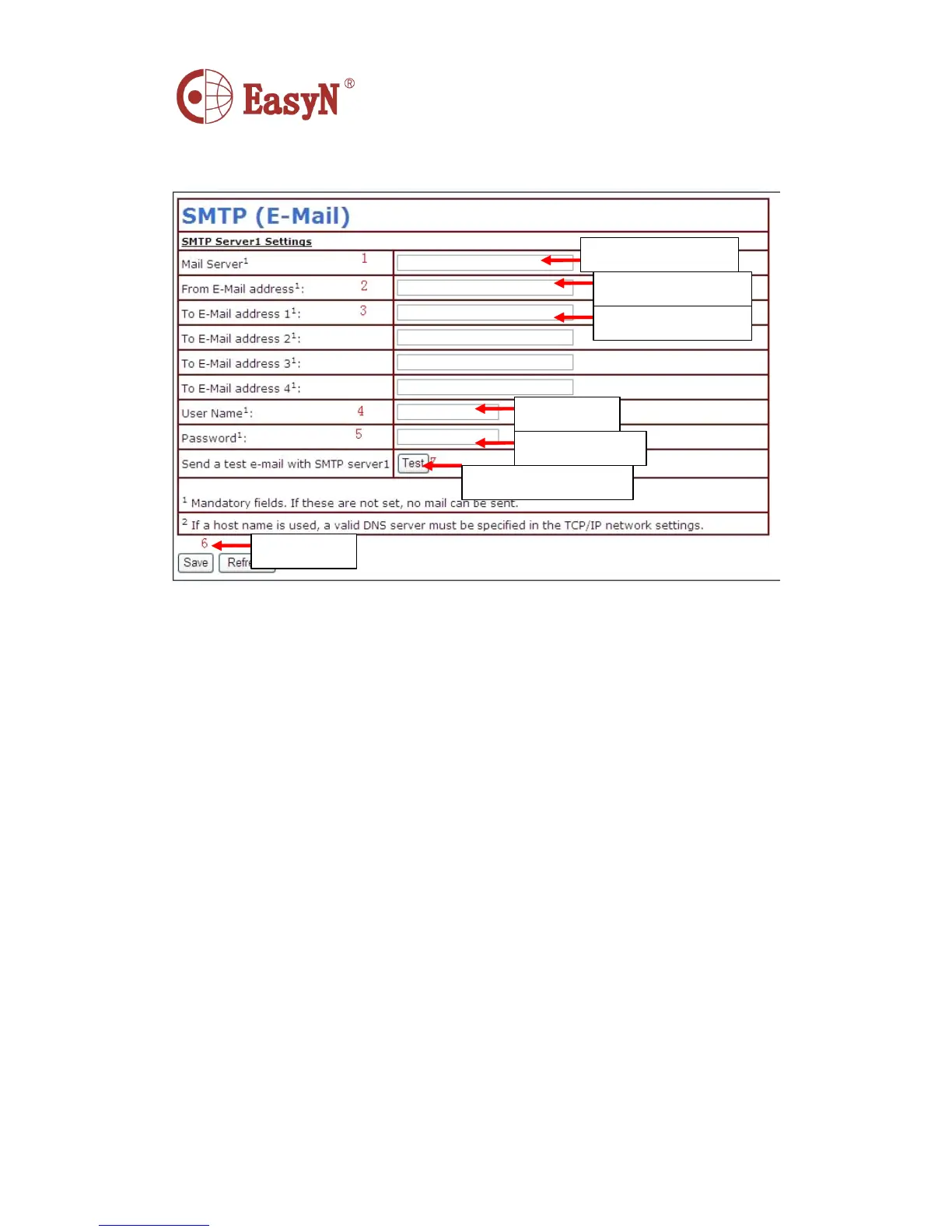
P icture 14- email service configuration
I n picture 14, the configured content is must , if that information is not
correct , then the configuration is failed.
N otice: before configuring this page, please confirm the email
i nformation is available.
� SMTP server: input the SMTP server of email server
� S ender address: input email address to send email
� Receiver address: input email address to receive snapshots and IP
� address. I t can support 4 receivers .
5.8 . MOTION DETECTION
S elect motion detection to monitor a fixed area, it will trigger alarm
when there is abnormal situation. T he configuration interface as picture
22 , device can support 16 areas of motion detection , tick on option under
viewing window to enable the function of selected area. A fter enabling
the area , the screen will show a area frame and area number , click mouse
on the frame to drag to anywhere , also the frame size can be changed by
dragging the right-down corner of the frame. A fter configuration , click
apply button to enable the settings.
I nput email server
I nput sender email
I nput receiver email
L ogin name
L ogin password
C lick to save
A fter save, click to test



 To Next Page