MF2E-E -B 2
- 7 -
3.
3.
3.
3. DEVICE
DEVICE
DEVICE
DEVICE APPEARANCE
APPEARANCE
APPEARANCE
APPEARANCE AND
AND
AND
AND INTERFACE
INTERFACE
INTERFACE
INTERFACE
3.1 . DEVICE APPEARANCE
Picture
Picture
Picture
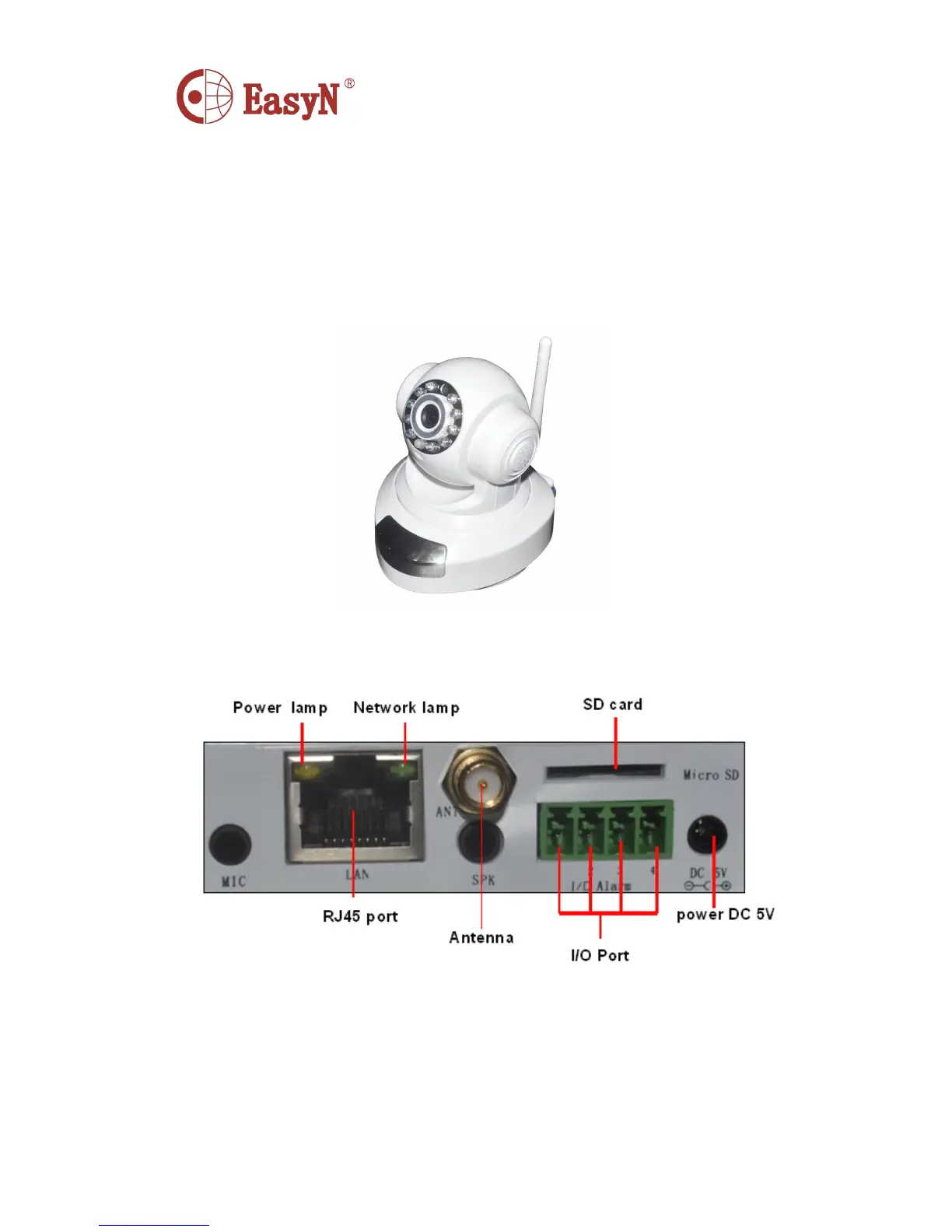
Picture 1-
1-
1-
1- device
device
device
device appearance
appearance
appearance
appearance
3.2 . DEVICE INTERFACE
Picture
Picture
Picture
Picture 2-
2-
2-
2- device
device
device
device interface
interface
interface
interface
P
P
P
P ower:
ower:
ower:
ower: connect to external power adapter, standard: DC 5V/2A
RJ
RJ
RJ
RJ 45:
45:
45:
45: network interface standard: 10/100M auto -adjusted internet interface, it can connect
many kinds of devices, such as hub , router, and switch, etc.
N
N
N
N etwork
etwork
etwork
etwork lens:
lens:
lens:
lens: lens flickers when network connecting
P ower lens: lens on when power on



 To Next Page