-9-
START-S1XL
Manuale tecnico
ACC program:
1° ch TX OPEN-STOP-CLOSE-STOP...
2° ch TX CLOSE-STOP-CLOSE-STOP...
11 - 14 same as 1st ch TX
11 - 12 Check setting DIP3B
11 - 13 OPEN command only
(does not STOP)
11 - 15 makealinkifnotused
ON
2
1
43
ON
2
1
43
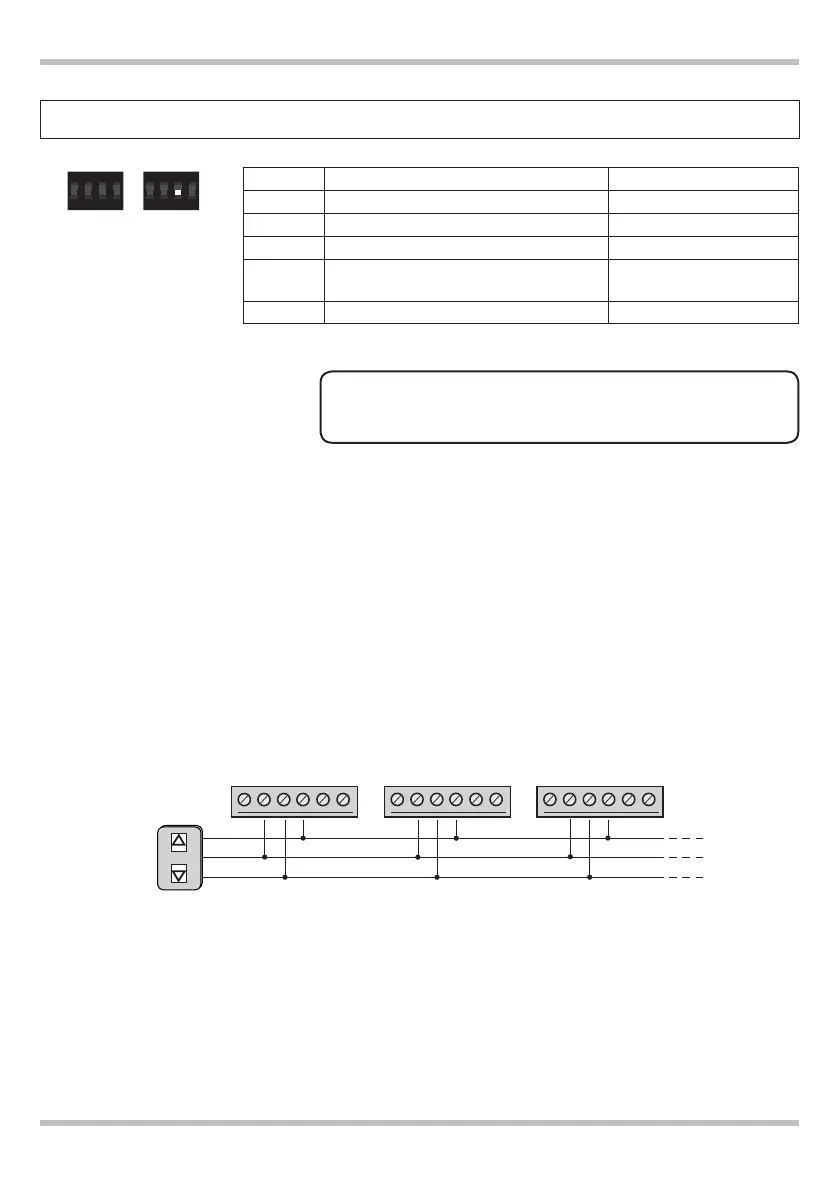
DIP 3-B OFF
The CLOSE Command
(terminal 12) only allows
the closure, if pressed
again does not STOP.
DIP 3-B ON
The entrance CLOSE
(terminal 12) only works
as a STOP input.
DIP A DIP B
In this operating mode,
you can’t install the safety photocells.
!
11 12 13
close
open
Button
11 12 13
close
open
11 12 13
close
open
OPEN
CLOSE
control
board 1
Example ACC mode
NowisapracticalexamplefortheinstallationofcentralSTART-3S1XLvers.2,setinACCmode(OPEN/
CENTRALLOCKING).Thismodeofoperationpermitstooperateoneormorecontrolunitsviaasinglecom-
mand,andthenallowstheopeningorclosingfullautomationbypressingasingletasto.TheCLOSEinput
(terminal 12) only works as a STOP input.
control
board 2
control
board 2


 To Next Page
 Loading...