12
EN
EBS Ink-Jet Systeme 20111028#4.2
EN
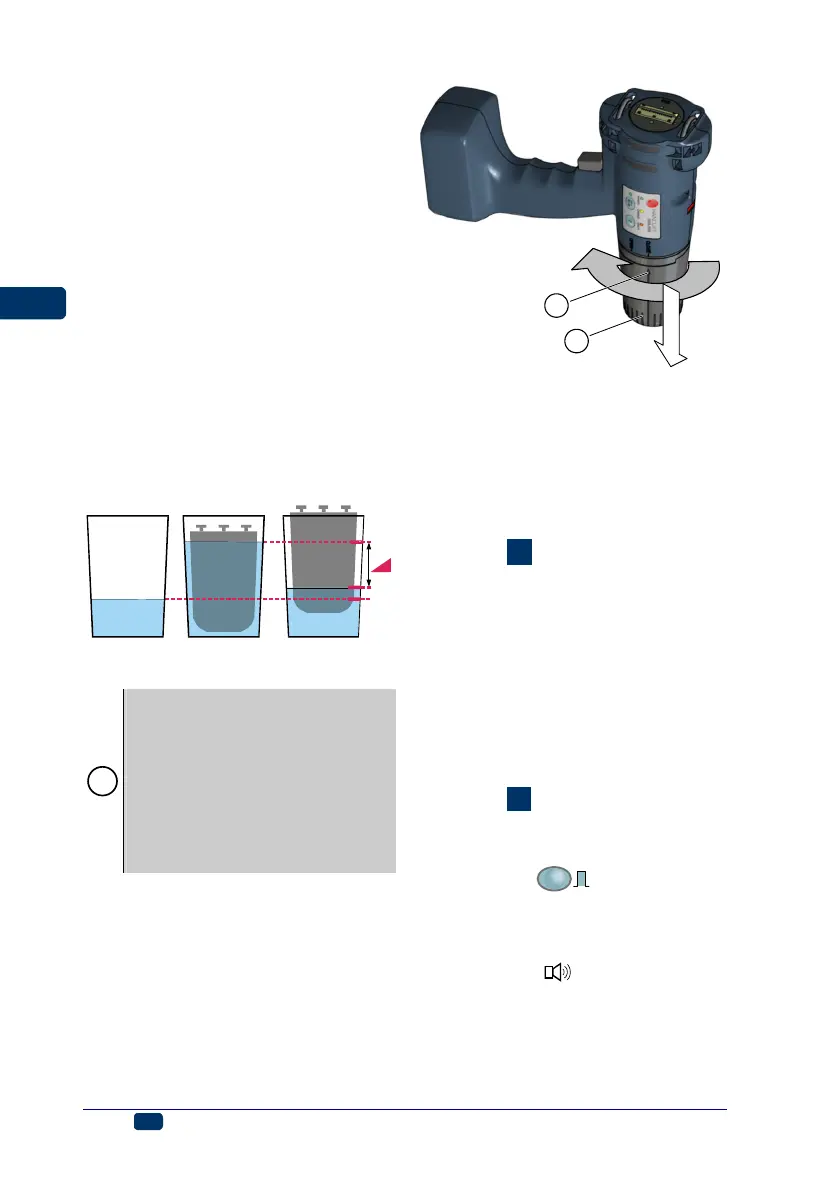
2. Detach the full container from the
printer, place it with its bayonets
30 up into a vessel whose diame-
ter is slightly greater than the di-
ameter of the container and pour
water so that the container starts
floating without turning upside
down. Mark the water level on
the vessel before (line 1) and af-
ter (line 2) the full container has
been immersed. Then insert the
empty container and mark the
immersion level (line 3). You can
check the ink consumption level
at any time by immersing the
container in water and comparing
the current level with the previous
lines (lines 2 and 3). Make sure
there is always the same water
level in the vessel (line 1).
1
3
2
full ink
container
empty ink
container
Replacing Ink Container
!
If possible, replace the container in
dustfree conditions so as to minimise
the amount of contaminants getting
in to the printer’s ink system.
Do not leave the printer with the ink
container detached for a longer time
than that required to replace the
container. While detaching or install-
ing the container be careful not to
splash anyone or anything with ink.
1. Turn the printer off - see
Switching the Printer Off.
b
a
10
12
2. Put the printer in such a way that
the container points downwards,
turn empty container 10 to the left
(a) so that arrow 12 points to the
OPEN position. Wait about 3
seconds while holding the con-
tainer to equalize the pressure.
3. Remove the container carefully (b).
See figure
E
.
4. If gasket 31 and contact plates in
the guide holes for bayonets are
dirty, remove ink leftovers from
them with wash-up.
5. Install a new container - see
Installing Ink Container in the
Printer
.
Switching the Printer On and
Off
See figure
.
Switching the Printer On
Press key 18,
PRINT
ON/OFF
, and while hold-
ing it down press release button 5.
When the printer is switched on, lamp
16 glows and a sound signal is heard
from buzzer 32
.
Once the printer has been switched
on, you can start printing a text that is
stored in the printer memory - see
Printing.



 To Next Page