20111028#4.2 EBS Ink-Jet Systeme
EN
15
EN
key from your computer keyboard.
The markers can be deleted as any
other characters - with the
Delete
and
BackSpace
keys.
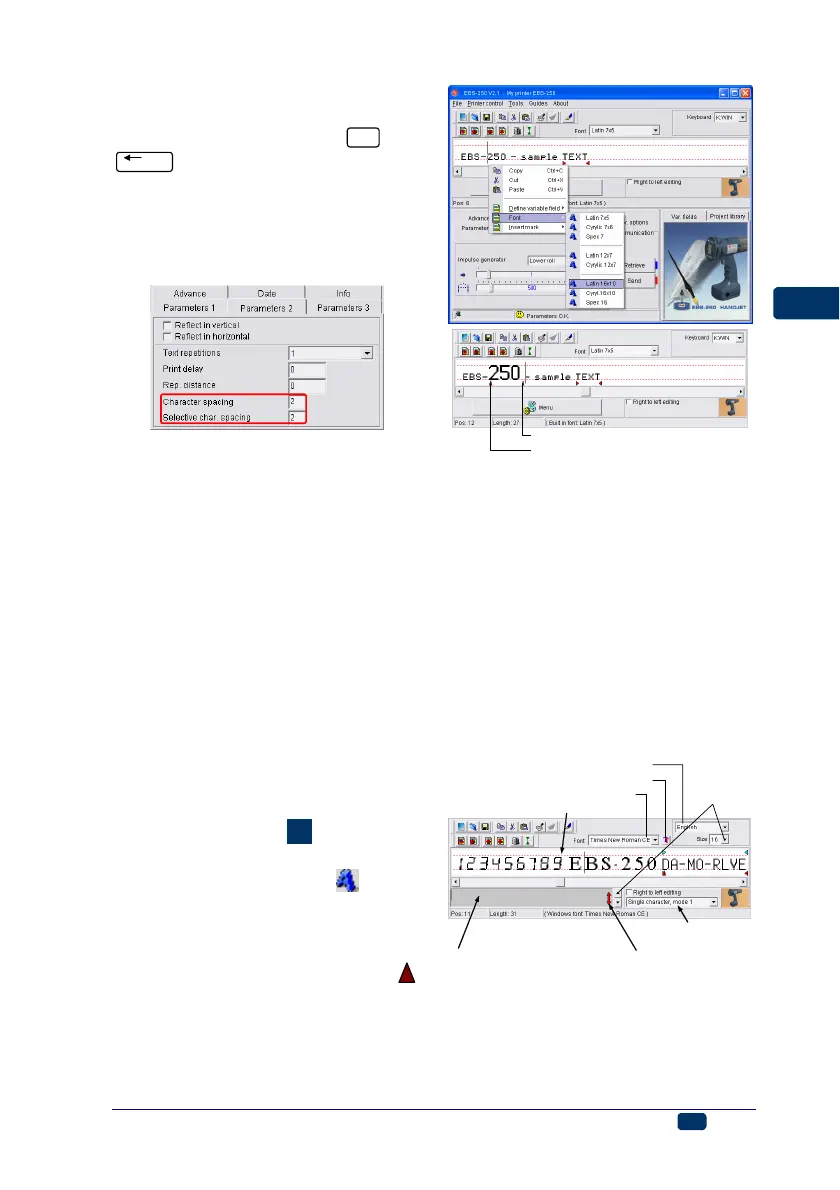
The spacing between proportional
(monospaced) characters is set with
the Character spacing (Selective
char. spacing) parameter from the
Parameters 2 tab sheet.
Using and Changing Built-in Fonts
of the Printer
The program uses built-in fonts as
standard. In order to change the font
type and size at any point of the text,
follow the steps below:
1. Position the cursor in the text edit
line exactly where another font is
to be inserted.
2. Holding the cursor on the text edit
line, press the right mouse button
(or the MENU button) and select
Font from the menu displayed.
Then select the font type you need
from the list displayed, e.g.
Latin 16x10. You can also do that
using the pull-down list called Font
on the tool bar of the text edit win-
dow (see figure
F
). The printer
fonts are at the top of the list and
marked with the symbol .
3. Move the cursor to another posi-
tion and insert another font-
change marker.
If only one font-change marker
has been inserted, all characters from
the marker position to the end of the
text are displayed (printed) with the
use of the replaced font.
font-change marker (Latin 7x5)
font-change marker (Latin 16x10)
Using and Changing Windows
®
Fonts
You can also use Windows
®
fonts to
create texts in your printer.
1. Move to the Font list and replace
build-in font with one of fonts in-
stalled in your Windows®. You can
change the font Size and the key-
board "language" in Windows®.
While increasing the text height do
not exceed H
max line because oth-
erwise the excessive top part of the
text will be cut off.
other parameters of Windows
®
fonts
change
the font
size
change the font
the line indicating
the maximum print height H
max
character insertion mode
for Windows® fonts
excessive-font-size indicator
change Windows
®
keyboard language
if you use Windows
®
fonts type
in characters in this widow
2. Move the cursor to the position
where you want to start a text
and type in the text. You can
change the font at any time.



 To Next Page