4
EN
EBS Ink-Jet Systeme 20111028#4.2
EN
Components of Portable
Printer System
See figures
B
C
D
E
.
1. Upper guide roll.
2. Nozzle plate - front part of the
print head (ink outlet).
3. Lower guide roll, to synchronise
printing.
4. Openings with plugs for adjusting
electromagnets.
5. Release - a print release button,
also used by other functions.
6. Printer base, battery compart-
ment.
7. Printer holder.
8. Hanger.
9. Control panel and keypad.
10. Ink container.
11. Ink container label.
12. Container OPEN-CLOSED indicator.
13. Name plate.
14. Battery charge socket.
15. Charge plug.
16. Power LED indicator.
17. PRINT ON/OFF LED indicator
(the print state).
18. PRINT ON/OFF button.
19. Function key F.
20. Error LED indicator.
21. Charge LED indicator.
22. USB-Bluetooth Module - for wire-
less (radio) communications.
23. USB plug.
24. Radio transmission LED indica-
tor.
25. Power pack to charge printer
batteries.
26. Plug of power pack 25.
27. Computer.
28. HANDJET
®
EBS 250 Printer.
29. Non-return valves in the ink con-
tainer and ink system.
30. Guide bayonets in the ink con-
tainer.
31. Ink container gasket.
32.
Buzzer - a buzzing signal
generator, located inside element
7 of the printer.
33. LED display showing the number
of a text file that is ready for print-
ing.
Signs
!
Information signs indicating:
6 that the actions described need to be
taken with extra or special care,
6 the printer’s additional or specific func-
tions or options, which are not described
anywhere else,
6 untypical behaviour of the printer and
other hints.
!
A warning not to perform the
operation that might be unsafe or criti-
cal for the printer. It requires the user to
follow closely the instructions given
therein.
B
C
Figure numbering notation
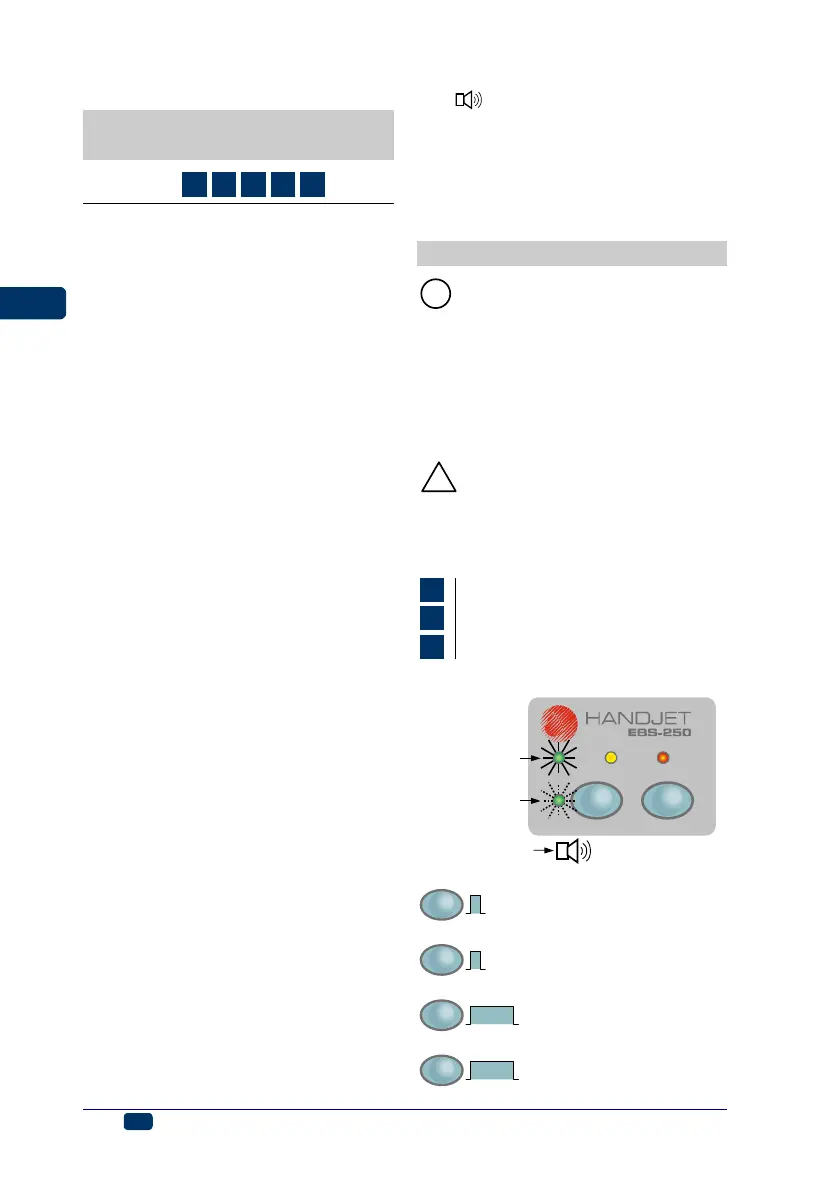
The meaning of LED and other indicators:
ERRORCHARGEPOWER
F
PRINT
ON/OFF
The lamp flashes
The lamp glows
Buzzer
PRINT
ON/OFF
PRINT ON/OFF button (18)
should be pressed for a short
time (<1 sec)
F
F button (19) should be
pressed for a short time (<1
sec)
PRINT
ON/OFF
3 sec.
PRINT ON/OFF button (18)
should be pressed for
a longer time (>3 sec)
F
3 sec.
F button (19) should be
pressed for a longer time (>3
sec)



 To Next Page