28
EN
EBS Ink-Jet Systeme 20111028#4.2
EN
Transfer/Save Text Files to/in the
Printer.
4. Repeat steps from 1 to 3 in order
to programme other texts.
You can save the project list to a text
file using the Copy list to editor
command which is available after the
right mouse button has been pressed
above the text library window.
Quick Saving/Retrieving Text Files
to/from Text Library
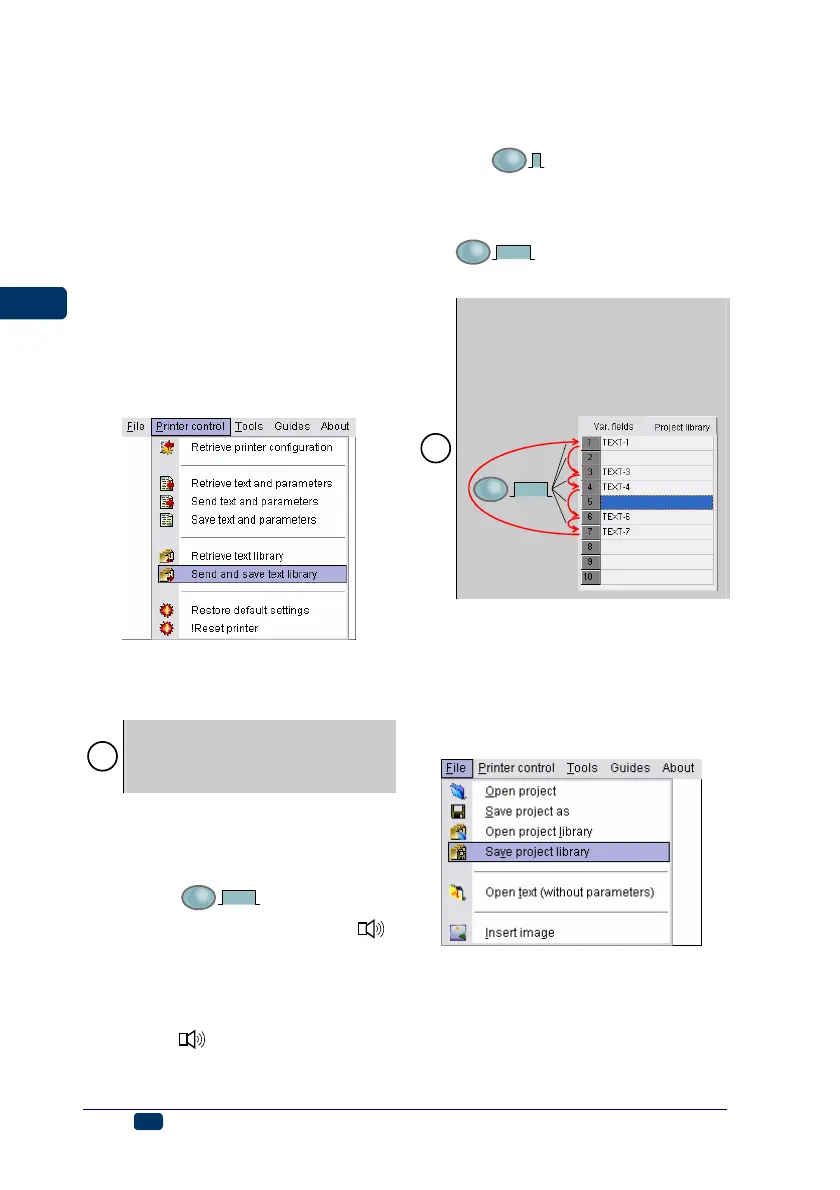
In order to save the entire text library
to the printer use the command Send
and save text library.
Similarly you can retrieve the text
library from the printer using the
command Retrieve text library.
!
The command Send and save text
library erases all text files contained
in the non-volatile memory of the
printer.
Printing Text Files from Library
Select texts stored in the text library
of your printer one by one by pressing
button 19 -
F
3 sec.
for a while until
bussing is heard from buzzer 32 .
Such a switching operation can be
performed regardless whether the
printer is in the print state (lamp 17
lights) or not. The buzzing from
buzzer 32
is different for a first
text. On display 33 you can see which
of the library texts is selected. The
number displayed corresponds to the
number in the text library.
1. Start printing by pressing button
18 -
PRINT
ON/OFF
.
2. Print a text.
3. Switch the printer to print another
text by pressing button 19 -
F
3 sec.
.
4. Print the successive text.
!
In order to ensure that the printer
skips over text files during the text
switching operation (to be performed
with function key 19) delete the text
name in the library and save such an
empty text name in the printer.
F
3 sec.
Saving the Project Library on
Computer Disc
The project (text and print parameter)
library can be saved on a computer
disc with the command Save project
library from the File menu.
Similarly you can open the project
library on your computer with the
command Open project library.



 To Next Page