35
Designed in
Summerville, SC
Support: Support.Eccotemp.com Shop Online: www.Eccotemp.com Phone: 866-356-1992
34
34
Support: Support.Eccotemp.com Shop Online: www.Eccotemp.com Phone: 866-356-1992
PLEASE NOTE: SH12
-
A IS FOR INDOOR PERMANENT INSTALLATIONS ONLY. THIS MANUAL AND ALL ECCOTEMP CONTENT IS SUBJECTED TO CHANGE WITHOUT NOTICE.
PLEASE VISIT SUPPORT.ECCOTEMP.COM FOR MORE INFORMATION.
English
1. Download the App to get Started
Find and download the Eccotemp smart phone app on the Apple App Store or the Google Play Store by typing
“Eccotemp” into the search panel.
2. Setup and Login
Once the app is installed, create a login and connect the app to the water heater. Follow the directions on screen.
HIGH
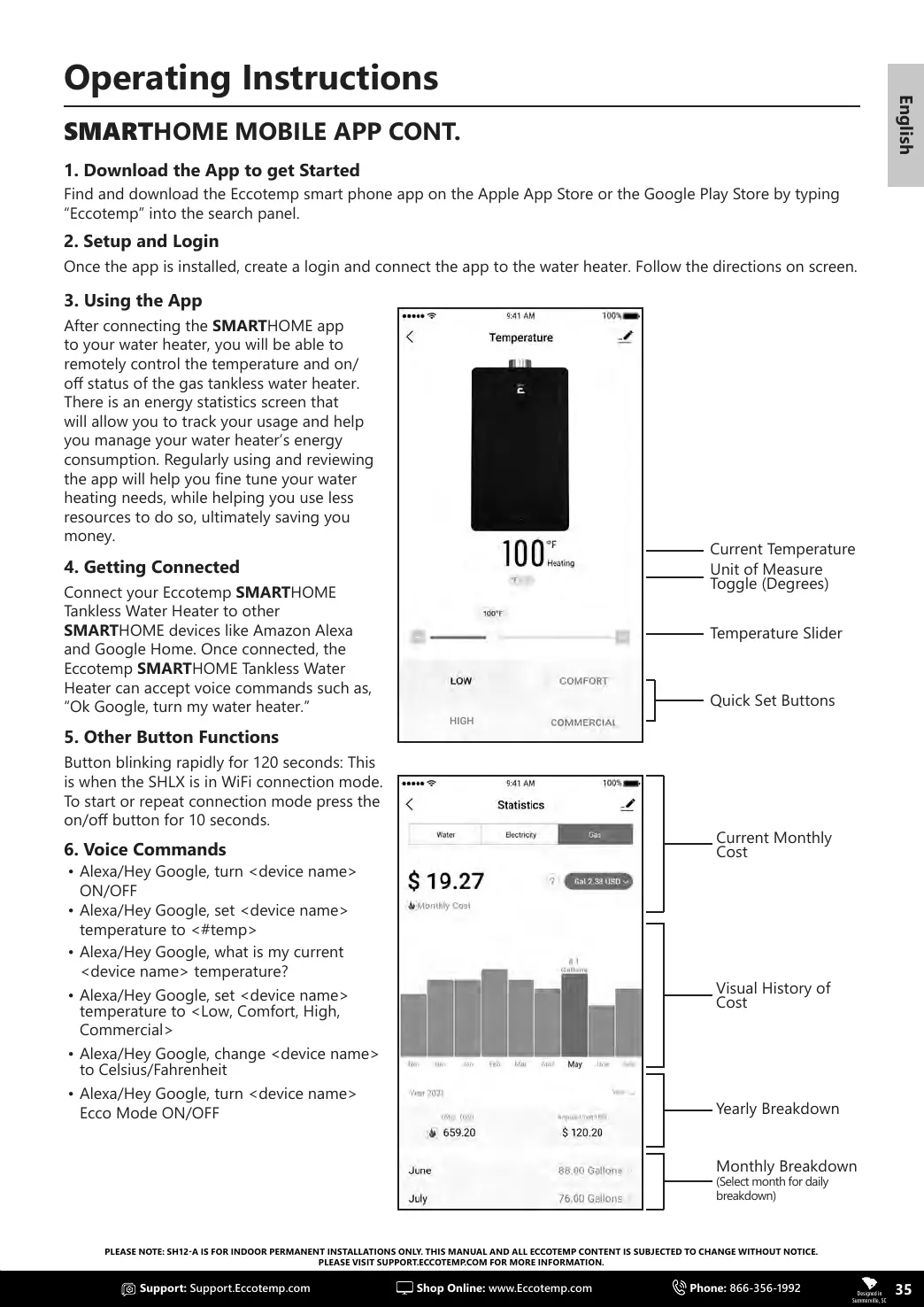
Current Temperature
Temperature Slider
Quick Set Buttons
Unit of Measure
Toggle (Degrees)
3. Using the App
After connecting the SMARTHOME app
to your water heater, you will be able to
remotely control the temperature and on/
o status of the gas tankless water heater.
There is an energy statistics screen that
will allow you to track your usage and help
you manage your water heater’s energy
consumption. Regularly using and reviewing
the app will help you ne tune your water
heating needs, while helping you use less
resources to do so, ultimately saving you
money.
4. Getting Connected
Connect your Eccotemp SMARTHOME
Tankless Water Heater to other
SMARTHOME devices like Amazon Alexa
and Google Home. Once connected, the
Eccotemp SMARTHOME Tankless Water
Heater can accept voice commands such as,
“Ok Google, turn my water heater.”
5. Other Button Functions
Button blinking rapidly for 120 seconds: This
is when the SHLX is in WiFi connection mode.
To start or repeat connection mode press the
on/o button for 10 seconds.
6. Voice Commands
• Alexa/Hey Google, turn <device name>
ON/OFF
• Alexa/Hey Google, set <device name>
temperature to <#temp>
• Alexa/Hey Google, what is my current
<device name> temperature?
• Alexa/Hey Google, set <device name>
temperature to <Low, Comfort, High,
Commercial>
• Alexa/Hey Google, change <device name>
to Celsius/Fahrenheit
• Alexa/Hey Google, turn <device name>
Ecco Mode ON/OFF
Current Monthly
Cost
Visual History of
Cost
Monthly Breakdown
(Select month for daily
breakdown)
Yearly Breakdown
Operating Instructions
SMARTHOME MOBILE APP CONT.


 To Next Page