Familiarization
Section 4
Digital Satellite Receiver Page 4 - 19
© 2001 EchoStar International Corporation
All rights reserved
4
5.3. THE DVR INFOBANNER
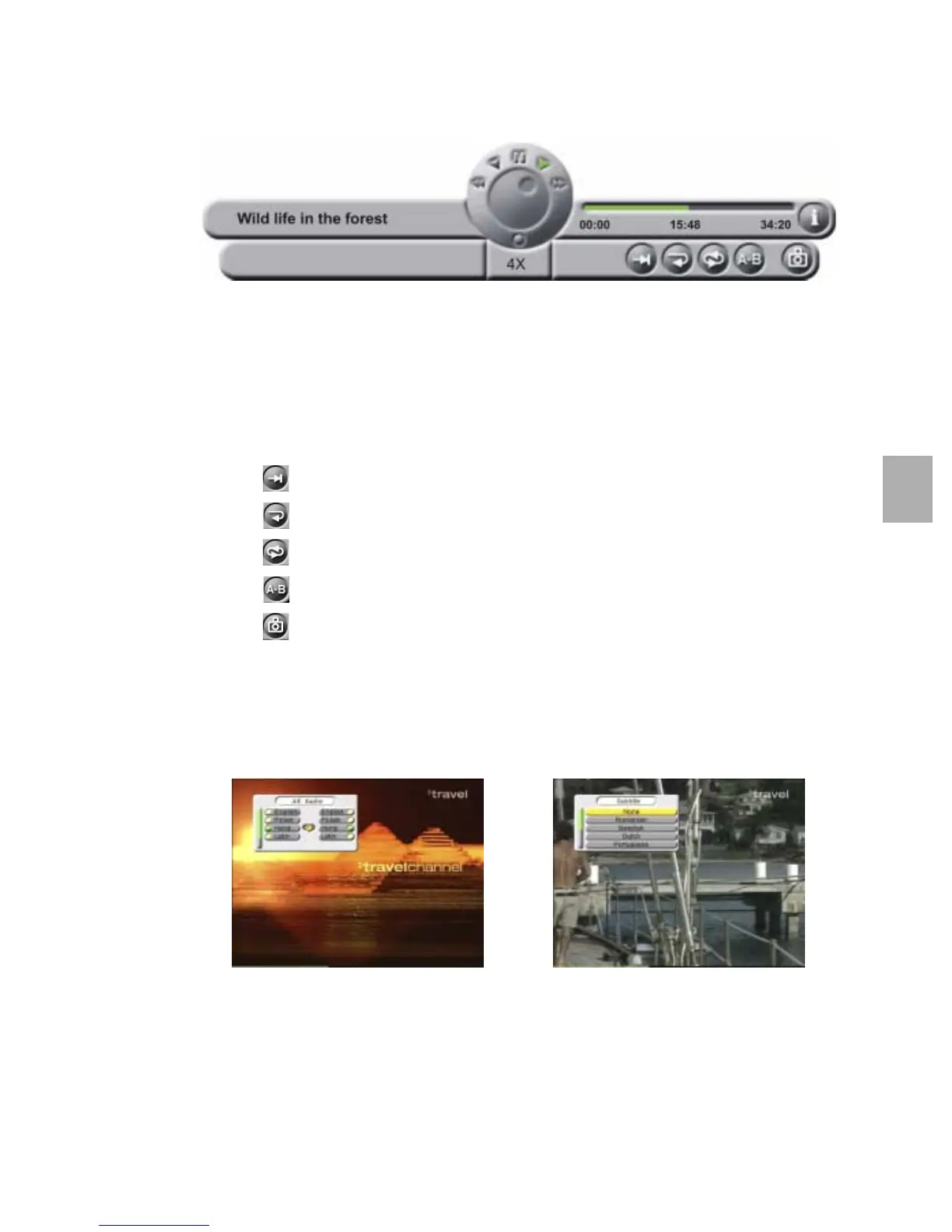
The DVR InfoBanner shows the information related to the actual recording. The information
shown is (some information only if provided during the recording by the service provider).
■ The recording information bar, to show the name of the recording;
■ The jog shuttle, to show the actual status of the DVR (rewind, reverse slow motion, pause,
play, fast forward and record);
■ The progress information bar, to show the start time and duration indicator,
during a recording this bar shows the used and available space on the hard disk drive;
■ The i-button, to indicate that there is detailed program information available;
■ The speed indicator to show the (re)wind and slow motion speed;
■ The menu bar, to show the special functions. The special functions are:
- the button, to mark a scene with an index marker;
- the button, to repeat the recording continuously;
- the button, to repeat all the recordings from the selected (favorite) list;
- the button, to mark and repeat a scene continuously;
- the button, to capture an image as a personal background.
5.3.1. POP-UP MENUS
There are two types of pop-up menus.
Some pop-up menus are used to show that the receiver is busy to execute a task. Other pop-
up menus require interaction with the user, you have to confirm or deny a earlier given
command to complete the task.
If transmitted, you can set per channel your alternate audio and subtitling as shown above.











 To Next Page