24
Audio/Video operation
4 AM/FM radio operation
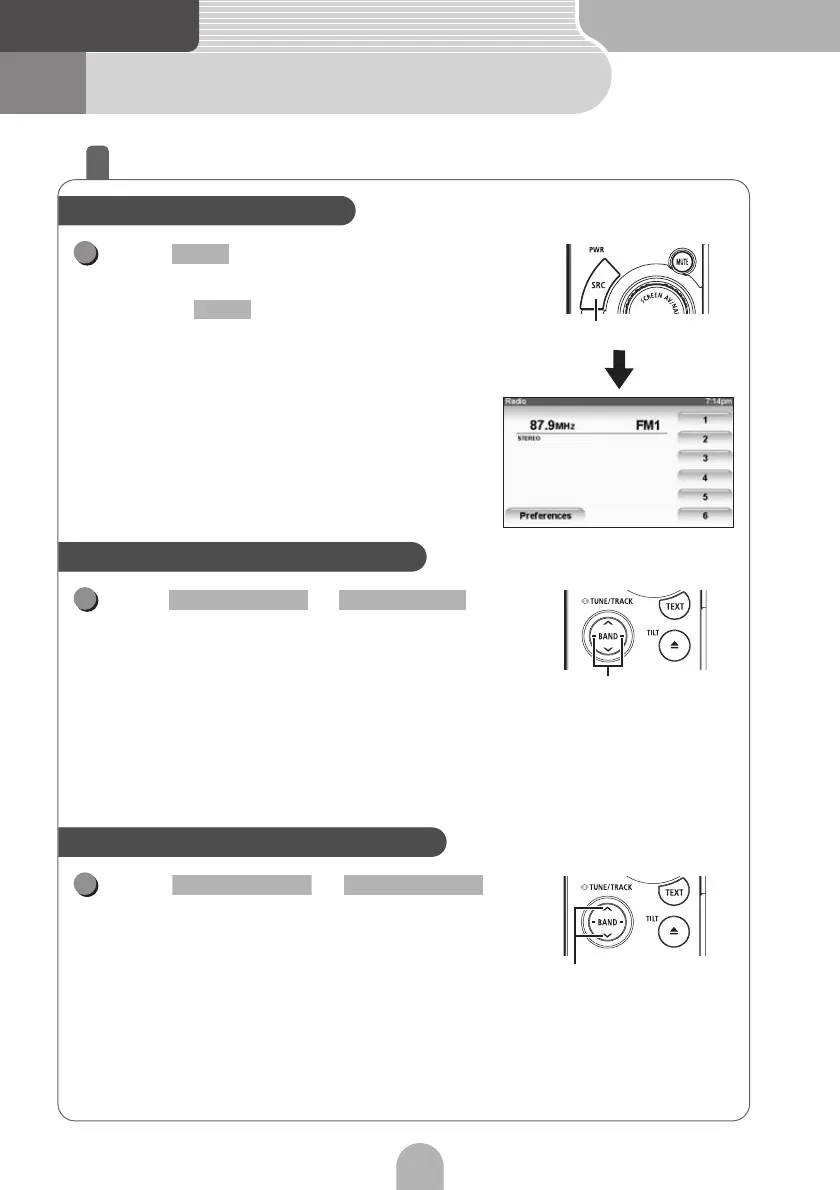
How to listen to the AM/FM radio
Press repeatedly until "FM" or
"AM" appears on the sub-display.
• Each press of switches the bands as follows.
FM1
→ FM2 → FM3 → AM → FM1 → ...
Press or .
•Right:
Tunes to higher frequencies.
• Right (at least one second):
Increases the preset channel number.
• Left:
Tunes to lower frequencies.
• Left (at least one second):
Decreases the preset channel number.
• Preset channels can also be selected using the touch switches.
Press or .
• Upper:
Searches for higher frequencies.
• Upper (at least one second):
Searches for higher frequencies quickly.
• Lower:
Searches for lower frequencies.
• Lower (at least one second):
Searches for lower frequencies quickly.
Select radio for the source
SRC
1
SRC
BAND
Manual selection of radio stations
Tune button
1
SELECT (Right) SELECT (Left)
Automatic selection of radio stations
Seek button
1
SELECT (Upper) SELECT (Lower)



 To Next Page