EN
| 18
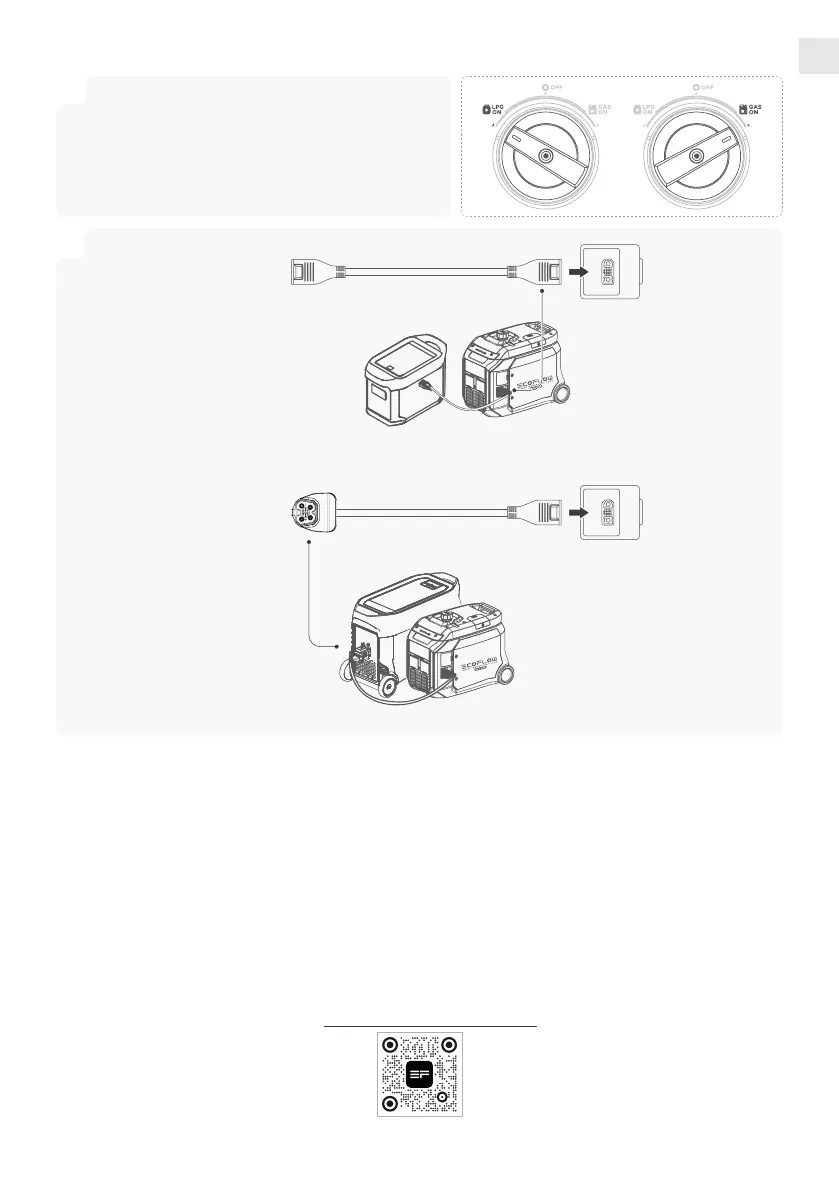
• Connect to the EcoFlow DELTA 2 Max Extra Battery
2
1
DELTA Pro to Smart
Generator Adapter
Extra Battery Cable
• When the Extra Battery is fully recharged, it will send a request to the generator to stop charging. The
generator will respond and stop DC recharging.
DELTA 2 Max Extra Battery
DELTA Pro Extra Battery
Charge EcoFlow DELTA 2 Max Extra Battery or DELTA Pro Extra Battery
• Connect to the EcoFlow DELTA Pro Extra Battery
EcoFlow App
EcoFlow offers a companion app for device management. With this mobile application, you can:
• All-in-One Control: Manage all your EcoFlow devices conveniently from anywhere.
• Real-Time Monitoring: Stay updated on power generation and consumption details with seamless, real-time
updates, allowing you to monitor your energy usage efciently.
• Maintenance Reminders: Receive timely reminders for product maintenance.
• Customizable Energy Schemes: Personalize your energy usage by choosing from a variety of customizable
options, tailoring them to suit your specic needs and preferences.
• Technical Support and Firmware Updates: Access in-app technical support and receive rmware updates
promptly, ensuring that your EcoFlow devices remain up-to-date and function optimally at all times.
Scan the QR code below or download it at: https://download.ecoflow.com/app
EcoFlow APP
• When Using LPG:
Turn on the LPG cylinder valve, then turn the
Engine Switch to “LPG ON”.
• When Using Gasoline:
Turn the Engine Switch to “GAS ON”.








 To Next Page