11 |
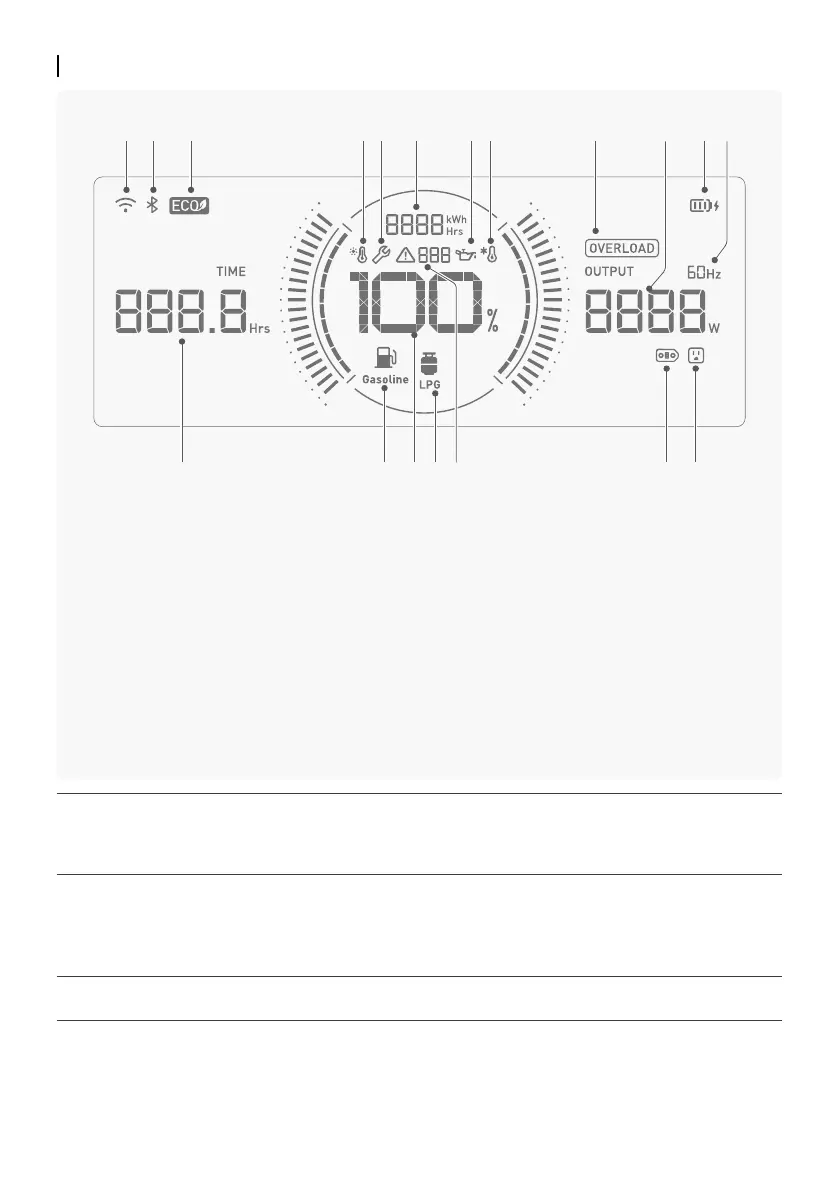
①
Wi-Fi Connection
②
Bluetooth Connection
③
ECO Mode
④
Over Temperature Alert
⑤
Maintenance Reminder
⑥
Total Running Time /
Total Power Generation
⑦
Engine Oil Alert
⑧
Low Temperature Alert
⑨
Output Overload Alert
⑩
Output Power
⑪
Internal Rechargeable Battery Level
⑫
Operating Frequency
⑬
AC Output Socket
⑭
Extra Battery Port (XT150)
⑮
Error Code
⑯
Fuel-LPG
⑰
Fuel Level
⑱
Fuel-Gasoline
⑲
Remaining Running Time
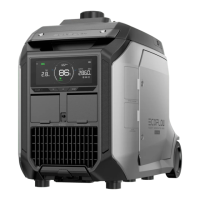
Display Screen
①/②
Bluetooth Connection: This icon will be displayed when a phone is connected to the generator via
Bluetooth.
Wi-Fi Connection: This icon will be displayed when the generator successfully accesses the internet via
a wireless network.
③
In this mode, the generator will automatically match the RPM according to power output level in order
to reduce fuel consumption and noise. ECO Mode is enabled by default.
To turn it off / on:
Method 1: Press the ECO Mode Button for about 1-2 seconds;
Method 2: Turn it off / on in the EcoFlow app settings. For details, refer to "EcoFlow App" (Page 18).
⑰
When using LPG as the fuel source, the display will show "88" by default. If you want to check the
current LPG level, enable "LPG Level Monitoring" via the EcoFlow app.
*See "Troubleshooting Guide" (Page 26) for more details about error codes.
③ ⑥④⑤ ⑧⑦ ⑨ ⑪⑫
⑲ ⑬⑭⑰ ⑯⑱ ⑮
① ② ⑩








 To Next Page