29
Getting Connected and Installing Drivers (Macintosh)
8
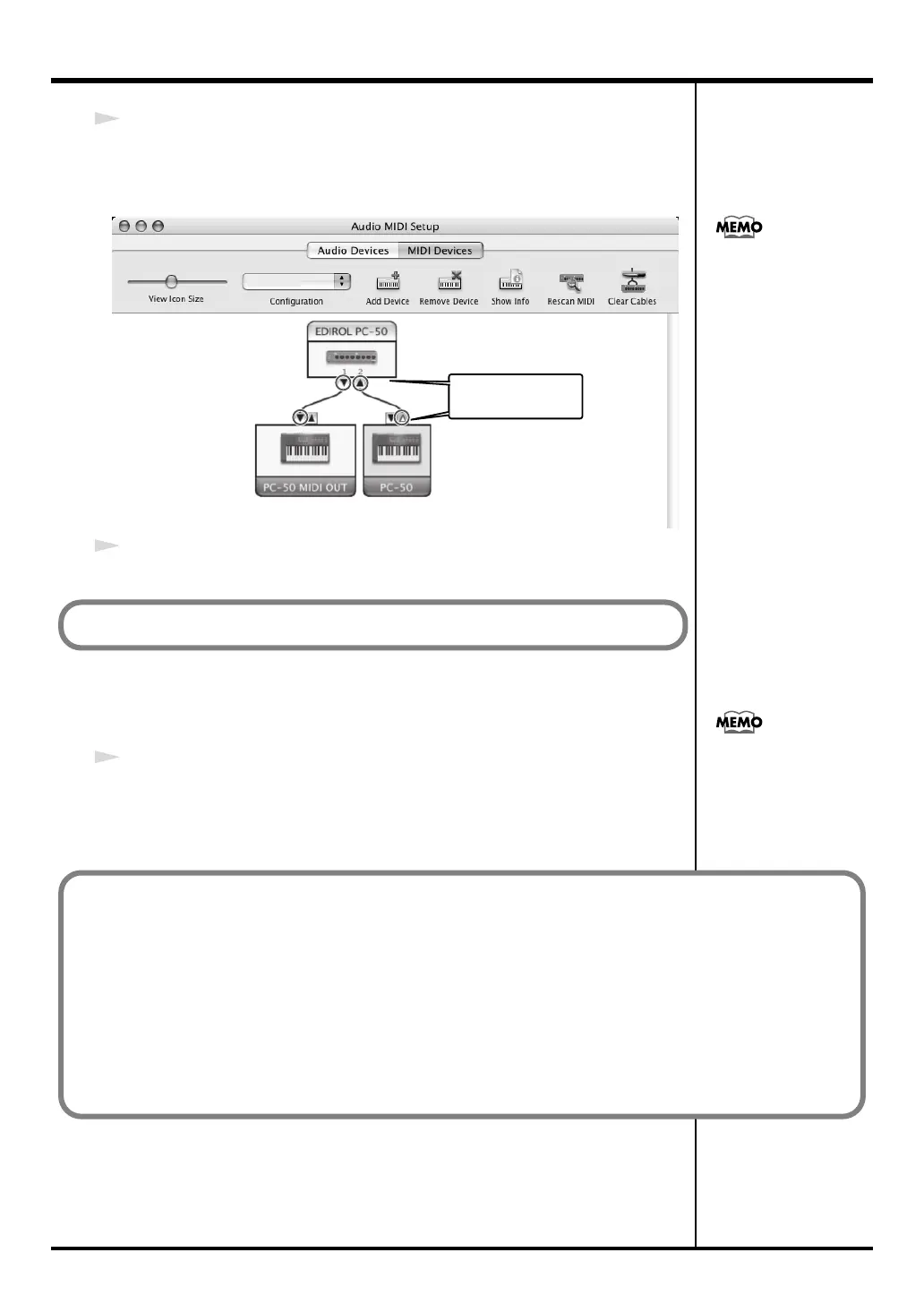
Connect the
▼
and
▲
symbols (which signify the outputs and inputs) of the
EDIROL PC-50
icon to those of the
New External Device
icon by using the
mouse to drag between them.
9
Close the
Audio MIDI Setup
.
■
Software settings
1
Make MIDI device settings on your sequencer software.
For details on the PC-50’s output devices, refer to
“Input / output devices”
(p. 36).
Mac OS X v10.2 was used
in producing the screen
shot shown at left.
Use the mouse to
drag a connection
Next, make software settings.
For details on MIDI device
settings, refer to the
owner’s manual for the
software you are using.
■
When using the PC-50 with your software
Before using the PC-50 with your software, please note the following points.
• Use the USB cable to connect the PC-50 to your computer before you start up your software.
• Do not disconnect the USB cable from the PC-50 while your software is running.
• Quit your software before you disconnect the USB cable from the PC-50.
• Turn off the Sleep function of your Macintosh.
• The PC-50 will not operate in the Mac OS X Classic environment. Use the PC-50 when the Classic
environment is not running.
PC-50_e.book 29 ページ 2005年11月10日 木曜日 午前10時33分



 To Next Page