18
eSteer10 User Manual
Standard Adjustment Method
To use the standard adjustment method, it is essential to follow the instructions provided in Chapter
4, "Implement Settings," of the user manual. Additionally, perform the following steps:
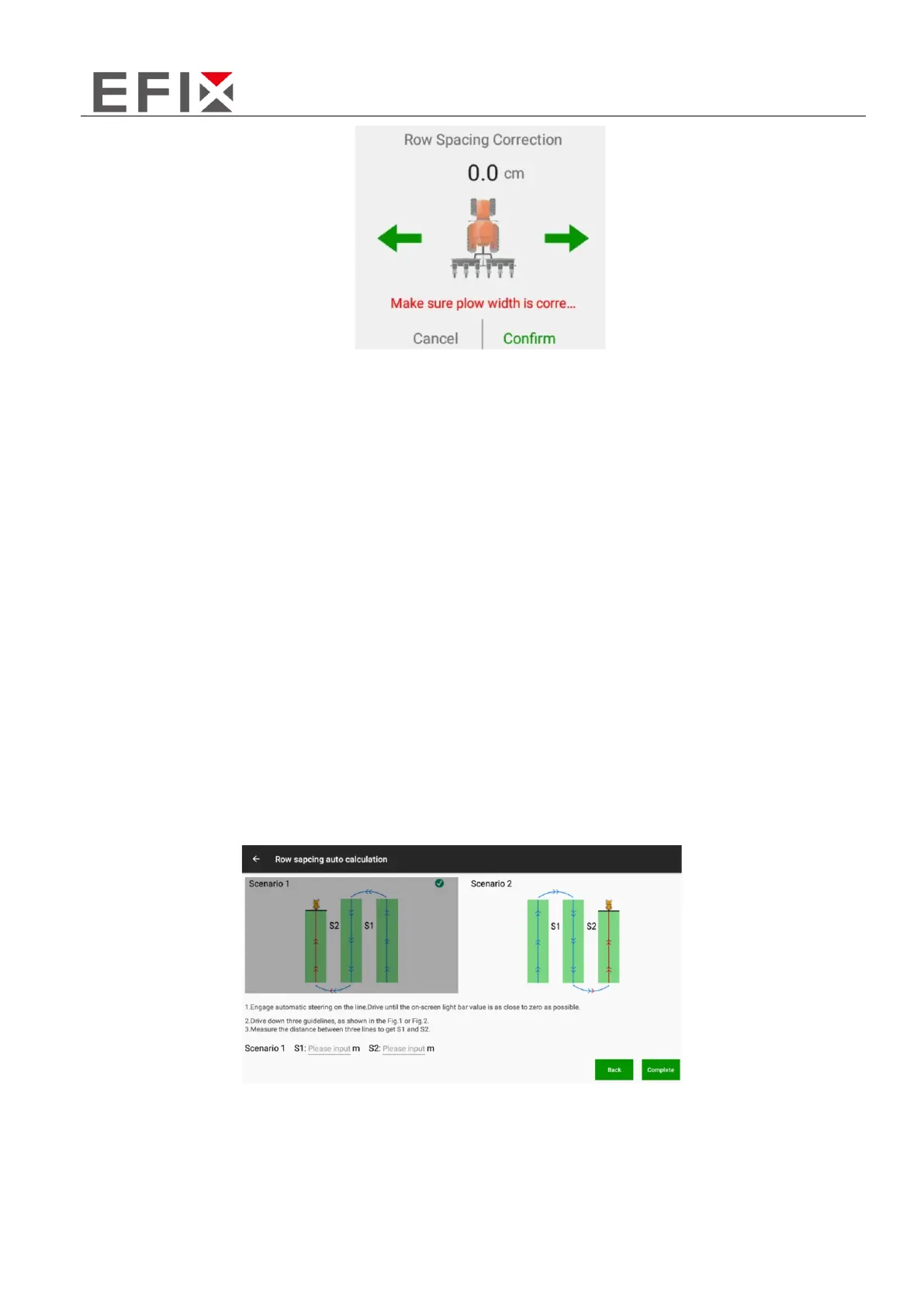
a. Engage the automatic driving mode and drive the vehicle for three rows.
b. Measure the row spacing of two transition rows during the automatic driving.
c. On the main interface, click on "Implement" -> "Width" -> "Transition Row Auto Calculation" to
enter the automatic calculation interface for transition rows.
d. Select the appropriate diagram or scene that represents the automatic driving for three rows.
e. Input the measured data (S1 and S2) for the two transition rows in meters.
f. After entering the data, click "Done" to initiate the automatic calculation of the transition row
data. The system will modify the values for "Implement Width" and "Center Offset" accordingly.
Note: Pay special attention to the orientation of the first row in Scene 1 and Scene 2. In Scene 1, the
first row turns left, while in Scene 2, the first row turns right. Selecting the wrong scene may result in
incorrect transition row calculations.
Following these steps and accurately inputting the transition row data will ensure the automatic
calculation of transition rows and proper modification of the implement width and center offset
values.



 To Next Page