- PF321A6012
7.26 Acoustic Signal
Function with control panel
An acoustic signal which sounds in the following cases can be enabled by means of parameter 127:
When the bobbin thread monitor is On, after completion of the stitch count.
When the machine run blockage is On.
During service hours monitoring
8 Signal Test
Function with or without control panel
Function test of external inputs, multiple-function key bar and transistor power outputs with connected actuators
(e.g. solenoids and solenoid valves).
8.1 Signal Test Using the Incorporated Control Panel or the V810/V820/V850
8.1.1 Inputs to the control
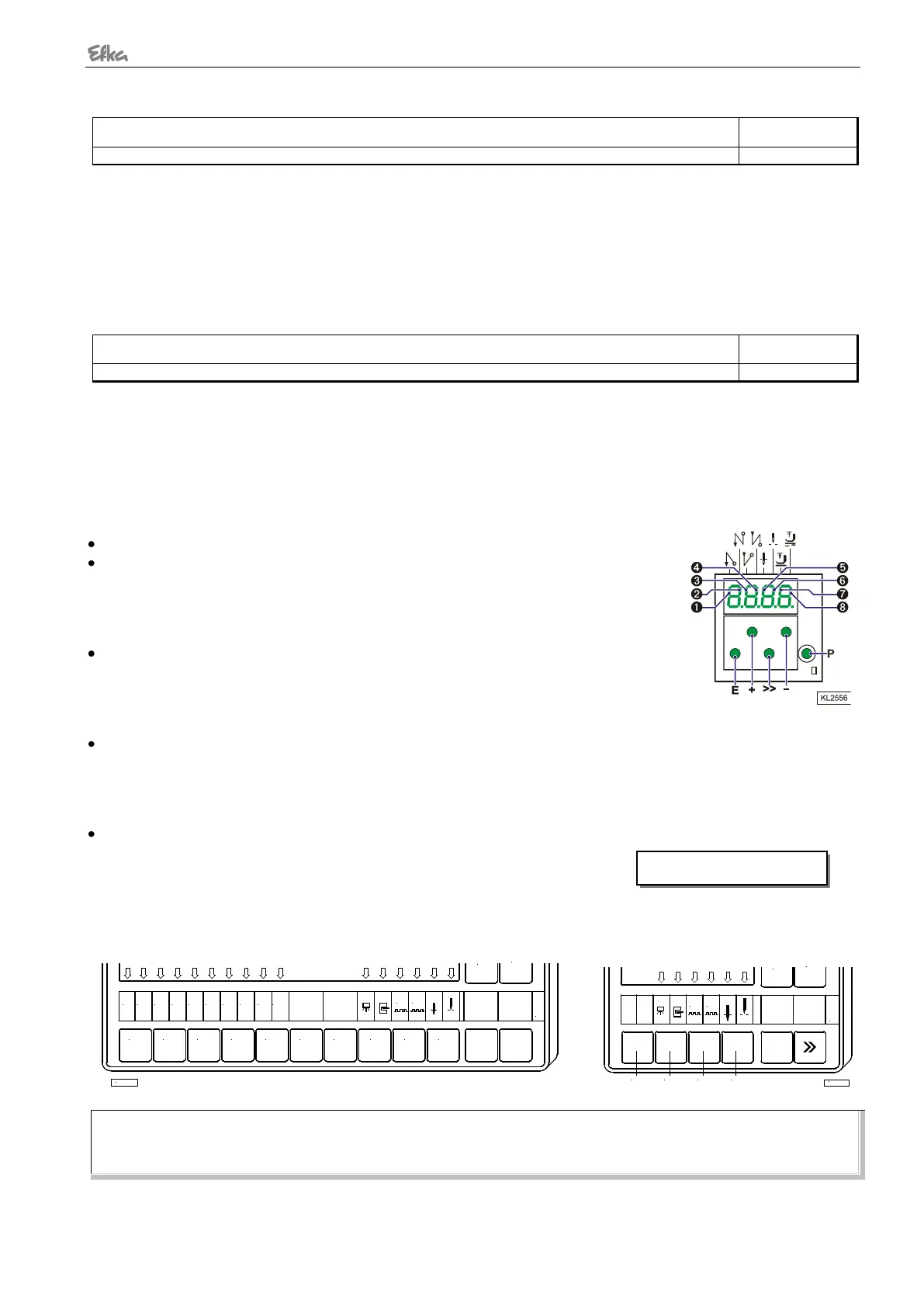
Select parameter 173.
Operator control panel: Functions of signals “light barrier, sensor (IPG... or
HSM...), generator impulse 1 and 2, positions 1 and 2” can be checked directly
and indicated by means of LEDs 3...8. The inputs in1...in10, in11 (LSM), in12,
and in13 appear individually on the display. Several switches and/or keys must
not be actuated at the same time.
V810 control panel: The above signals are indicated by means of arrows
above the keys 2...4.
The inputs in1...in10, in11 (LSM), in12, and in13 appear individually on the LC
display. Several switches and/or keys must not be actuated at the same time
(see control).
V820 control panel: The above signals are indicated by means of arrows above the keys 8...0
The inputs in1...in10, in11 (LSM), in12, and in13 appear individually on the LC display. Several inputs can be
actuated and displayed at the same time.
If several keys and/or switches are actuated at the same time, e.g. in3, in5, in6, in7, the least significant input
will be displayed, e.g. in3.
V850 control panel: As V820, but with display e.g.: ST2/07:IN1 = ON
Display example for input 13 on the V820/V850 control panel:
V820/V850 Control Panel V810 Control Panel
NOTE
If an input is active with open contact, the corresponding arrow lights up when the contact is open. If an input is active with
closed contact, the corresponding arrow lights up when the contact is closed!
IN3
1
IN2IN1
42 3 5 6
IN8IN7IN6IN5IN4 IN10IN9
987 0
G2
G1
+
TEST
-
KL2460


 To Next Page