Instruction Manual
3 Putting into Service
Before putting the control into service, the following must be ensured, checked and/or adjusted:
The correct installation of the drive, position transmitter and accompanying devices, if necessary
The correct selection of the trimming operation using parameter 290
If necessary, the correct adjustment of the direction of motor rotation using parameter 161
The correct selection of the functions of keys (inputs) using parameters 240...249
The setting of the transmission ratio between motor shaft and machine shaft using parameter 272
The setting of the type of position sensor using parameter 270
If necessary, the setting of the number of angular degrees after the sensor position using parameter 271
If necessary, the setting of the positions using parameter 171 (possible with all settings of parameter 270)
The correct positioning speed using parameter 110
The correct maximum speed compatible with the sewing machine using parameter 111
The setting of the remaining relevant parameters
Begin sewing in order to save the set values
4 Top part detection
In machines equipped with a top part detection module (OTE module), all parameters needed for the sewing
process are set according to the values stored in the module.
Whether an OTE module is present and, if so, which module, is tested each time the power is turned on.
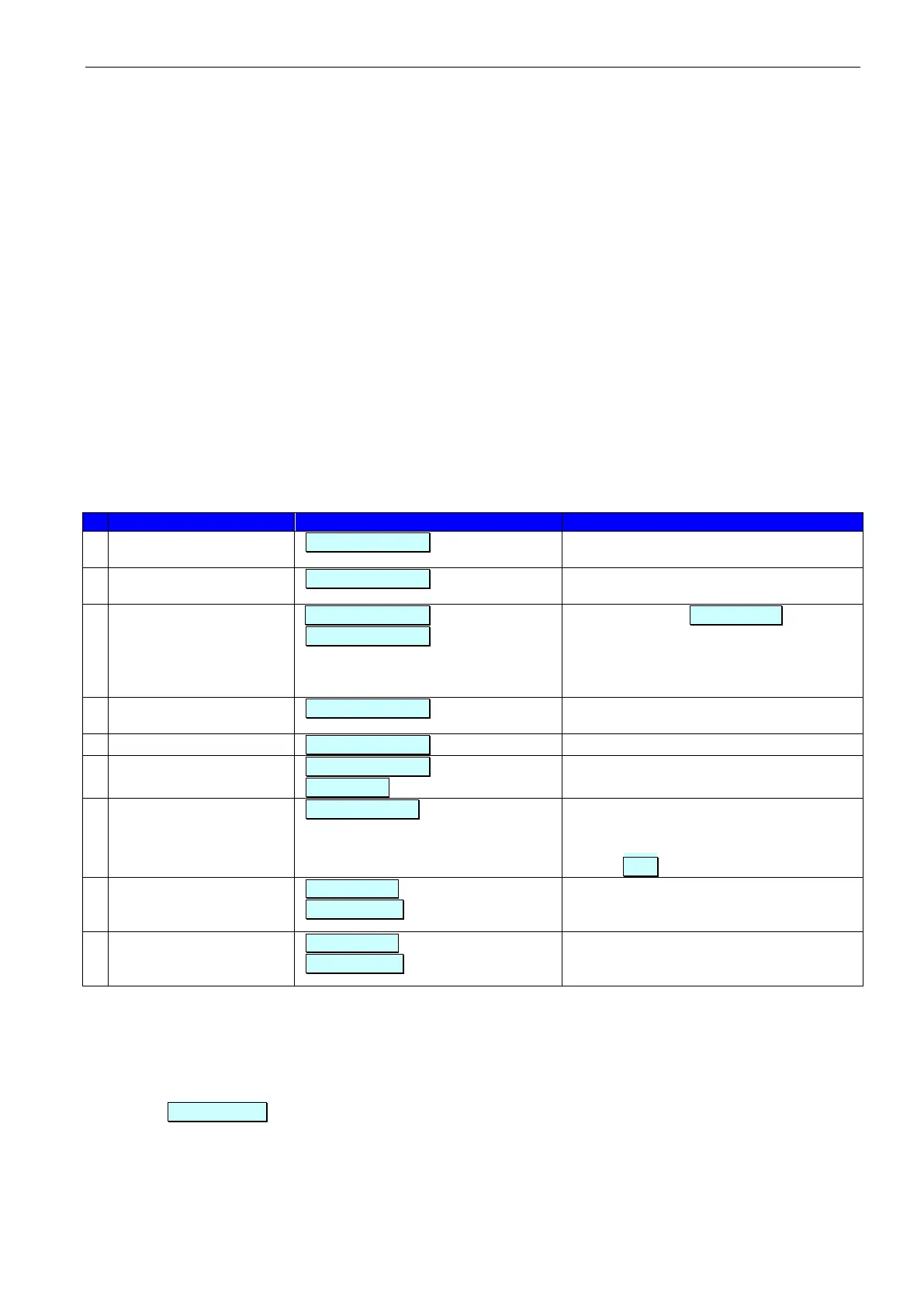
Depending on the result of the test, different messages appear on the display of the control panel, and different
operations are possible and/or required:
Display on the control panel
Further sequence / options
The PF321A control type
is correctly detected
Sewing process released with the
parameter read out of the OTE module
Sewing process released with the
parameters set in the control
SP74D control type
detected
id wrong (2 sec.)
ote format 0
0 = do not format iLL idEnt .
All functions remain disabled
1 = format with the parameters read out of
the control.
Continue with # 7
No valid control type
detected
All functions remain disabled
All functions remain disabled
crc bAd (2 sec.)
nEw IdEnt
After P or E key, continue with # 7
Select machine class. After automatic
setting of the parameters in question, it is
necessary to determine the transmission
ratio Pully
*1)
.
Program ID of control
more recent than that of
the OTE module
nEw ProgId (2 sec.)
otE updAtE
0 = do not overwrite OTE
1 = overwrite OTE with the parameters
read out of the control.
Program ID of control
older than that of the
OTE module
oLd ProgId (2 sec.)
otE updAtE
0 = do not overwrite OTE
1 = overwrite OTE with the parameters
read out of the control.
The possible options (e.g. 0 or 1) are selected by pressing the + / - keys on the control panel. Confirmation with
the P or E key.
*1)
To determine the transmission ratio, the pedal must be pushed fully forwards. The drive runs at a reduced
speed until the transmission ratio has been determined, then releases the pedal controlled speed. The
display Pulley goes out.
It is also possible to format a top part detection module using parameter 850.


 To Next Page