EasyManua.ls Logo

EFOY Pro 800 - 5 Operation; Operation on the Device

EFOY Pro 800
85 pages
Print Icon
To Next Page IconTo Next Page
To Previous Page IconTo Previous Page
Loading...
Operation
Page 35
5 Operation
5.1 Operation on the device
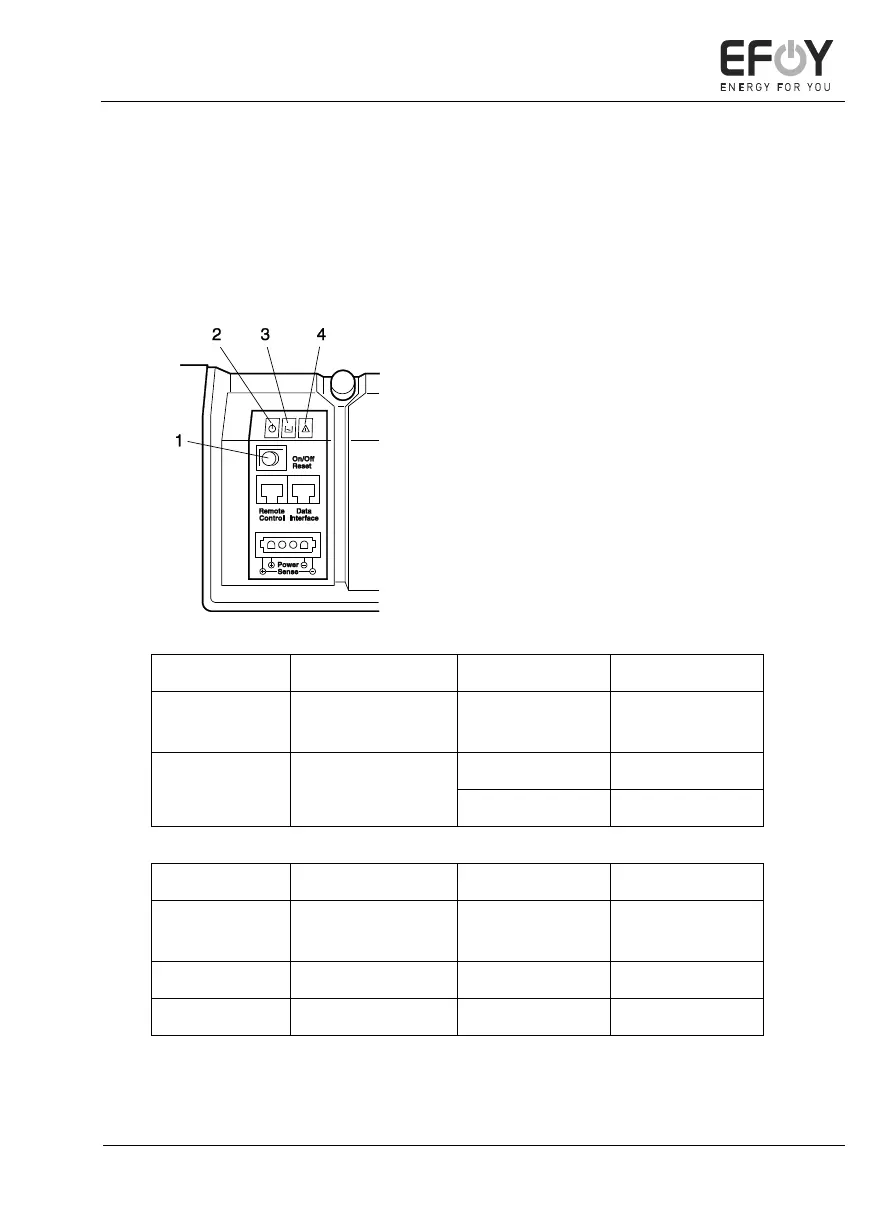
The integrated LEDs provide an overview of the operating status of the
EFOY Pro fuel cell. You operate the device using the buttons.
1. Buttons
2. Green LED
3. Yellow LED
4. Red LED
Button action
Result
Starting state
Resulting state
Push briefly
(< 0.5s)
Reset
On, Off or
Automatic
Automatic
Push longer
(> 3s)
Switch On / Off
On or Automatic
Off
Off
On
LED state
Green LED
Yellow LED
Red LED
On
Ready
Add service
fluid
Error
Flashing
Shutting down
Fuel empty
Interruption
Off
Off or error
No error
No error

Table of Contents

Other manuals for EFOY Pro 800

Related product manuals