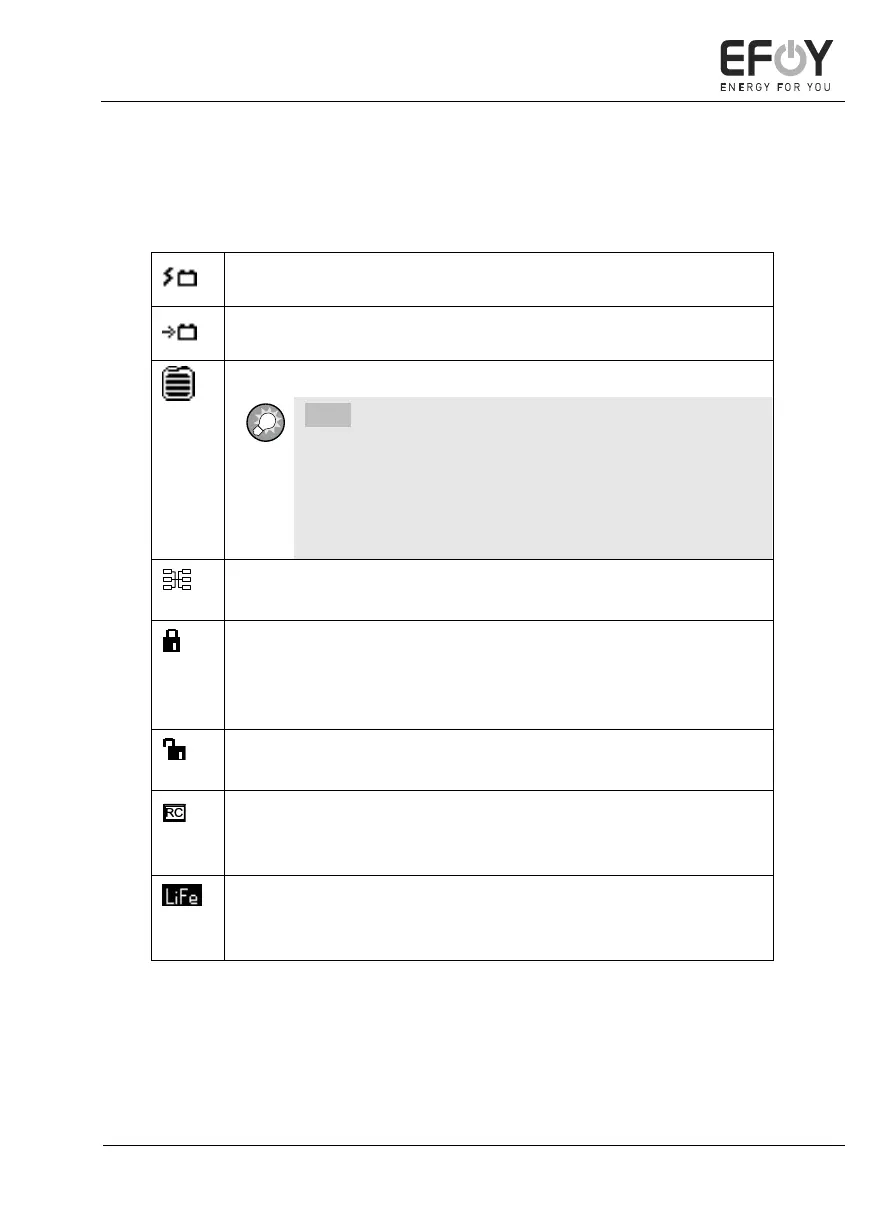
Symbols on the display
The display shows different symbols depending on the operating status
and operating mode of the EFOY Pro fuel cell:
Current charging current of the EFOY Pro fuel cell.
Fill level of the fuel cartridge.
INFO:
The fuel gauge for the fuel cartridge is just an indicator
and calculates the methanol consumption. The FS1 fuel
cartridge sensor must be used to measure the actual fill
level. The fuel cartridge should only be replaced once it
has been completely emptied.
A cluster icon is displayed for EFOY Pro devices that run in paral-
lel (see chapter 8.5 "Cluster controller CC1" on page 79).
If want to operate the EFOY Pro fuel cell using an external con-
troller, the external control function must be enabled (see chap-
ter 5.5.4 "External control" on
page 61). If this is not enabled, a padlock symbol appears.
If the external control is switched on, an open padlock appears at
the bottom right of the display (Factory defaults).
If you have switched external control on and the device is in
"Remote Control" mode, "RC" (Remote Control) appears at the
bottom right of the display.
If the battery type was changed via the expert menu to Lithium
iron phosphate (LiFePO4), a LiFe-icon appears top right on the
display (see chapter 5.2.5 "Expert menu" on page 44).


 To Next Page