10.3 INSTALLING WITH DIFFERENT EG4 BATTERY MODELS
EG4
®
LifePower4 batteries can communicate with all EG4 48V server rack modules.
If communicating multiple EG4 batteries together, the Multipack firmware will need to be used via an
RS485 Update. For the example below, all batteries will need to be updated EXCEPT the
EG4 LifePower V2.
RSD will be disabled on the battery models that has this feature when using the multipack firmware.
Please visit https://eg4electronics.com/resources/downloads
for the Multipack firmware.
NOTE:
When installing multiple batteries or adding a battery to an existing rack, please ensure each
battery is charged individually to 100% before paralleling them together. This step is crucial
to optimize battery performance and ensure proper operation.
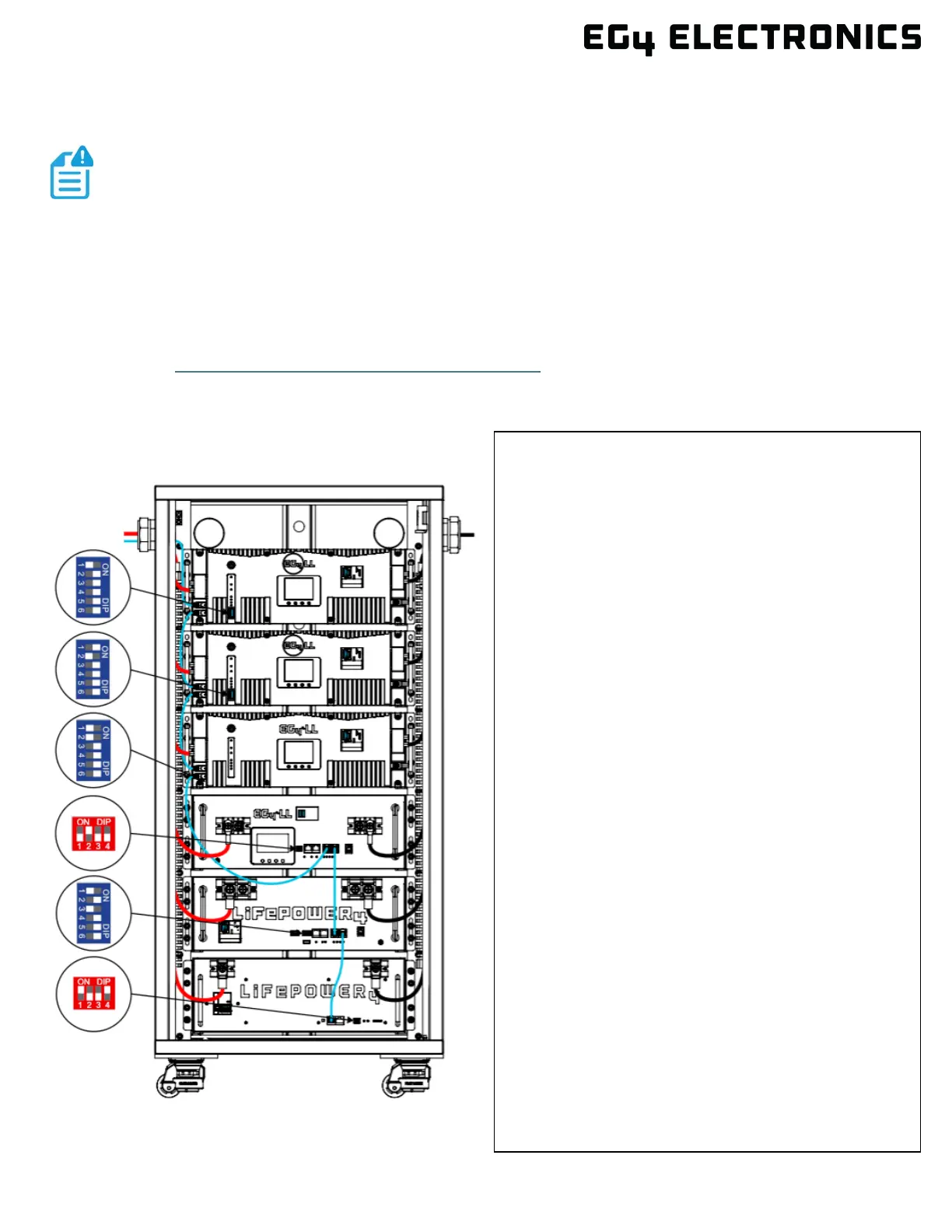
1. Always use the newest model
of LL at the top of the rack as this will need to
be the battery that communicates with the
system. This battery is also known as the
master and will need to have ID number 1.
2. When installing the batteries, ensure that the
same models are grouped together in the
bank. This allows for communication to flow
between the batteries consistently.
3. After installing the batteries into the rack, refer
to the DIP Switch ID table to assign the
address code of the bank in numerical order,
beginning with the master and progressing
among the different models.
The image on the left shows a bank with the
following EG4 modules:
1. LL-S (6 DIP) [ID-1]:
Requires Multipack Firmware
2. LL-V2 (6 DIP) [ID-2]:
Requires Multipack Firmware
3. LL-V2 (4 DIP) [ID-3]:
Requires Multipack Firmware
4. LL-V1 [ID-4]:
Requires Multipack Firmware
5. LifePower4 V2 [ID-5]:
No firmware update needed. Set the Inverter
Protocol dipswitch set to the “Simplified Link
Protocol.” See Section 6.
6. LifePower4 [ID-6]:
Requires latest firmware


 To Next Page