Błąd! Użyj karty Narzędzia główne, aby zastosować 标题
1 do tekstu, który ma się tutaj pojawić. Błąd! Użyj karty Narzędzia główne, aby zas
tosować 标题 1 do tekstu, który ma się tutaj pojawić.
Page 19 / 37
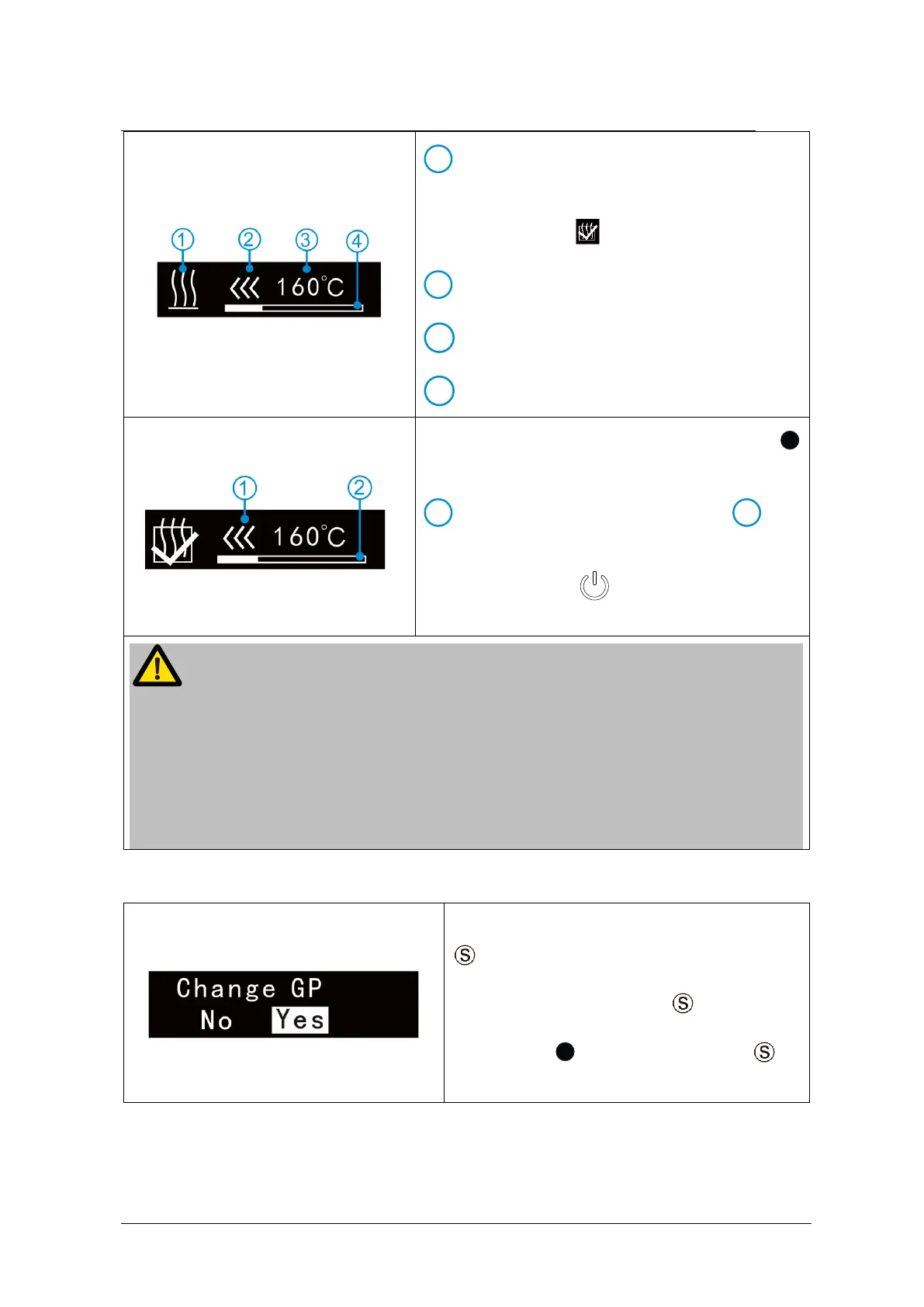
Heating indication, When the set
temperature is reached, heating process will
switch off and “ ”will display on screen.
Real time heating temperature
After heating completed, hold down press
to push out Gutta-percha. At the same time,
the light of direction flashes,
the
residual Gutta-percha bar will change
according. Press to exit and return to
standby interface.
If there is a little residual Gutta-percha in handpiece or cartridge, tighten the
cartridge again to prevent leak Gutta-percha after heating.
If there is too much residual Gutta-percha in handpiece or cartridge, please refer
to daily cleaning process.
Please use good mobility Gutta-percha, otherwise the Gutta-percha will leak. If
leaking please refer to daily cleaning process.
7.3 Changing Gutta-percha
During standby state, holding down press
in 2 seconds to entry memory
parameter setting. Press till “Change
GP”. Press till “Yes” and press to
confirm.















 To Next Page