OPERATION
NP-DK50 2V 50, 2x2V 110-A-5_06-2020-MD 44 06/2020
15. SWITCHING THE COMPRESSOR
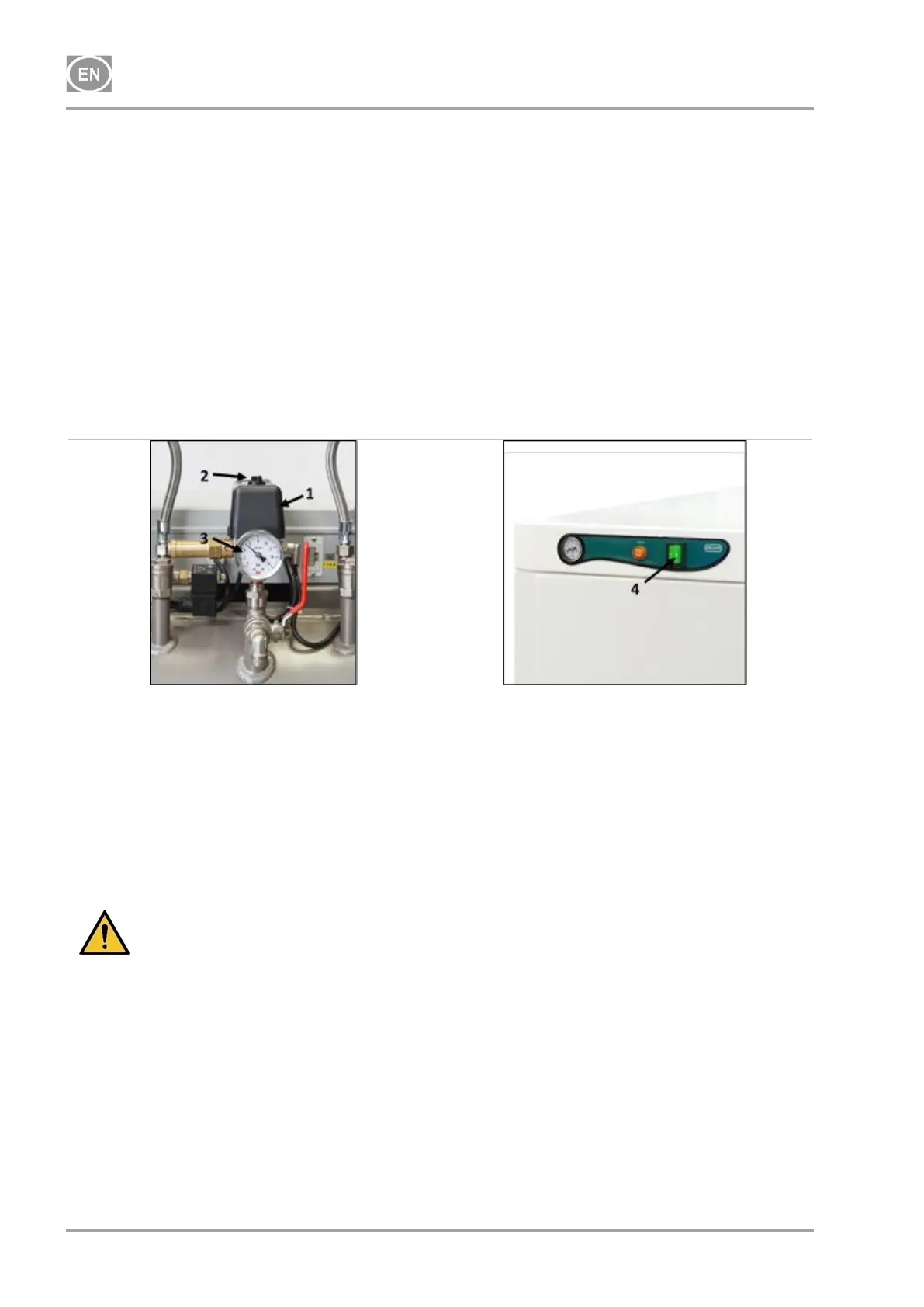
Start the compressor (without a cabinet) at the pressure switch (1) by turning the switch (2) to position
“I.” This starts the compressor and fills the tank to the switching off pressure, which then shuts off
the compressor.
Start the compressor (with a cabinet) at the switch (4) on the front side of the cabinet, the indicator
will turn green. This starts the compressor and fills the tank to the switching off pressure, which then
shuts off the compressor.
The compressor operates in automatic mode, switched on and off by the pressure switch, depending
on compressed air consumption.
Check the values of switch-on and switch-off pressure using the pressure gauge (3). Tolerance of
± 10 % is acceptable. Pressure in the air tank must not exceed the allowed operating pressure.
Fig. 13: Switching the compressor
The compressor starts to operate according to the description of operation as follows:
- Compressor (without dryer) – when first started and put into operation, the compressor fills
the air tank to the switch-off pressure and the pressure switch turns off the compressor. Then
the compressor operates in automatic mode, switches on and off depending on compressed
air consumption.
- Compressor with dryer – the compressor operates in the same manner as above, only the
compressed air passes through the cooler that removes moisture from the compressed air.
Risk of damage to pneumatic parts.
The pressure switch (1) was set up by the manufacturer and any other changes
to it settings may be performed only by a qualified technician trained by the
manufacturer.
16. SWITCH OFF THE COMPRESSOR
Switching off the compressor due to service or any other reason shall be performed using the
pressure switch (1) by turning the switch (2) to position „0“ (Fig. 13) and pulling out the mains
plug from the socket. This disconnects the compressor from the mains supply.
Vent the pressure in the air tank to zero by opening the drain valve. (Fig. 7).



 To Next Page