MAINTENANCE
20 SM-DK50 DS-EN-20_02-2016
Output test, adjusting output pressure
Connect the hose with valve and flow meter (flow meter
set) to the connection port marked OUT.
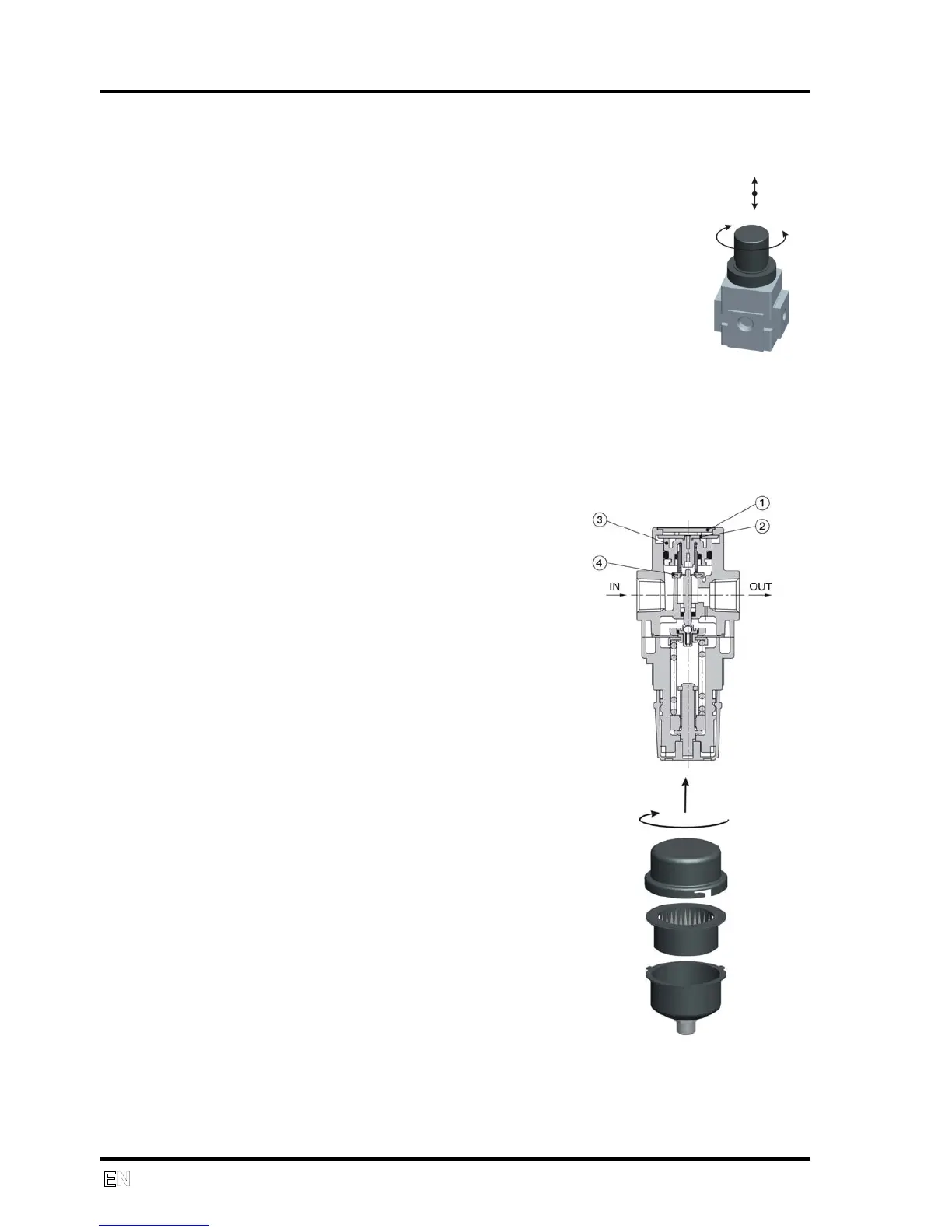
Pull up the control knob on the regulator (20) and rotate
clockwise until it reaches the stop.
Switch on the the compressor. Turn the valve on the hose
to set the pressure on the compressor pressure gauge
(display) to 5 bar.
Check compressor output using the gradations on the flow
meter.
Rotate the control knob on the regulator (20) to bring the
output pressure on the compressor pressure gauge
(display) to 3 bar.
Press down the control knob on the regulator to lock in the
regulator setting.
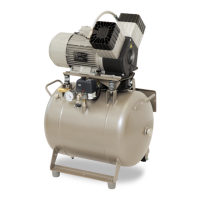
Cleaning the pressure regulator
Set the pressure to the minimum position
Remove the plug (1)
Rotate and remove the latch (2)
Remove the line from the valve (3) and
the valve (4), then clean the valve seat
and the o-ring
Re-install the components in the
following order: (4), (3), (2) and (1)
Replacing the inlet filter (21)
Unlock the cover and pull it out.
Replace the filter
Lock the cover
Spare part:
Intake filter 05W POLYESTER, Item 025200194


 To Next Page