ELAN HOME SYSTEMS
© ELAN Home Systems 2005 • All rights reserved. Page 15
D400/D401 INSTALLATION MANUAL
Triggers
The ALL ON trigger port automatically un-mutes
the D400 when a 3-24 VDC signal is present and
mutes it when the signal is absent. The Front
Display of the D400 will show “M” when a channel
is in Mute.
The 12 Volt DC Trigger Out is used to turn on other
equipment, additional D400s, other amps, or to
perform automated functions desired by the user.
ALL ON
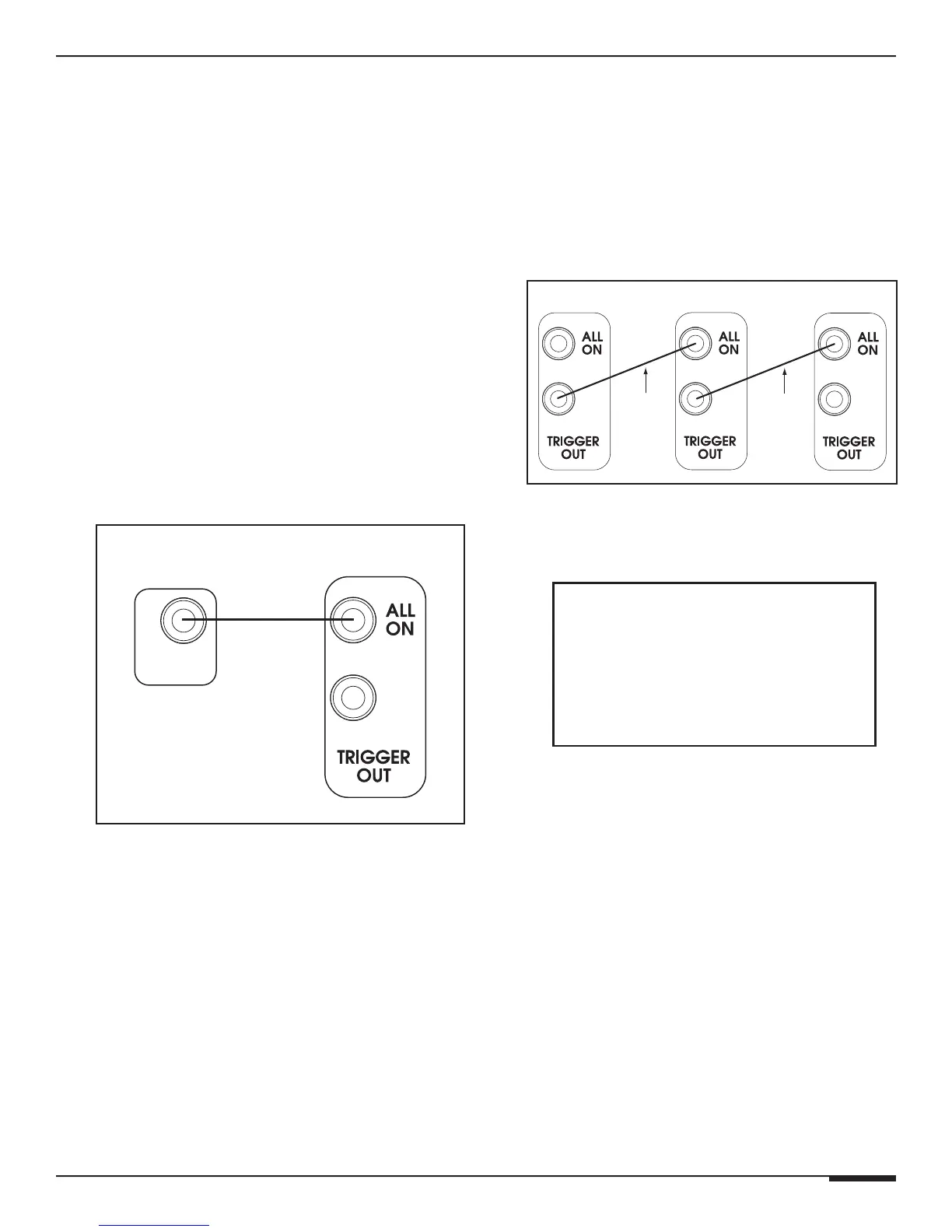
To Mute/Un-Mute the D400, simply connect a
system-wide 3-24 Volt DC Triggering Source to
the ALL ON Trigger Input using a 3.5mm mono
interconnect cable. Examples of triggering
sources include an ELAN Multi-Zone Controller’s
SYSTEM TRIGGER OUT or REMOTE OUT, an A/V
receiver’s switched outlet connected to a power
supply, or a +12VDC TRIGGER OUT from another
ELAN D Series amplifier.
TRIGGER OUT
Whenever the D400 is powered On, the TRIGGER
OUT becomes active. This output sends a
+12VDC 100mA signal to other devices with a
Trigger input. Examples of proper usage of the
+12VDC TRIGGER OUT include muting/un-muting
another D Series amplifier, triggering the switched
outlets of a Z•Power Controller, or triggering an IR
sequence using VIA!
®
products.
3.5mm Mono
Interconnect Cable
3-24VAC/DC
Trigger Out
D400 RearTriggering
Source
TRIGGER INPUTS
ACCEPT
3 TO 24 VDC
D400 #1 Rear
D400 #2 Rear
3.5mm Mono
Interconnect
Cable
D400 #3 Rea
3.5mm Mono
Interconnect
Cable



 To Next Page