ELAN HOME SYSTEMS
Page 16 © ELAN Home Systems 2005 • All rights reserved.
D400/D401 INSTALLATION MANUAL
3. Setup
Setting Channel Levels
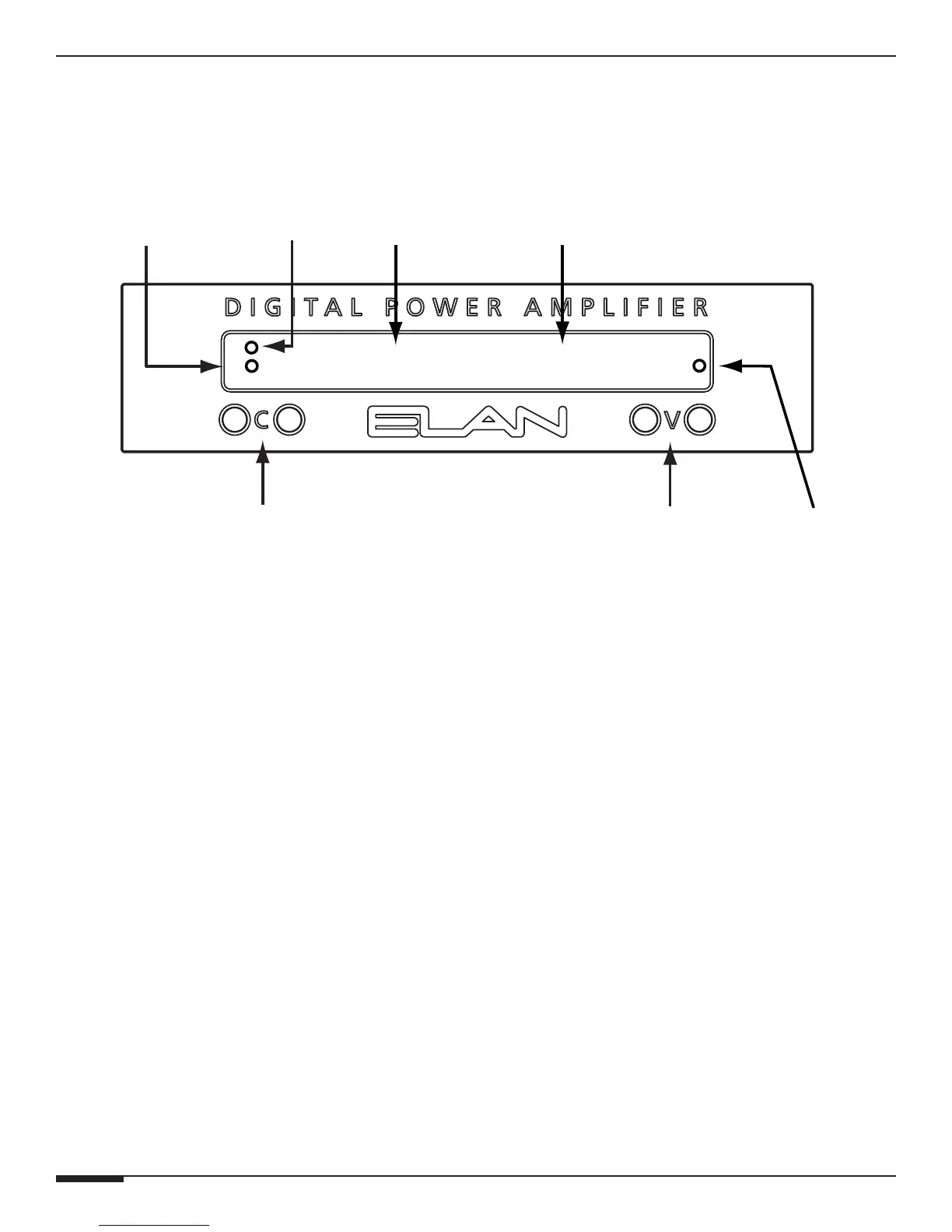
Each amp channel can be individually adjusted
from the front panel. Pressing the C button will
toggle between the amp channels — Left and
Right channels can be adjusted independently.
The C button to the left cycles downward, the one
on the right cycles upward. When the desired
channel is displayed on the front panel, use the V
buttons to adjust the level for the selected chan-
nel. The V button to the left lowers the volume,
the one on the right raises the volume. Factory
Default is 50.
Set the levels by first lowering them all the way
down, then raise the volume of any keypads
or volume controls to maximum. Slowly adjust
Volume Up for this channel until the red clipping
LEDs begin to light up, then drop the level one or
two steps. Follow this procedure for all channels.
Lockout Mode
The Lockout feature is designed to disable all front
panel functions. Use this feature once the sys-
tem is fine-tuned and ready-to-go. By locking the
D400’s front panel, level adjustments cannot be
inadvertantly changed.
To place the D400 in Lockout Mode:
1. With the Front Display dark, Press C- and V-
simultaneously.
2. Continue pressing C- and V-. The Front Display
will show the Volume setting momentarily.
3. Four seconds later, the Front Display will read
LOCK. Release the buttons.
4. Follow the same procedure to Unlock the amp.
Please Note: If the user tries to change settings
while in Lockout Mode, the Front Display will read
“VOLUME LOCK IS ON”.
Blue Signal
Presence
LEDs
Channel
Select
Display
Channel Select
Down/Up
Buttons
Volume
Down/Up
Buttons
Volume
Level
Display
Red Channel
Clipping
LEDs
Powe
LED
CH 2
VOL 54



 To Next Page