ELAN HOME SYSTEMS TS7 User’s Guide
© ELAN Home Systems 2010 | All rights reserved.
Page 30
ELAN VIA!dj II (Continued)
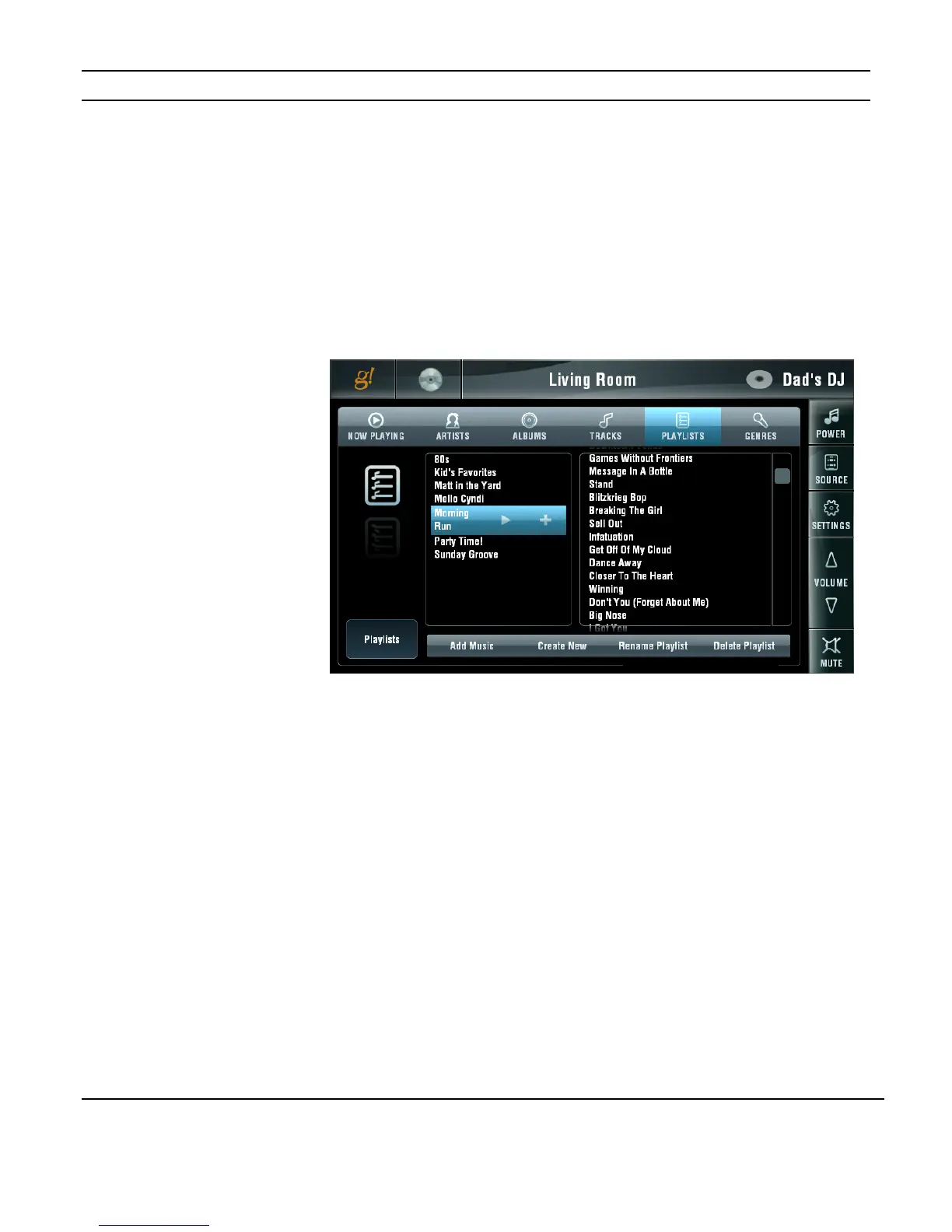
Playlists
The VIA!dj allows you to create groups of tracks called Playlists and identify them with a
name of your choice. You could select your favorite dance tracks from a number of
different albums for example, and include them in a list called Party Time. You could then
play your selections by simply accessing the PLAYLISTS TAB and choosing your pre-made
list.
You can add tracks, complete albums and all albums by a specific artist in any mix to a
Playlist.
When a Playlist is selected the tracks in the Playlist will display to the right. Use the scroll
button to see additional tracks. Pressing and holding on a track name will allow you to
drag the selections up and down in the display.
Buttons across the bottom of the display allow you to ADD MUSIC to a Playlist, CREATE a
NEW Playlist, RENAME a PLAYLIST and DELETE a PLAYLIST.
The track order in the Playlist can be re-arranged and tracks that have been added can be
deleted in the PLAYLIST TAB.
The following pages will cover each of these functions in detail.
Figure 3-41:
Media Page
ELANVIA!dj II
Playlists Tab


 To Next Page