ELAN HOME SYSTEMS TS7 User’s Guide
© ELAN Home Systems 2010 | All rights reserved.
Page 56
Voice Mail (Continued)
Internal Voice Mail
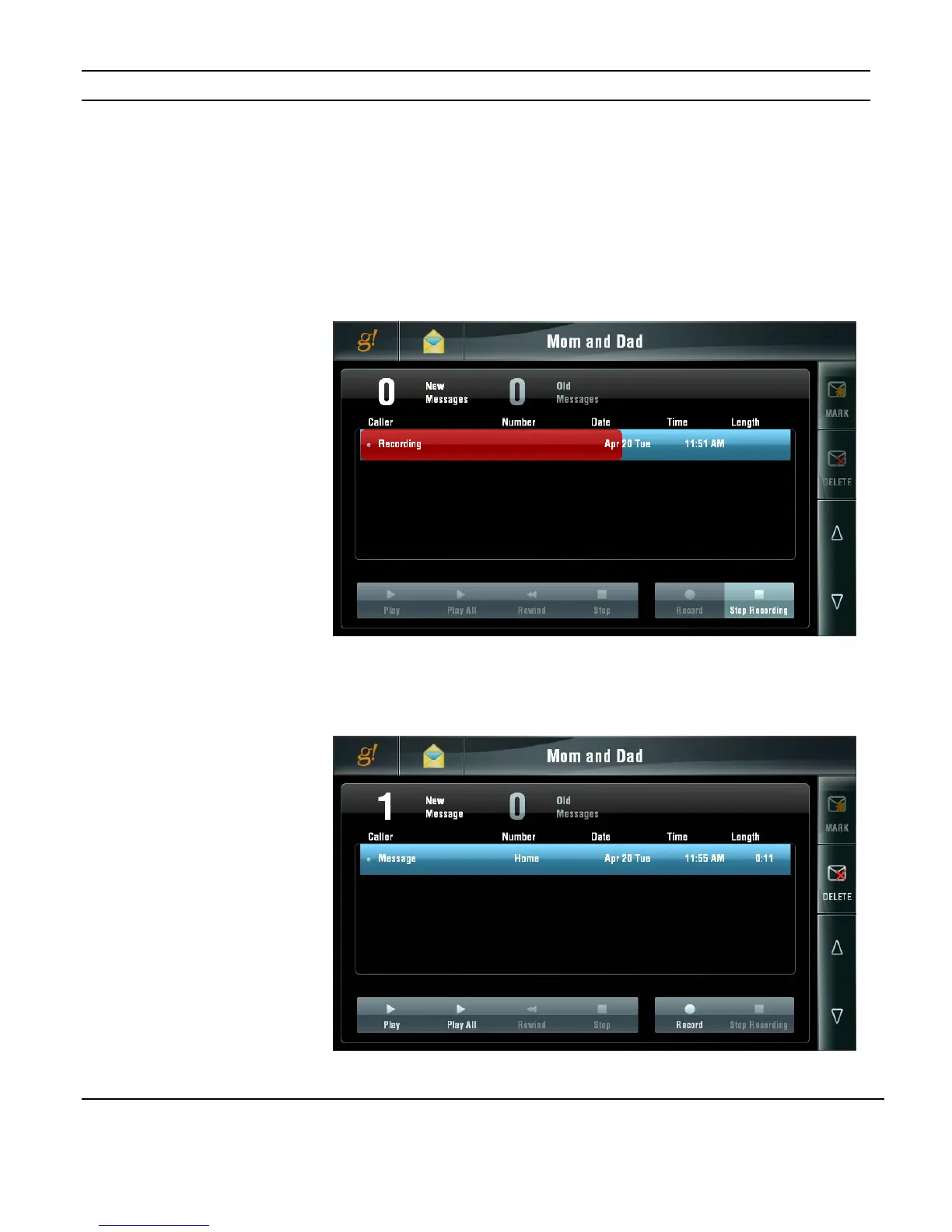
Messages may be recorded directly into a Mail Box using the TS7. To directly record a
message, select the Mail Box you wish to record the message for and press the RECORD
button. Speak directly into the TS7 to record the message.
The TS7 will display a recording signal strength meter. When you have completed your
recording, press the STOP RECORDING button. The message will be saved automatically.
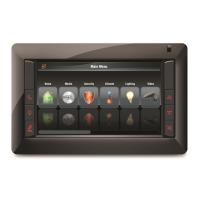
The message will show in the Voice Mail Box just like an incoming phone call message but
instead of an incoming name and phone number “MESSAGE” and “HOME” will be
displayed.
The Internal Voice Mail can be treated just like any message in regard to playback,
deleting, marking as new, etc.
Figure 3-85:
Messaging Page
Internal Mail
Recording
Figure 3-86:
Messaging Page
Internal Mail
Message


 To Next Page