82 / EN
Description
The system interface is a device that controls the heating sys-
tem. It can be used as a room thermostat and/or as a system
interface for monitoring the installation’s operation and con-
figuring the desired settings.
Glossary of terms
Zone: a heating system can be divided into multiple hydrau-
lically independent areas, which are referred to as “zones”.
Each zone can autonomously generate a heating/cooling
request towards the heat generator. For example, a building
can be divided into a zone with radiant panels and a zone
with radiators.
Time slot: by selecting the scheduled operating mode for a
zone, the user can define a specific time schedule. The time
schedule is divided into intervals which are referred to as
“slots”; for each slot it is possible to define a target tempera-
ture (set-point) according to the time schedule set during the
system’s configuration.
Daily 2-level time scheduling: the daily 2-level time sched-
uling allows for dividing the schedule into a maximum of 4
comfort slots and 4 reduced-temperature slots within the 24
hours of each day.
Daily multi-level time scheduling: in this mode, available
only on specially configured products, it is possible to define
up to 12 daily slots, each of which can be associated with a
specific target temperature value.
Menu navigation
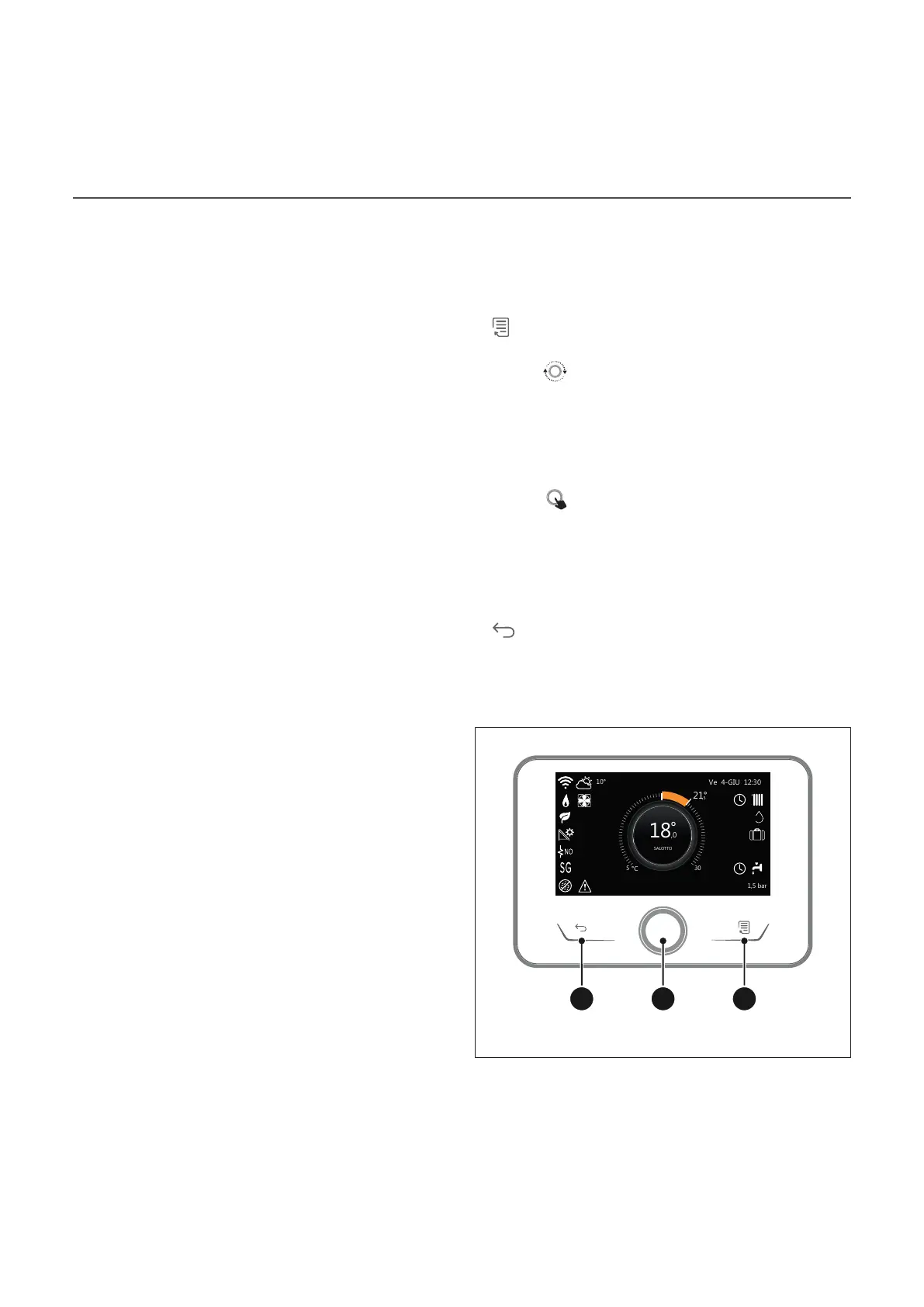
The interface is equipped with a colour display, a selector and
two buttons.
The interface menus can be navigated using the “Menu” but-
ton (A), the selector (B) and the “Back” button (C).
–
“Menu” button (A): when pressed, it opens up the main
menu.
– Turning
the selector (B) allows the user to perform the
following functions:
– move through the items that can be selected on
the screen.
– scrolling the settings for a specific function or pa-
rameter.
– Pressing
the selector (B) allows the user to perform the
following functions:
– accessing the items that can be selected on the
screen.
– confirming the settings for a specific function or
parameter.
–
The “Back” button (C) allows the user to perform the
following functions:
– returning to the previous menu or sub-menu.
– cancelling the entry of a setting for a specific func-
tion or parameter.
ABC
Fig. 1


 To Next Page