84 / EN
Description
ABC
D I
L
E F G H
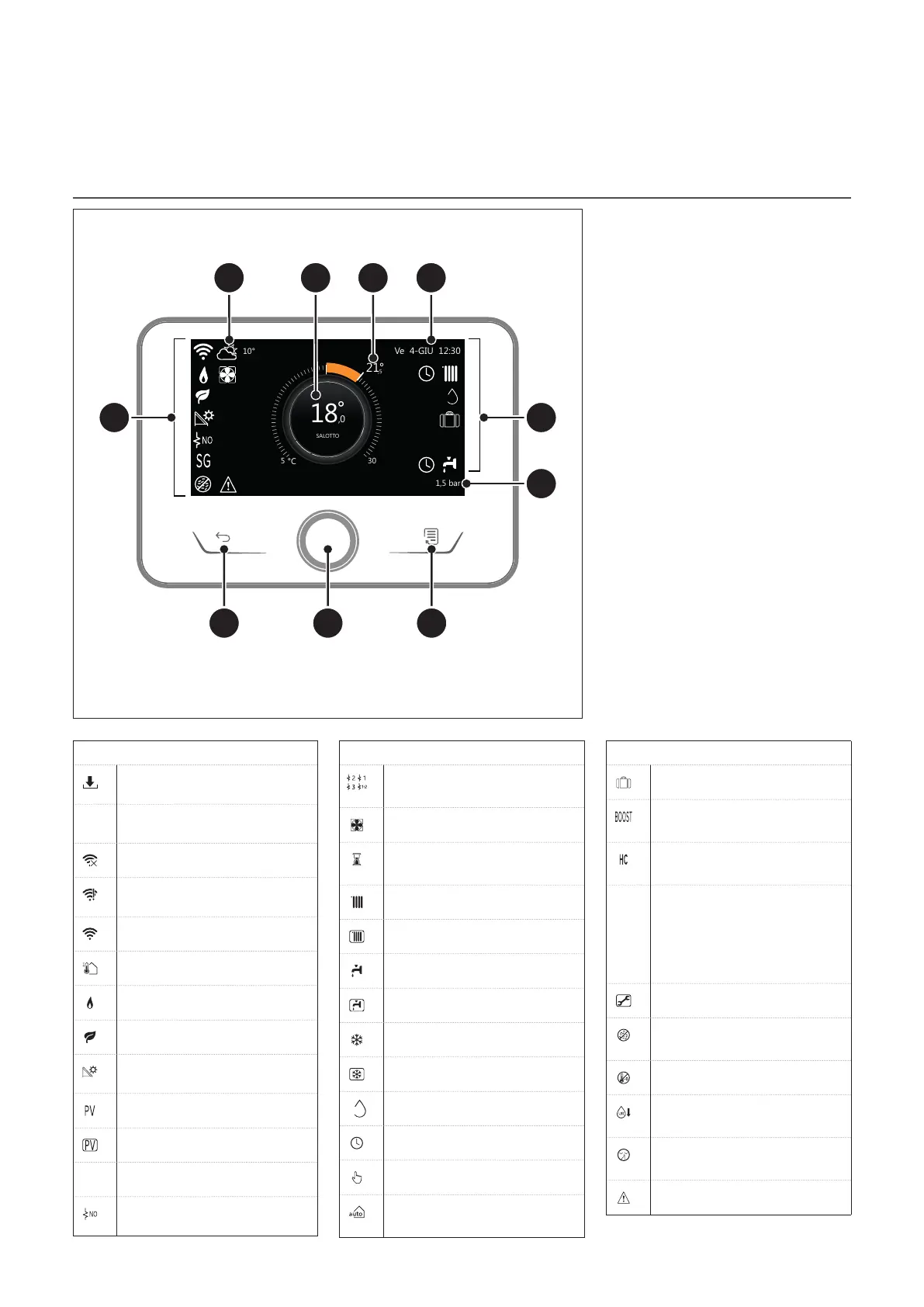
Fig. 3
Complete home page
A Menu button
B Selector
C Back button
D Function icons
E Weather and outdoor temperature
F Room temperature
G Required temperature
H Time & Date
I Operation icons
L Pressure indication
i
The REMOCON PLUS 2 inter-
face is compatible with REMO-
CON NET when used with an
ELCO Wi-Fi module. Find out
more on www.remocon-net.
remotethermo.com
SYMBOLS
Wi-Fi module update in
progress
AP
Access Point Opening in
progress
Wi-Fi Off or not connected
Wi-Fi connected but internet
access failed
Wi-Fi active
Outside air temperature
Flame present
Optimum boiler efficiency
Solar heating module con-
nected
Photovoltaic contact enabled
Photovoltaic contact active
SG
Smart Grid system enabled
Supplementary heating ele-
ments not enabled
SYMBOLS
Number of heating element
stages active
Heat pump active
Room set-point extension
active
CH
Heating active
Domestic hot water
Domestic hot water active
Cooling service enabled
Cooling service active
90%
Relative humidity index
Time program
Manual
Temperature regulation func-
tion active
SYMBOLS
Holiday function active
Domestic hot water Boost
function enabled
Hot water comfort enabled in
electricity reduced band rate
Hot water comfort enabled in
electricity reduced band rate
and domestic hot water set-
point at 40°C in electricity full
band rate
Test mode active
Thermal sanitation function
active
Anti-frost function active
Dehumidification function
active
Silent mode active (only for
heat pumps)
Error in progress


 To Next Page